In 2024, 82% of consumers said they would use a chatbot rather than wait for a customer-service representative to answer a phone call, according to Statista's analysis of consumer opinions on conversational AI. That preference doesn't mean visitors want a fake person on your pricing page. It means they won't sit in a queue while the offer sits unread. An AI website assistant earns a place only as a bounded on-page clerk: it answers from your site, and it hands the conversation to a person when emotion, billing, or trust is high.
What an AI Website Assistant Does on a Page
An AI website assistant is a chat layer on the page that answers from the site's own content while the visitor is still deciding. Teams comparing formats often start with an AI chat widget overview or a shortlist of the best AI chatbot for websites before they pick a page job.
A static FAQ is a shelf label. It prints the price and hopes the shopper finds the right line. The assistant is the clerk who can point at that line, repeat the listed terms, and still call a manager. The clerk doesn't invent a discount, doesn't pretend to be a crowd of customers, and doesn't argue with someone who is already upset.
Say a course page lists a six-week workload and a set start date. A visitor types "is this the beginner one?" The clerk's job is to quote the syllabus, not to flatter the visitor into a checkout they aren't ready for. If the syllabus on the page is stale, the clerk repeats the stale fact. That's the failure, and it starts in the copy, not in the model.
| Job | Best page | Visitor gets | Fails when |
|---|---|---|---|
| Product Q&A | Pricing and feature pages | Answers from listed prices and features | Site copy is stale or contradictory |
| Objection handling | Launch and sales pages | A direct reply to a common doubt | Tone argues with a complaint |
| Support deflection | Help and FAQ pages | A 24/7 answer instead of a phone queue | Billing or refund has no human path |
| Social-proof chat | Course and webinar pages | Others asking the questions visitors already have | The crowd looks like undisclosed real people |
| Guided next step | Pages with visits of 10+ minutes | A suggested next action after browsing | Used on checkout, thank-you, or exact-word promos |
Name the URL before the features
Product Q&A and objection handling live where the offer is explained. Support deflection only works if billing can leave the bot. Social-proof chat helps when the questions are ones people already have, and it hurts when the crowd looks like hidden live buyers. Guided next steps belong on long browsing visits, not on checkout, thank-you pages, or promotions that need exact wording.
Before any feature talk, write one URL and one job from that table. If you can't name both, the widget is decoration. It earns the corner of the page only when it moves a signup, an enrollment, or a resolved question without covering the offer.
Answer quality is a test, not a vibe. AI testing tools and techniques from AskYourQA are a useful pass over whether a reply stays inside the material you approved, which is the same bar this clerk has to clear.
Why Teams Embed Assistants in 2026
The quiet product page is now the odd one out. Visitors already meet conversational answers in other services, so a page that only offers a search box feels slow by comparison.
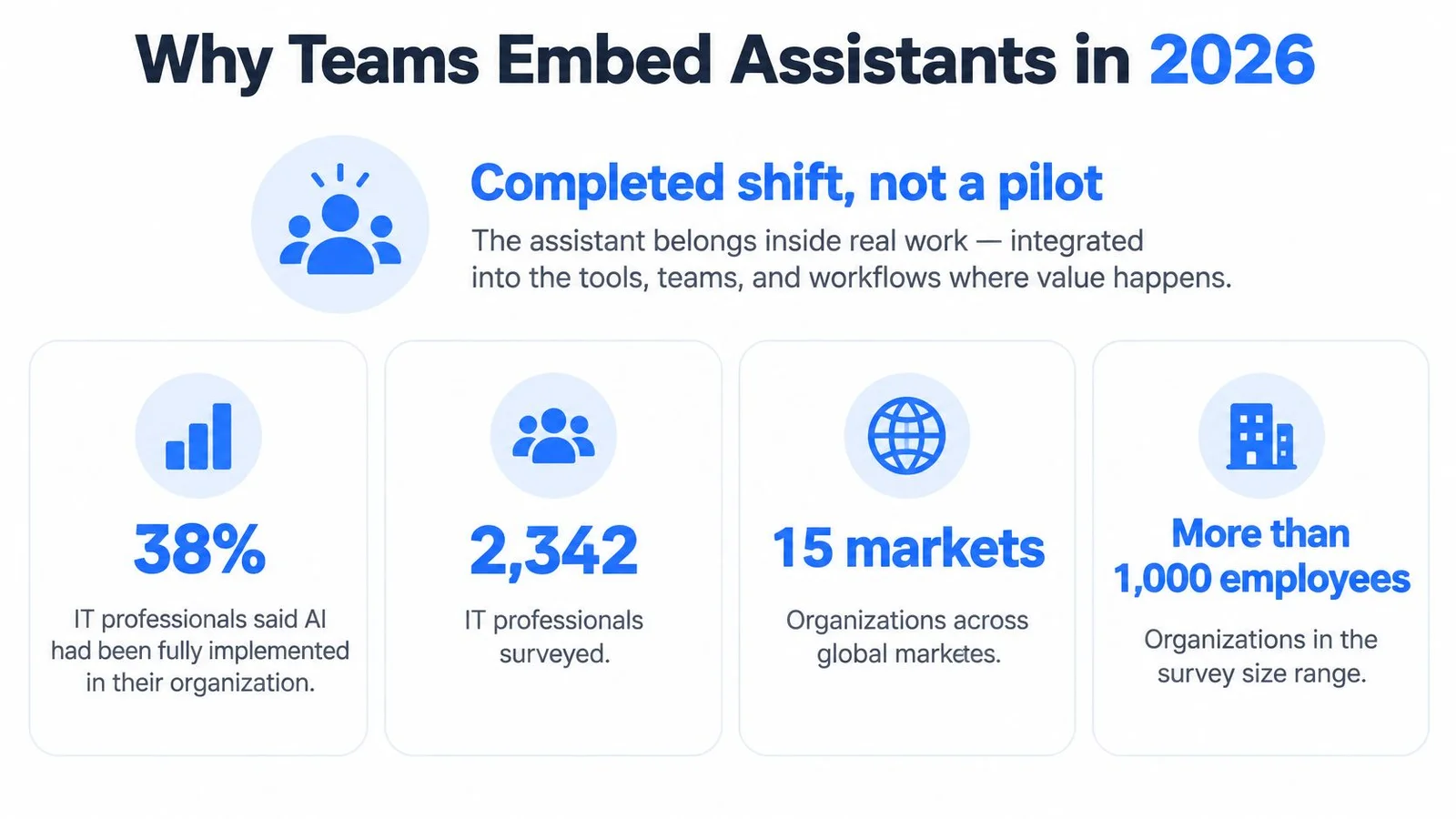
IBM's 2023 Global AI Adoption Index surveyed 2,342 IT professionals at organizations with more than 1,000 employees across 15 markets. Among them, 38% said their organization was actively implementing generative AI, and another 42% said it was exploring the technology, so 80% were either deploying or evaluating it, according to the IBM Global AI Adoption Index. For a marketer, that isn't a lab story. It's the reason a shopper who just used a chat tool at a bank or a retailer expects your feature page to answer too.
Stanford University's 2025 AI Index reported that 78% of surveyed organizations used AI in at least one business function in 2024, up from 55% in 2023, a 23-percentage-point increase. Generative AI use in at least one function rose from 33% to 71%, more than doubling in a year.
From the help-desk corner to the offer
Older bots waited in a corner until something broke. The assistant on a product page, a course page, or a webinar page explains the offer before the click. The visitor's question is part of the sale, not a ticket after the sale failed.
Model access is no longer the blocker. Fit, source control, and honest limits decide whether the widget helps.
Private investment and corporate spend have followed that shift, which is why answer quality, grounding, and conversion hooks keep improving. Your job isn't to prove the category exists. It's to decide which page can use a clerk without pretending the clerk is a person.
The Features Behind Better Answers
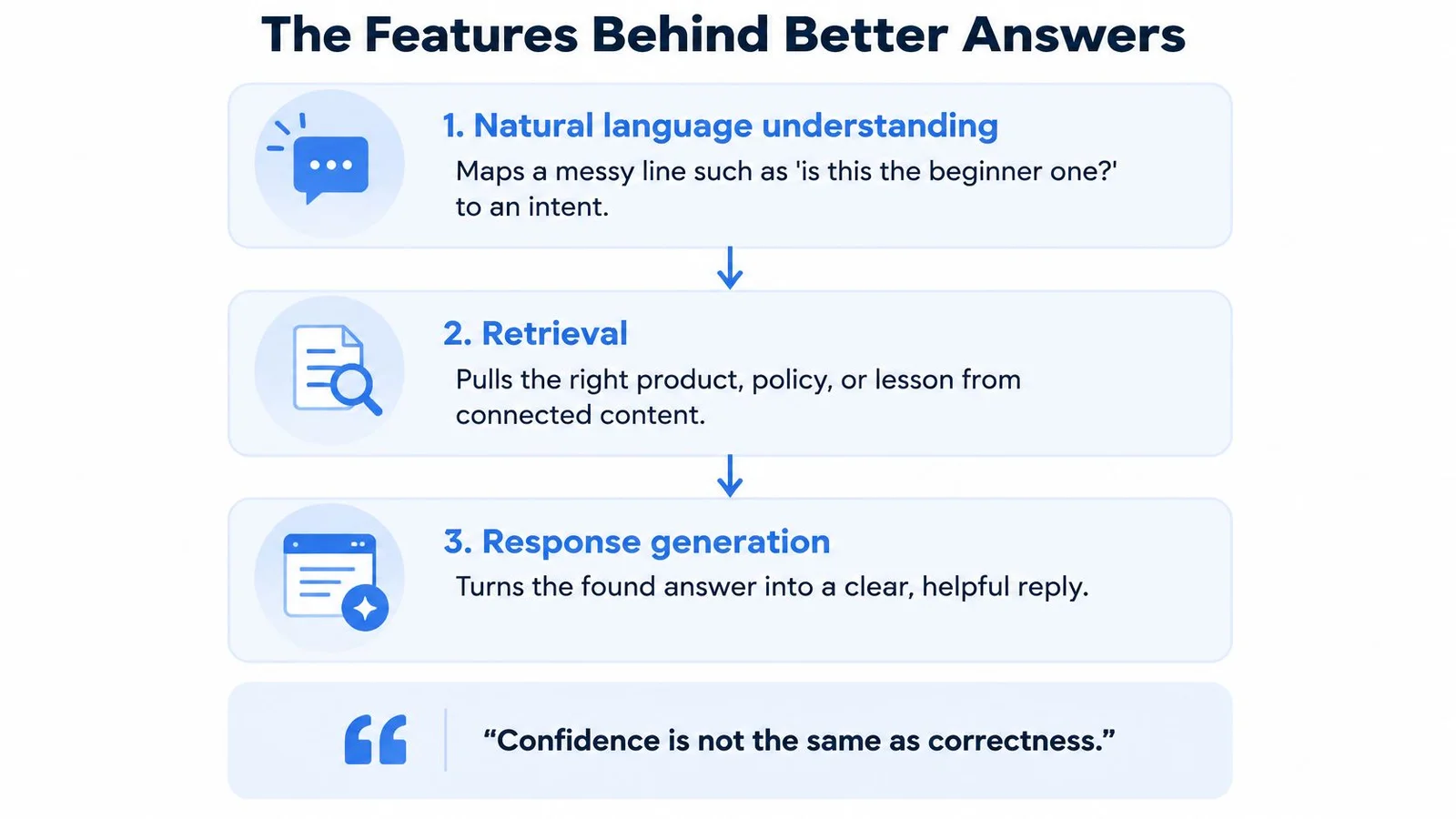
Better answers come from three pillars in order. Skip one and the reply sounds smooth while it gets the offer wrong.
1. Natural language understanding
A visitor rarely types a clean intent. "Is this the beginner one?" might mean pricing, fit, schedule, or a refund. Natural language understanding maps that messy line onto one of those intents, or onto a refusal. If the map is wrong, every later step quotes the wrong passage with perfect grammar.
2. Persona, context, and retrieval
Persona and context means a named voice with tone limits. It answers only from versioned site copy, meaning prices, features, and dates, plus facts and guardrails the owner set. Retrieval pulls the matching chunk. Our assistant learns from the customer's website content, so that information has to stay accurate and up to date. If the website is wrong, the assistant repeats the error. The site stays the source of truth. A practical pass on refreshing that source set is in how to train an AI chatbot.
How you shape that voice is a design choice, not a model setting. A practical walk-through sits in what conversation design covers.
3. Response generation and the metrics
Generation turns the found passage into a short reply. Fluency isn't the score.
Confidence is not the same as correctness. A sure tone on a missing fact is worse than a qualified "I don't have that on this page."
Retrieval-augmented generation should be judged as retrieval plus generation. In a NIST TREC Retrieval-Augmented Generation evaluation, one evidence-constrained system reached weighted citation precision of 0.77 and weighted recall of 0.76, versus an approximately 0.40 median among participants, while its strict information-coverage score was only 0.20. Forcing claims to match retrieved passages improves attribution and can leave gaps. That's the trade-off to accept: a shorter, sourced answer beats a complete-sounding one you can't defend.
| Metric | Reported or target value | Comparison |
|---|---|---|
| Weighted citation precision | 0.77 for evidence-constrained system | About 0.40 participant median |
| Weighted recall | 0.76 for evidence-constrained system | Same roughly 0.40 participant median |
| Strict information coverage | 0.20 for evidence-constrained system | Far below the citation scores |
| Unsupported-claim rate | Measure per release | Track by intent |
| Abstention rate | Measure per release | A rise is fine when evidence is missing |
Put four numbers on the dashboard, not one happiness score: unsupported-claim rate, abstention rate, retrieval recall, and resolution by intent. Read individual conversations. The design to ship is approved chunks only, atomic claims, entailment for each claim, and an abstain or a human handoff when the evidence isn't there.
Pick the Pages Where an Assistant Earns Its Place
Three pages earn a clerk. Plenty of others don't.

Three scenes that fit
On a course sales page, a visitor stalls on workload. A group-style thread asks that question in public, and the rep answers from the syllabus. The doubt gets an answer, and it looks normal because other people asked it too. We build that as social proof plus instant support: simulated participants raise the questions visitors already have, and the rep answers from the page. FOMOchat is built for that pattern (group-style questions beside the offer, answers grounded in your page), alongside the same placement choices covered in social proof for ecommerce and the risk-check framing in I need proof. The rep can do this at 11 p.m. because the owner doesn't have to be online.
On a webinar, the thread follows the video clock. A price question surfaces while the offer is on screen. The rep stays inside approved facts and doesn't freelance a bonus that isn't in the script. That timed reply is useful for webinar-replay engagement, the same clock-synced idea you see in an interactive chatbot that stays beside the pitch instead of opening a separate help desk. Open-ended continuation on the same video is a different tool, and it doesn't belong there.
On a product launch, someone asks who it's for after the founder has logged off. The answer comes from the feature page. If the feature page names the audience, the clerk can name it too. If the page is vague, the clerk should say so.
Where it should stay off
Open chat fits pages where people stay 10 minutes or more and are still browsing. It doesn't fit checkout, thank-you pages, tightly scripted pitches, or short promotions that need exact wording. The same limit hits video or webinar mode when the message has to stay word-for-word. Social proof helps when the questions are real doubts. It hurts when simulated participants look like undisclosed live customers.
A short look at how a study-style assistant stays beside the work, rather than replacing the page, is here:
Four checks, then one URL
- The visit is long enough to browse. If people land and leave in under a minute, don't add a thread.
- Price and policy on the page are current. Train after the copy is right, not before.
- A human can take billing or complaints. Publish that path on the page.
- One script can sit without covering the offer. The headline and the button stay visible.
Start with one high-intent URL: a course sales page, a webinar registration page, or a product page with a repeated objection. Mark every other important URL as help, neutral, or do not use. One clean embed teaches you more than five widgets on pages that were never going to convert from chat.
When Human-Like Replies Lose Trust
Sounding more human isn't more trustworthy once the visitor is upset, or once they learn the reply came from AI. That is also why the chatbot vs live chat choice matters: the bot handles calm product questions, and a person takes billing or complaints.
In a calm product question, competence is enough. Quote the price, name the limit, stop. In a complaint, a refund, a billing dispute, or launch anxiety, a warm AI voice can raise dissatisfaction after disclosure, because the warmth wasn't a person. Experimental work on AI disclosure in advertising and service finds that human-like language can backfire in high-emotion situations, especially after visitors learn the response came from AI. In lower-emotion scenarios, AI can still read as competent. Separate advertising experiments found that disclosure lowered trust and positive attitudes in three studies, while other work finds disclosure can improve perceived honesty. The useful question isn't "should we say it's AI?" It's when, how, and with what path to a person.
In 2024, 50% of consumers reported feeling positive about using AI to interact with brands, compared with 91% of business leaders, according to LivePerson's State of Customer Conversations report. The team's enthusiasm isn't the visitor's default. Write the handoff for the skeptic.
| Situation | Allowed behavior | Hand off |
|---|---|---|
| Product fit or price question | Answer only from approved page facts and qualify uncertainty | No, unless the fact is missing |
| Mild objection on a launch page | Restate the offer and the limit in a calm voice | No |
| Complaint or launch anxiety | Brief acknowledgement, say it is AI, offer a person | Yes |
| Refund, billing, or account dispute | Do not invent policy or look up private accounts | Yes, immediately |
| Request to hide that it is AI | Refuse; keep the label and the fallback contact | Yes if the visitor insists on a person |
Access, privacy, and the one-page rule
The widget needs keyboard use, real labels for screen readers, readable contrast, and a reduced-motion option, plus a visible email or form. An assessment of 15 popular Belgian websites found that only two chatbots passed all four tested checks, and screen-reader use was difficult or impossible for 12, as reported by the Digital Trust Index. A separate analysis in that same review reported that more than 80% of chatbots had at least one critical accessibility issue, while 45% had missing semantic structures or misused ARIA roles. Many widgets fail assistive tech, so the fallback contact isn't optional.
Say that a third party may process the message. Don't collect payment, health, or identity data in general site chat. State who can read transcripts and how long you keep them. Make simulated group dialogue identifiable so proof doesn't become a trick. How those limits get enforced in the model is covered in how guardrails work.
Leave with one page of rules: what the bot may answer, when it names itself, and who gets the handoff. Bounded automation beats performed empathy when the stakes rise.
How to Add an Assistant Without Hurting Speed
The widget is a third-party script. It can erase the conversion it was added to create.
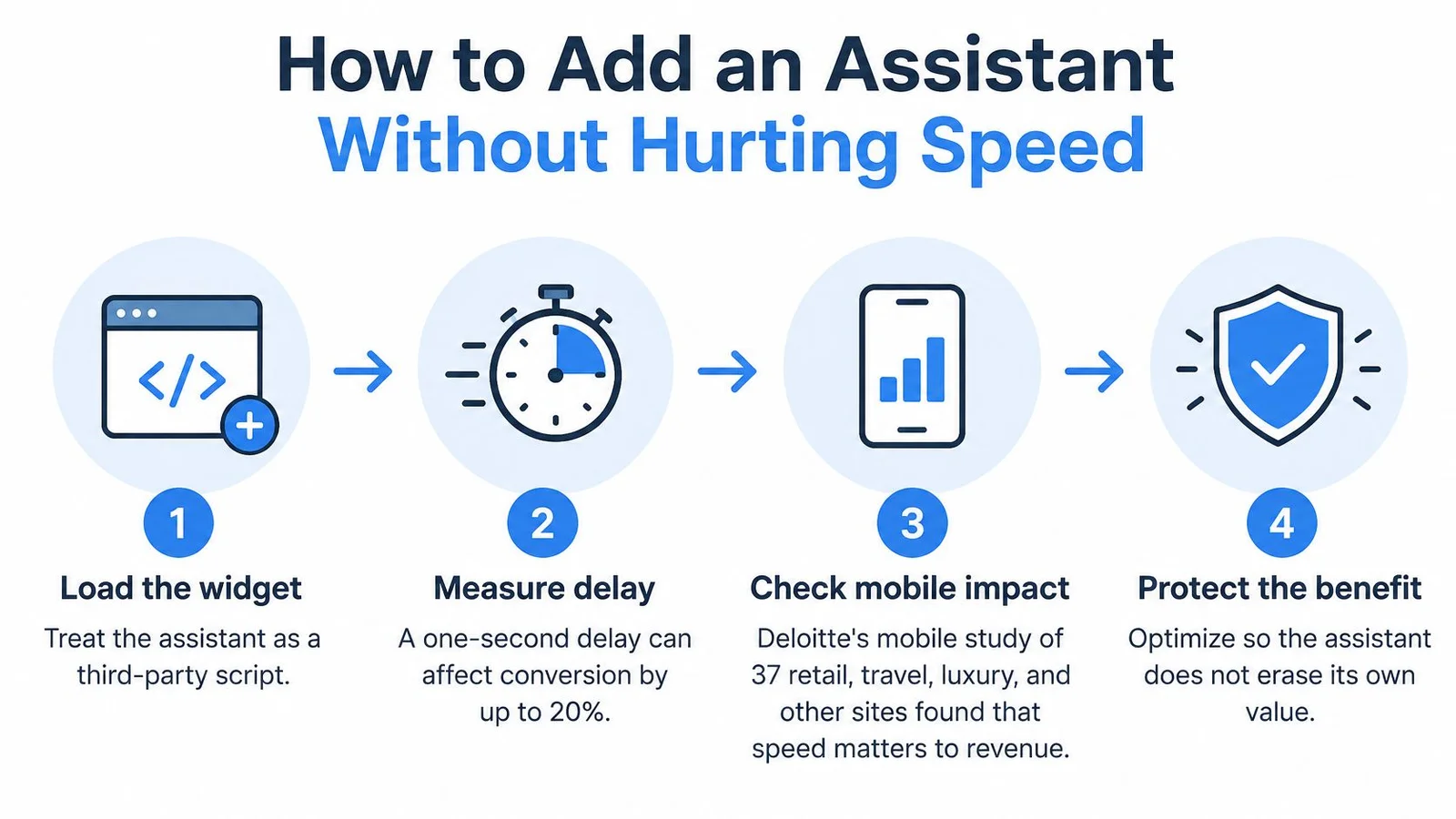
Google reports that a one-second delay in page loading can affect conversion rate by up to 20%. Deloitte's analysis of mobile data from 37 retail, travel, luxury, and lead-generation brands, cited in that same Google brief, found that reducing load time by 0.1 seconds increased average conversion by 8% for retail sites and 10% for travel sites. A widget that blocks rendering, ships a heavy bundle, or waits on the model before the offer paints creates that delay before the clerk can help anyone.
Four steps that protect the first view
- Make the site the source of truth first. Fix price, dates, and policy in the HTML before any training pass. A fast widget that quotes a retired price is still a bad clerk.
- Load asynchronously. Paste one script just before the closing body tag, deferred so it doesn't block the main thread, and paint a lightweight shell first. This is the step that keeps the one-second and tenth-of-a-second costs off your offer. WordPress, Shopify, and Webflow each accept that snippet in the site-wide footer or a custom code area, so it loads after the main content. Any site that accepts a script tag can host it.
- Show the model reply only after a click or a typed question. Stream or reveal the answer then. Answer time must never delay the first view of the headline, the price, or the button.
- Compare a no-widget control with the async widget on the same content and the same traffic. Segment conversion by device, network, and response latency, and watch Core Web Vitals. Don't call a lift until that test shows the widget didn't tax first paint.
| Finding | Reported effect | What to do on the page |
|---|---|---|
| One-second slower load | Conversion can fall by up to 20% (Google) | Never block first paint with the widget |
| 0.1-second faster mobile load, retail | Average conversion up about 8% (Deloitte, 37 brands) | Defer noncritical JavaScript |
| 0.1-second faster mobile load, travel | Average conversion up about 10% (same study) | Paint a light shell, then stream the reply |
| Widget on versus widget off | Lift is unknown until isolated | Hold page content constant and segment by device and latency |
FOMOchat is one example of that script-tag pattern for an embedded chat for website install. Setup takes about five minutes: enter the URL, let the model read the site, generate the conversation, and paste the code (see a concrete embed example). Notices and consents for the embed stay the site owner's job. Conversational widgets like this also show up in the broader set of conversational marketing examples teams ship when they want real-time proof without a blocking popup. A fuller pass on what to defer sits in how to improve page performance.
SEO and UX Rules for On-Page Assistants
The offer has to live in HTML that crawlers and visitors can read with the chat closed. Price, features, and policy stay on the page. Text that appears only inside the thread may never be indexed, so the page has to sell on its own.
A checklist tied to each URL
- Keep the primary copy in the document. If the widget is off, the claim is still there.
- Record Core Web Vitals before and after install. A page that slows on mobile can lose rankings and the conversion you hoped the clerk would add. Pair each reading with a status of help, neutral, or do not use.
- Reserve a corner on small screens. Don't cover the headline, the form, or the main call to action. Ship a visible dismiss control.
- Check narrow widths and the keyboard. Headline, form, and button stay visible on first paint, and a keyboard user can reach the chat and leave it.
- Point unanswered threads somewhere public. A frequently asked questions page gives the crawler and the visitor the same facts the clerk is allowed to repeat.
Chat answers aren't a substitute for being findable in answer engines either. If you want the brand's own pages to show up when people ask those tools about you, improve your brand's ChatGPT visibility with Kliqo AI is a practical companion to keeping the offer in crawlable HTML.
Write the status next to the vitals reading for the first URL you embed. If the status is "do not use," or if the vitals drop, take the script off that template and try the next page that passed the four checks.
FOMOchat puts a bounded AI company rep on your product, course, launch, and webinar pages, trained on your site content, with group-style questions and a path to keep answers inside your facts. If you want that clerk on one high-intent URL without hiding the offer, start with FOMOchat.