You've watched this happen in your analytics. A visitor reads your pricing page, scrolls back to the features, returns to pricing, then leaves without asking the one question that blocked them. They weren't uninterested. They were uncertain, and nothing on the page met them in that moment.
That's the gap an interactive chatbot is meant to close. Not with more popups, but with a conversation that notices context, answers clearly, and earns enough trust for the visitor to take the next step. (We've written about why notification popups fall flat on complex products if you want the longer version.)
What an Interactive Chatbot Actually Does
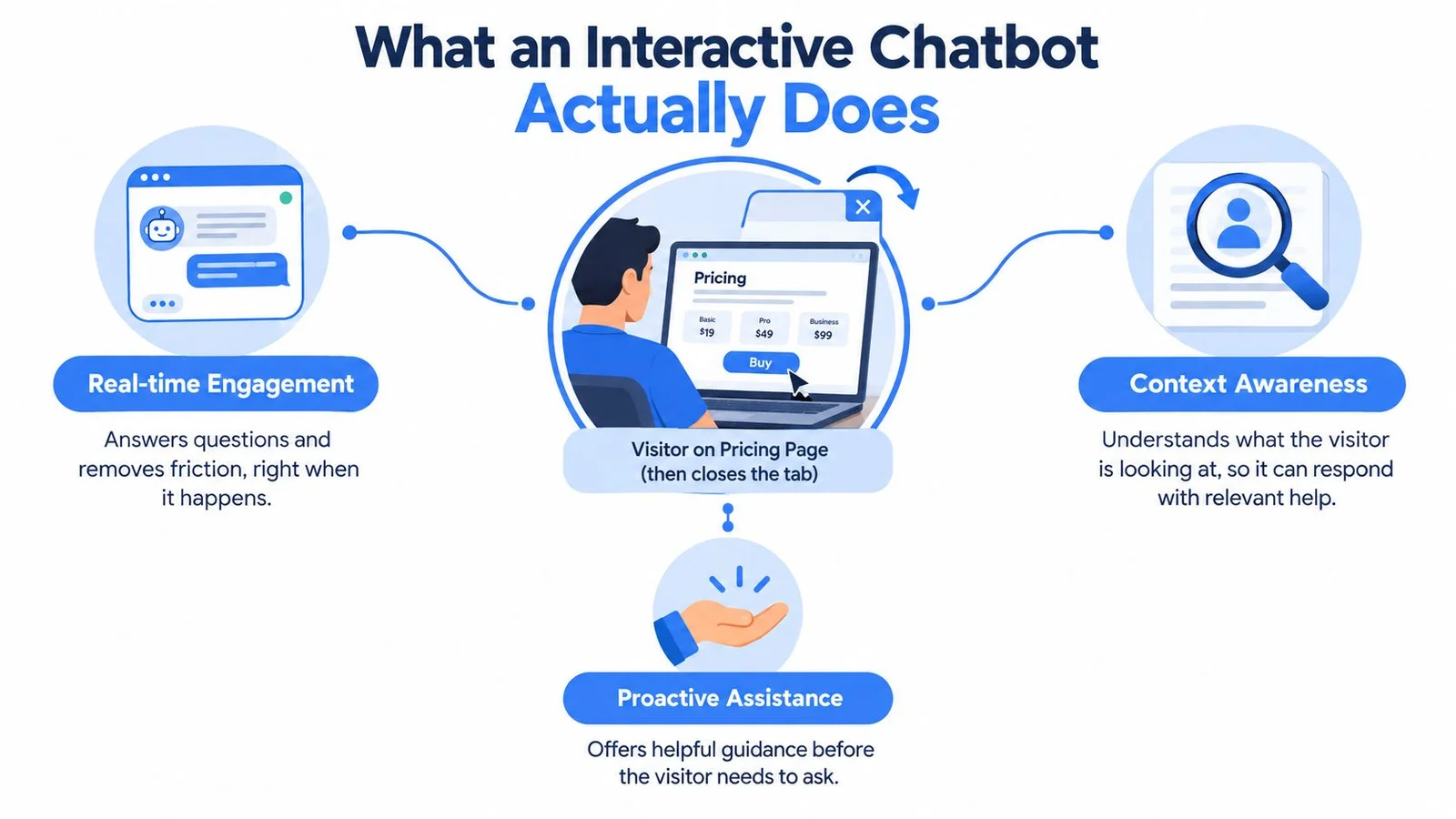
A visitor lingers on your pricing page, almost hovers over Buy, then closes the tab. A static FAQ bot might have offered a link to a help article they didn't click. An interactive chatbot works differently. It can notice where someone is on the page, surface a relevant peer question about your refund policy, give a short answer, and point to supporting detail.
The map below shows the three ideas behind that moment, engagement, context, and proactive help.
A Simple Definition You Can Use
An interactive chatbot is a conversational system that sustains a back and forth exchange, rather than matching one question to one canned reply. It can use context such as the current page, a prior visit, or a point in a webinar timeline. It can also adjust its reply to what the visitor just said.
That doesn't mean it should handle everything. The strongest setups give it a bounded job on a specific page. A course sales page needs enrollment questions answered. A SaaS pricing page needs plan differences explained. A webinar replay needs objections addressed at the right timestamp.
The Four Jobs to Expect
- Answer: Give a direct, sourced reply to a product, price, or policy question.
- Qualify: Ask a short follow up that reveals fit, such as team size or experience level.
- Reassure: Show relevant proof, clarify risk, and state limits.
- Route: Send the visitor to checkout, a demo, a lesson preview, or a human.
Chat that talks fills space. Chat that converts removes a specific reason to hesitate.
If a widget on your site only opens, says hello, and drops links, it's closer to a menu than a conversation. If it remembers the thread, reacts to context, and helps the visitor decide, you're looking at the interactive kind.
From ELIZA to Today, A Short and Useful History
Interactive chatbots emerged as a recognized form of human and computer communication in the 1960s. Between 1964 and 1966, MIT computer scientist Joseph Weizenbaum developed ELIZA, publishing its description in January 1966 in Communications of the ACM, as described in the account of ELIZA and the ELIZA effect. ELIZA ran on an IBM 7094 mainframe and accepted ordinary typed language.
Its best known DOCTOR script simulated a nondirective psychotherapist. It spotted keywords, then reformulated the user's words or asked a follow up question. It didn't understand language in the modern sense. Still, users sometimes attributed comprehension and emotional sensitivity to it, a tendency later called the ELIZA effect.
Why a Script From 1966 Still Matters
ELIZA proved two things that still shape buying decisions. A specialized persona can make an automated exchange feel purposeful. Conversational framing can also influence trust, even when the mechanism behind the replies is limited.
That's useful and risky at the same time. A focused persona helps a visitor know what to ask. It can also lead them to overtrust an answer, which is why disclosure can't be an afterthought in modern design.
From One Machine to a Network
In the early 1970s, ELIZA and PARRY exchanged what is described as the first fully automated chatbot conversation on ARPANET, according to the history of that early networked exchange. PARRY, created by psychiatrist Kenneth Colby and colleagues in 1972, simulated a person experiencing paranoid delusions. ELIZA played the therapist.
Neither system was general purpose. Each sustained a recognizable role within constrained rules. That pattern is exactly what good business bots still do. They answer product questions, guide enrollment, or handle support within clear bounds, and they're available wherever the visitor already is.
Later customer service bots widened distribution, and modern systems added content training and richer personas. The underlying lesson hasn't changed. Constrain the role, make the exchange feel clear, and don't confuse fluent replies with actual understanding.
Seven Core Features That Set Interactive Chatbots Apart
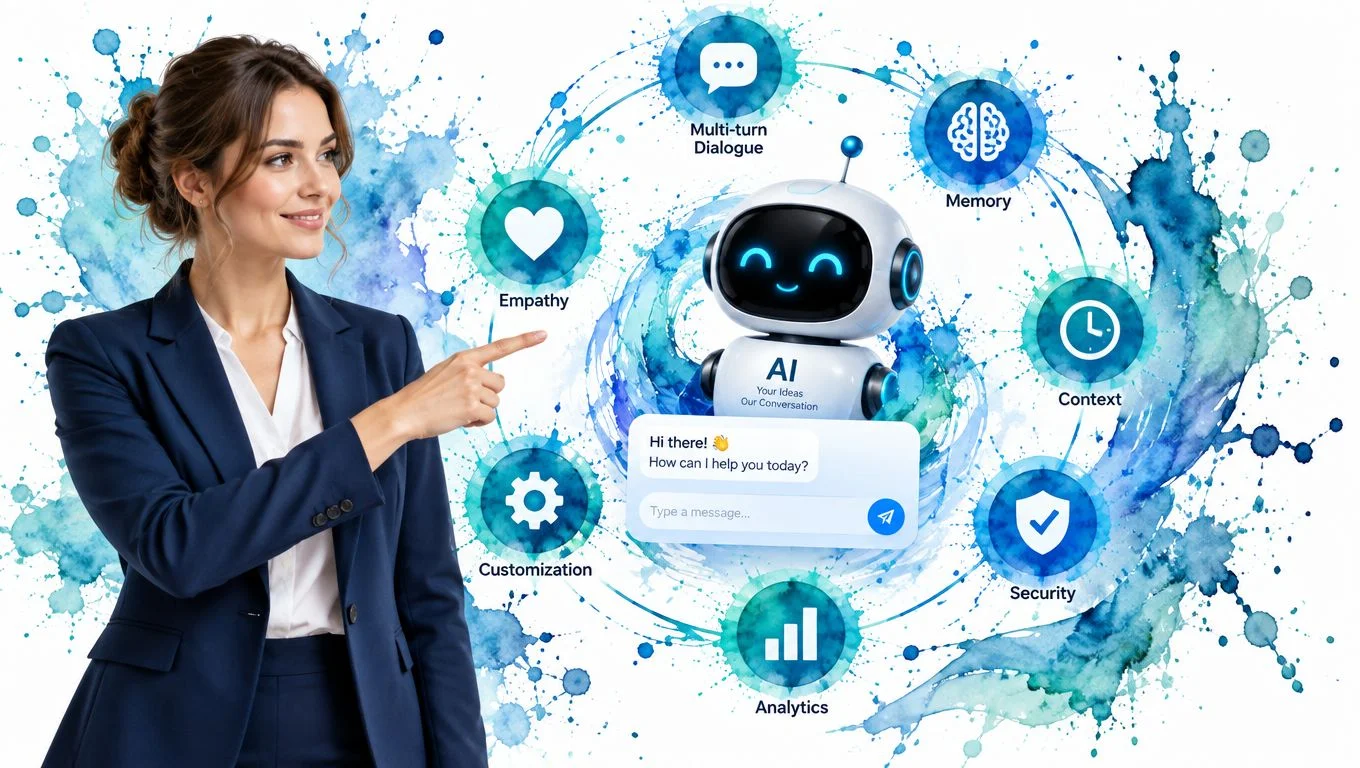
Vendor pages tend to blur everything into smart and AI powered. Ignore the adjectives. Check for these seven capabilities, and ask to see each one working on a page like yours.
The visual below groups the features visitors notice first, before they ever see your admin settings.
The Conversation Itself
1. Multi-turn dialogue with session memory. The bot remembers what was just asked, so a visitor can say "what about for a team plan" without restating everything. If it forgets after one reply, people give up fast.
2. Persona and tone customization. A course creator's assistant shouldn't sound like a bank's support bot. You should control name, voice, and boundaries. Good conversation design principles for chat flows help you decide how that persona greets, clarifies, and closes.
3. Real-time context awareness. Page location, referrer, returning visitor status, or video timestamp should change what the bot says. On a pricing page, a returning visitor might resume a prior thread about annual billing instead of starting over.
Proof, Knowledge, and Safety
4. Multi-party or social chat simulation. Some tools show named participants reacting and asking questions, which can surface objections a lone visitor won't type. This only helps if participants are clearly labeled and the dialogue stays relevant.
5. Content training on your own material. The bot should answer from your help center, course pages, and product docs, not from generic knowledge. If you're comparing how source material gets organized for retrieval, searchable knowledge base capabilities show one model for keeping answers grounded in approved content.
6. Guardrails and escalation. Look for confidence qualifiers, blocked topics, and a clean handoff to a human. A bot that says "I don't have that detail, here's who can help" protects trust better than one that guesses. Our guide on how to prevent AI hallucinations shows how to set those limits up.
7. Analytics tied to outcomes. Conversation counts alone tell you little. You need to connect threads to signups, enrollments, demo bookings, or support deflection, so you can fix the pages where people stall.
The short video below is useful while you evaluate, because it lets you compare a live conversational flow against this checklist.
Buying shortcut: If a vendor can't demo memory, source based answers, and escalation in one flow, the rest of the feature list won't save the deployment.
Interactive Chatbots Compared With Basic Bots and AI Assistants
These three tools look similar in a screenshot. A chat bubble opens, text appears, and the visitor types. Underneath, they solve different problems, and choosing the wrong one usually shows up as either shallow answers or uncontrolled ones.
For a broader look at how interface choices shape those expectations, DOM Studio's AI chat interface guide is a helpful companion while you compare layouts and interaction patterns.
Interactive Chatbot vs Basic Bot vs General AI Assistant
| Capability | Rule-Based FAQ Bot | Interactive Chatbot | General AI Assistant |
|---|---|---|---|
| Setup | Fast, built from fixed questions and answers | Moderate, needs content training and page context | Fast to open, harder to control for a specific site |
| Conversation depth | Single turn, follows a script | Multi-turn, uses session memory | Deep and free-form, not tied to your funnel |
| Personalization | Little beyond a menu choice | Uses page, visit history, or video timing | Personal to the user, not to your offer |
| Best job | Narrow, repeated questions | Sales, course, and webinar journeys | Research, drafting, and open reasoning |
| Main risk | Feels rigid and easy to exhaust | Needs guardrails and disclosure | May answer beyond your approved facts |
How to Place a Tool in the Right Column
Ask what happens after an unexpected follow up. A rule based bot will repeat a menu or fail politely. An interactive chatbot should clarify, stay within its trained content, and move the visitor toward a defined next step. A general assistant may give a brilliant answer that has nothing to do with your actual pricing or policies. If you're still weighing automation against people, our chatbot vs live chat breakdown helps.
Price follows that difference, though not neatly. Basic bots are usually cheapest to deploy for narrow questions. Interactive systems cost more because you're paying for context, training, and measurement. General assistants can be inexpensive to access, but adapting one into a controlled on site journey is its own project.
Many SaaS teams now use a hybrid pattern. The interactive chatbot handles the on site journey and known objections. It hands off complex reasoning or account specific work to a human or a broader assistant, with the thread attached. That split keeps the visitor experience focused without pretending one tool does everything.
Real-World Use Cases for Support and Conversions
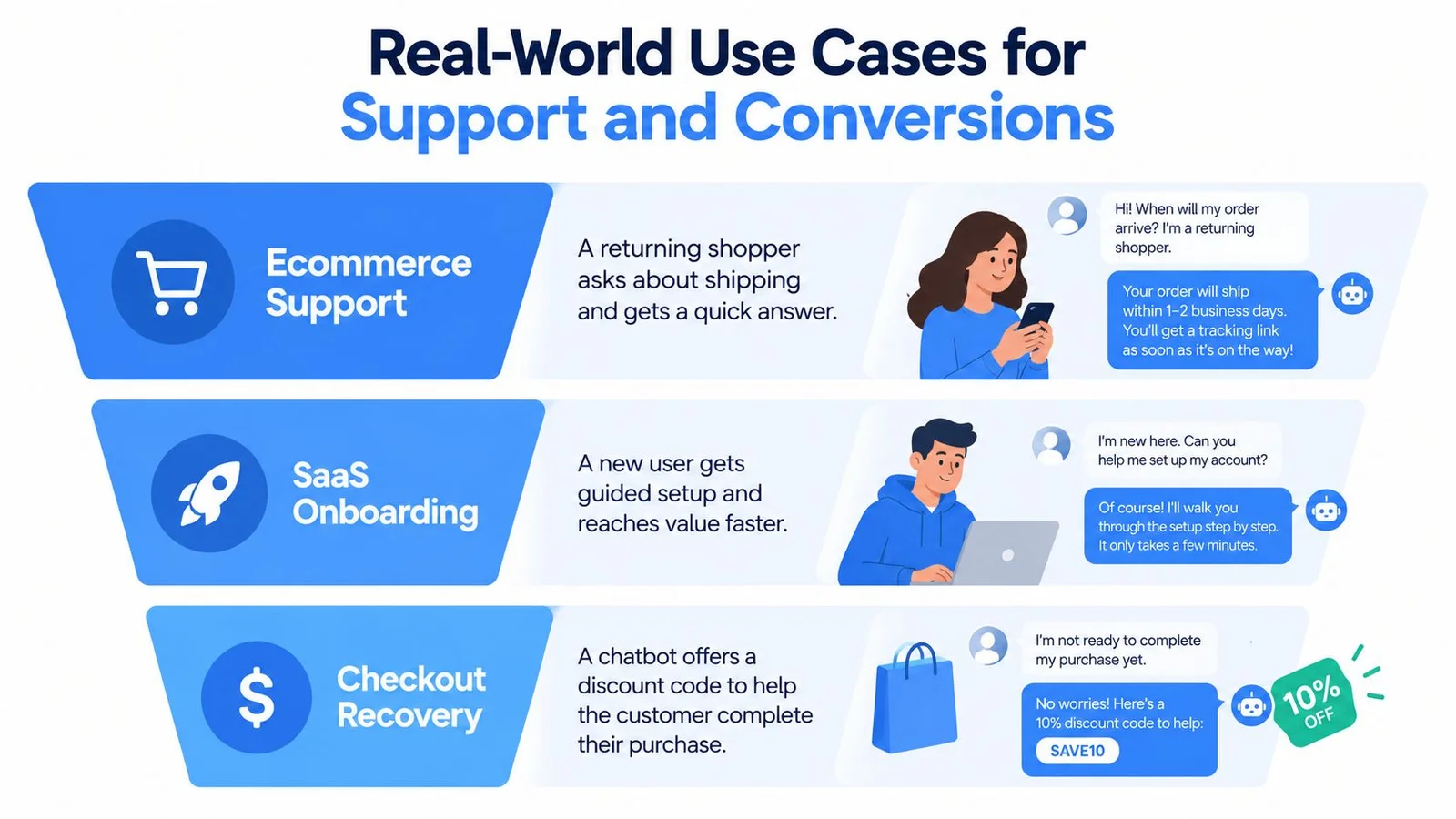
A returning shopper asks whether you ship to a new country. A basic bot links to a shipping page. An interactive chatbot pulls the answer from your synced help content, confirms the relevant condition, and asks whether they want delivery timing for the item in their cart.
If hesitation shows up at checkout, it can address the stated reason directly. That might be a policy clarification, a size question, or a permitted offer, rather than a generic plea to stay. For support leaders mapping those handoffs, Prometheus Agency's practical AI guide gives useful framing on where automation should stop.
Course and Education Funnels
A prospective student types a worried question about refunds late at night. The bot gives the policy in plain language and surfaces a relevant peer discussion from a prior cohort, clearly presented, instead of a brochure paragraph. The student sees that someone else asked the same thing before enrolling.
It can then route by intent. Someone asking about prerequisites gets a lesson preview. Someone asking about payment timing gets the enrollment page. That distinction matters, because sending every worried visitor to checkout feels pushy and often backfires.
Launches, Webinars, and Replay Pages
On a replay page, the chat timeline can sync with the video. When viewers reach the pricing segment, related objections appear in context. When they rewatch the Q and A, the relevant questions return with it, so the page doesn't feel empty after the live event ends. That's the core idea behind FOMOchat on evergreen replays: real questions and answers pinned to the moments viewers hesitate. Our roundup of webinar engagement tools covers other ways to keep a recording interactive.
This is also where support and conversion overlap. The same system that answers a technical replay question can guide a ready viewer to registration. Guidance on using conversational AI in customer support journeys is relevant here, since visitors rarely label their own intent as sales or support.
SaaS Onboarding Moments
A new user stalls during setup and asks why an integration matters. The bot explains the next step in the product's own terms and offers to continue where they left off. It isn't selling in that moment. It's preventing a quiet abandonment that your team would otherwise misread as lack of interest. Pair it with solid SaaS onboarding best practices and the bot has far fewer gaps to cover.
The best use case to show your team is the page where good visitors already hesitate. Start there, not on your homepage.
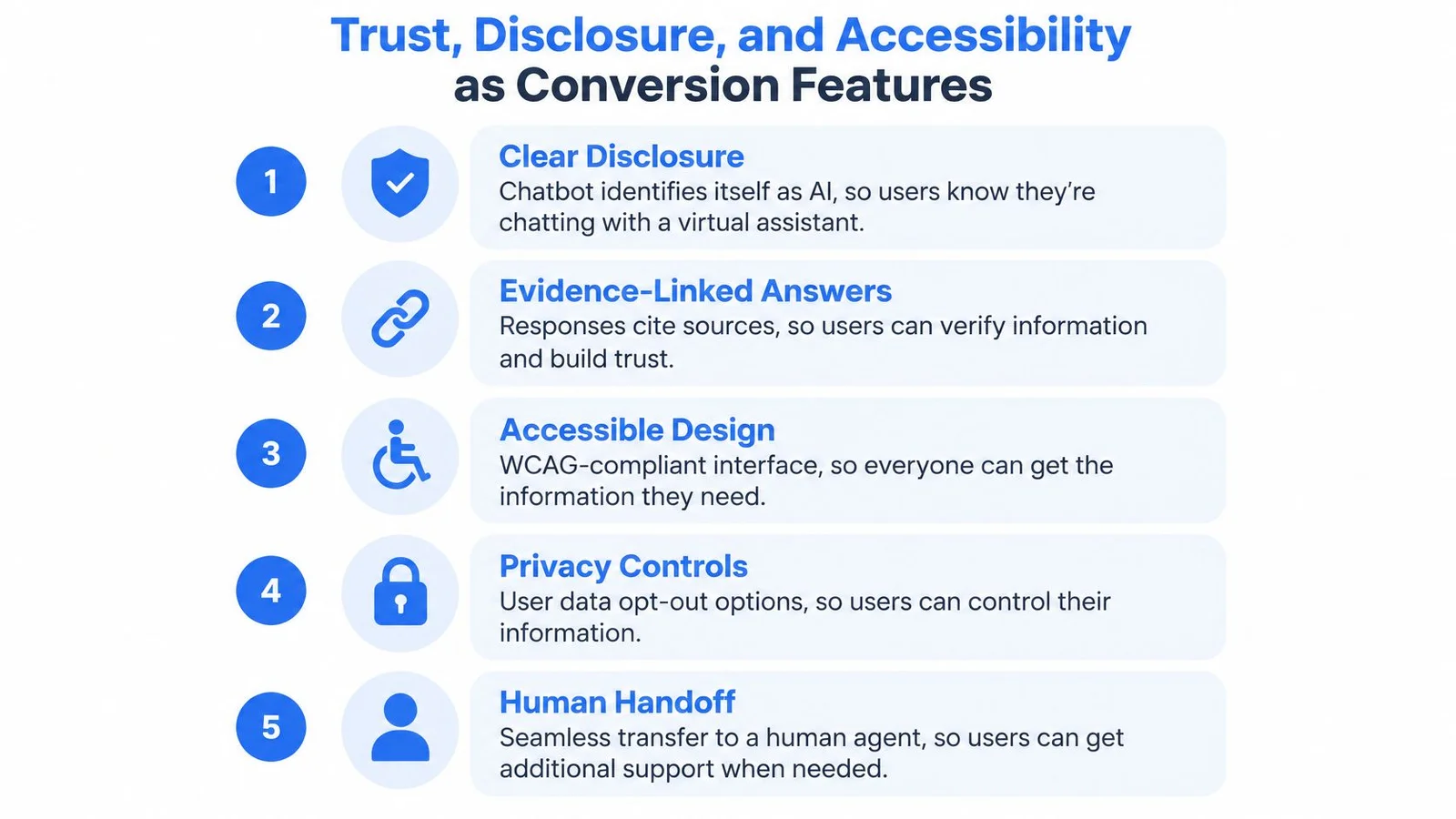
Trust, Disclosure, and Accessibility as Conversion Features
Most chatbot guides treat trust as legal cleanup. That's backwards. If visitors suspect they're being nudged by undisclosed automation, added activity can lower conversion instead of raising it.
Only 33% of consumers trust companies to use their personal information responsibly, while 43% remain concerned about AI privacy or security weaknesses and 40.5% are concerned that AI could mislead consumers, according to multi-market consumer research on privacy and personalization. A separate 2025 survey finding in that research context also matters for labeling decisions, because visitors increasingly expect to know when content is generated.
Disclosure Without Destroying Usability
Label AI participants where they appear, not in a footer nobody reads. Use a short badge or name treatment that stays visible in the thread. When the bot makes a factual claim about price, policy, or outcomes, link the evidence or qualify the confidence.
Distinguish authentic customer interaction from simulated conversation. If a dialogue is generated to illustrate common objections, say so plainly. Visitors can accept a helpful simulation. They resent discovering one they thought was live. Clear explanations of how guardrails work in practice can help your team set which claims need citations or human review.
- Label generated participants: Keep the marker attached to each speaker.
- Link factual claims: Point to the policy, lesson, or doc behind the answer.
- Show uncertainty: Use qualifiers and offer a human path when confidence is low.
Accessibility Is a Comprehension Issue
In a 2025 exploratory study, 69% of students with cognitive disabilities needed support formulating questions, 56% understood chatbot answers only occasionally, and only 19% could independently verify system responses, as reported in research on accessible chatbot interaction for students. Those numbers should change your defaults, not sit in an appendix.
Busy group chat, multiple personas, and rapid message streams can overwhelm people who need predictable pacing. Provide transcript views, reduced motion options, keyboard and screen reader support, and adjustable response length. Add question templates for visitors who know their concern but can't phrase it easily.
Plain language summaries help everyone, not only users with disabilities. So do explicit verification cues, such as a source link under a short answer. If someone can't parse your social chat, they may leave even when your offer fits them perfectly. That's a conversion loss you designed into the page.
A Buyer's Checklist for Evaluating an Interactive Chatbot
Bring specific questions to a vendor call, and score the answers while they're fresh. Weight capability and trust equally. A cheap setup that fails on trust will cost you more in lost signups than a slightly pricier tool that earns it.
Four Buckets to Score
- Capability: Can it sustain multi-turn dialogue, use page context, and answer from our content? Can we see it resume a returning visitor's thread?
- Trust: How are AI participants labeled? Show us how the bot cites sources, states uncertainty, and escalates to a human.
- Accessibility: Can response length be adjusted? Does it support keyboard navigation, screen readers, transcripts, and reduced motion?
- Operations: Which events feed the analytics dashboard? How do we update trained content when pricing or curriculum changes?
Ask how training updates happen, not just whether training exists. Practical guidance on how to train an AI chatbot on your own content will help you spot vague answers during that part of the call.
One option to evaluate against this list is FOMOchat, which supports persona training, AI labeled participants, and confidence qualifiers for its widget. Treat it like any other candidate. Run the same questions, test it on one high intent page, and keep the vendor that performs under your conditions.
Score the demo you can verify, not the roadmap you're promised.
Putting It All Together Before You Deploy
Answer three questions before you launch. What specific job does the chatbot do on this page? What trust and accessibility signals does it send? How will you know it's working after launch?
Pick one page and one job first. Design disclosure and accessible defaults on day one, not after complaints arrive. Tie every conversation to a downstream event, so your team reviews enrollments, bookings, or resolved tickets instead of chat volume.
Teams that treat an interactive chatbot as a credibility surface, not a novelty, give visitors a reason to stay and decide.
Ready to test that approach on a pricing, course, or webinar page? FOMOchat combines an AI representative trained on your content with clearly framed interactive group chat and video synced conversation, so you can answer objections where they happen and measure what follows. Start with one high intent page, apply the checklist above, and expand only when the results earn it.