You're ready to publish a landing page, and the chat widget is the last thing left to install. The preview looks right, but the live page raises harder questions: where should the snippet go, will it slow down mobile visitors, and what happens when someone blocks it?
A useful embed example needs to answer those questions, not just display a chat bubble. Treat the integration as a small software release: define its permissions, control when it loads, preserve an alternative conversion path, and measure completed signups rather than activity alone. If you just want the basic install steps first, our guide on how to embed a chat widget covers them.
The Core HTML Embed Example and Security Basics
<script async src="PASTE_PROVIDER_BOOTSTRAP_URL"></script>
This is an illustrative loading pattern, not a working vendor installation. Replace the placeholder with the HTTPS bootstrap address from your provider's installation instructions, and preserve any required configuration attributes. Don't guess script addresses, account identifiers, or initialization methods.
Asynchronous loading doesn't make JavaScript free. It avoids blocking HTML parsing while the script downloads, but execution still uses the browser's main thread. Confirm that the provider supports this loading pattern before modifying its generated snippet.
Separate loading from permissions
A script added directly to your page and an iframe have different security boundaries. Adding sandbox to a surrounding container won't restrict a script running in the host page.
For a provider that explicitly supports iframe delivery, a restrictive starting pattern is:
<iframe title="Product questions and answers" src="PASTE_PROVIDER_HTTPS_EMBED_URL" sandbox="" allow="" loading="lazy"></iframe>
This example intentionally grants no sandbox exceptions or optional capabilities. It isn't a drop-in chat integration: interactive content may need permissions that this starting point denies. Chrome's embedded-content guidance explains why sandbox restrictions and permissions policies matter when embedded content can execute scripts or submit forms.
- Grant only documented capabilities. Add script or form permissions only when the supported integration requires them.
- Keep secrets off the page. Don't place private access tokens or authenticated customer data in public markup.
- Validate communication. If the integration uses cross-window messages, require documented origin checks rather than accepting messages indiscriminately.
Security rule: A working widget isn't proof that its permissions are appropriate.
For deployments that also include an experiment loader, use the Otter A/B JavaScript integration guide as a companion implementation resource. Keep experiment assignment separate from widget initialization so you can disable either component independently.
Platform Specific Deployments for WordPress and Shopify
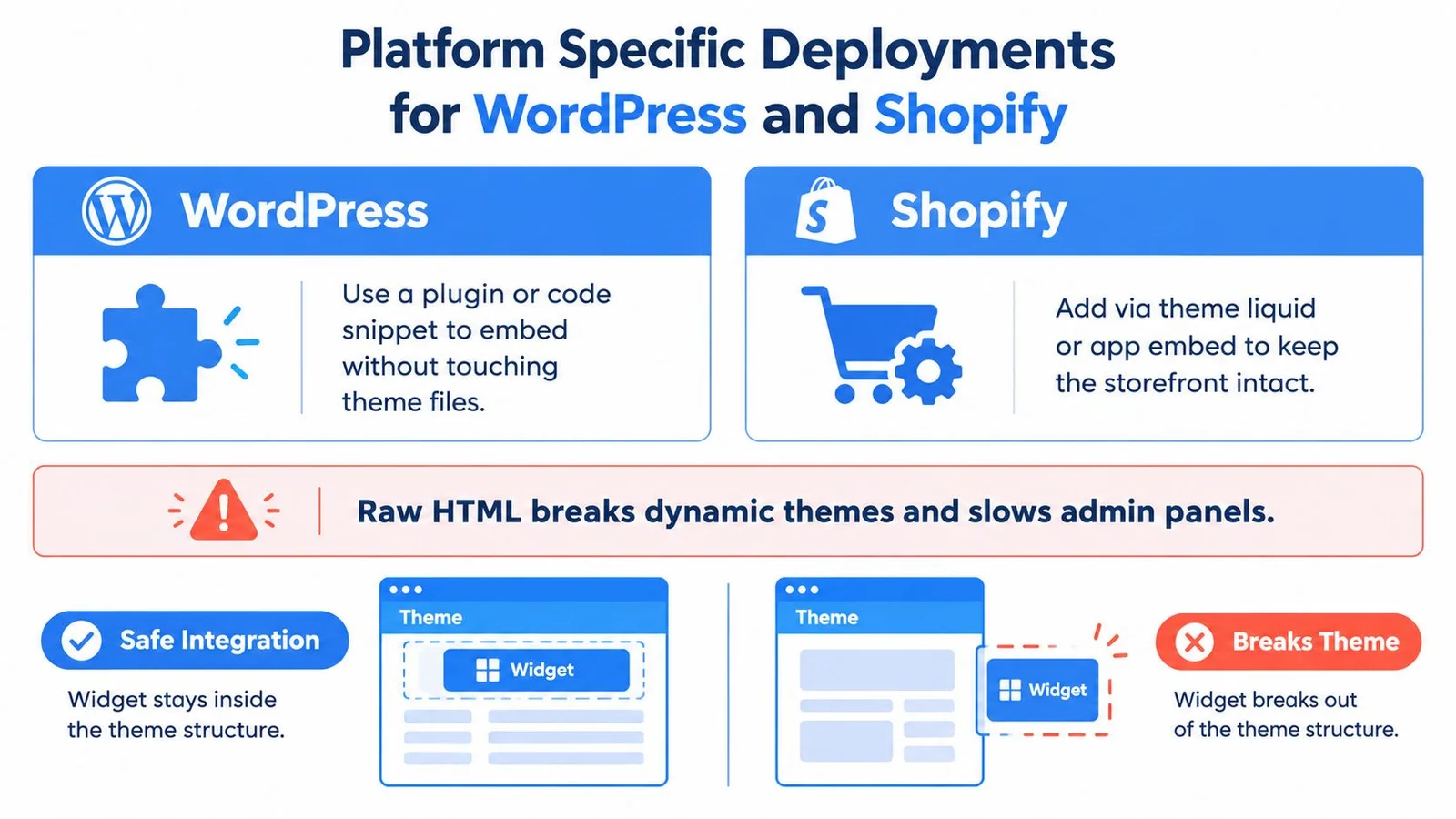
Choose an installation point you can maintain, disable, and scope to the intended pages. Pasting markup isn't unsafe; the practical risk is placing it somewhere your theme, editor, or optimization tools handle unpredictably.
Use this comparison to choose an integration route, rather than treating every installation as a raw HTML paste.
Choose the owner of the installation
| Platform | Recommended implementation approach | What to verify |
|---|---|---|
| WordPress | Use a maintained snippet manager or a developer-managed enqueue implementation | Front-end scope, placement, and optimization exclusions |
| Shopify | Prefer a supported app embed; otherwise use a controlled theme integration | Template targeting and behavior after theme changes |
| Webinar platform | Use its supported custom-code area | Preview restrictions, published behavior, and playback integration |
For WordPress, choose a front-end-only installation location rather than an administrator-wide injection. Put an inline container in the intended page content, while managing the bootstrap through your chosen integration mechanism. Test the published page while logged out, then check it again after clearing relevant caches. Still building the page itself? Here's how to create landing pages in WordPress.
Don't install the same snippet through both a plugin and the theme. The widget versus plugin comparison can help clarify which component owns delivery and which provides the visitor experience.
For Shopify, work in an unpublished theme before changing the live storefront. If you edit theme.liquid, make placement conditional on the intended templates rather than loading the widget indiscriminately. Treat checkout as a separate integration surface and verify what your store's supported extension route permits.
For teams maintaining both platforms, ECORN's Shopify WordPress for SEO and CRO is a useful planning resource.
For webinars, connect conversation timing to documented playback events where available. Test pause, seek, replay, and late entry rather than assuming every visitor watches continuously from the beginning. That's how FOMOchat handles evergreen replays: real questions and answers show up at the moments viewers tend to hesitate, not on a fixed timer. Our roundup of webinar engagement tools covers other ways to keep a recording interactive.
Protecting Page Speed and Core Web Vitals
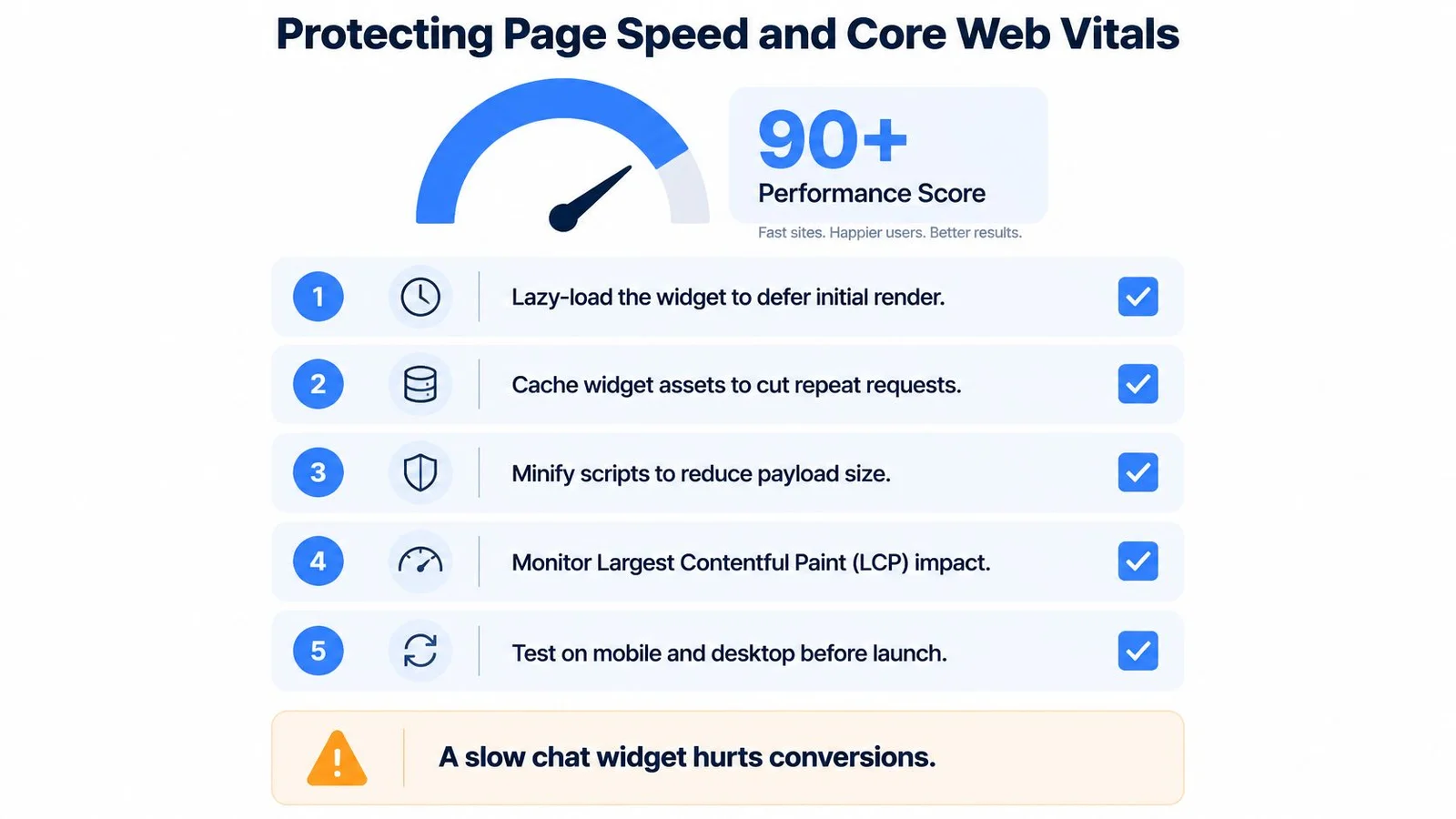
The embed needs a performance budget, not just a visual approval. Define what may load initially, what waits for interaction, and what evidence will stop deployment.
Use the checklist as a planning aid, not a substitute for field measurements or a promised performance score.
Measure the host page, not just the widget
Track Largest Contentful Paint, Interaction to Next Paint, and Cumulative Layout Shift before and after deployment. Addy Osmani's Core Web Vitals guidance identifies JavaScript tasks exceeding 50 ms as long tasks and supports evaluating the 75th-percentile field experience, rather than relying only on desktop lab results.
Instrument supported performance entries with PerformanceObserver, then compare equivalent page and device segments. Test throttled mobile conditions too, especially while opening the widget, typing, and expanding conversation history.
- Reserve layout space. Give an inline widget a stable container sized for the intended viewport. This prevents that container's insertion from moving surrounding content, but doesn't guarantee the entire page will avoid layout shifts.
- Delay expensive work. Initialize conversation assets on viewport entry or interaction when the provider supports it.
- Bound rendering. Avoid building an unrestricted transcript during initial page load.
- Set a release gate. Require no measurable regression in the relevant Core Web Vitals distribution, and confirm that disabling the embed restores baseline behavior.
Don't approve a widget because its closed state looks lightweight. Test the interaction visitors actually use.
Use the page-performance optimization guide to organize the implementation review.
Keep any supporting video separate from the initial widget payload. The following video is an optional reference, not evidence that your installation passes its performance checks.
Designing Accessible Fallbacks for Blocked Scripts
A visitor who can't open the chat still needs a way to ask a question or register. Progressive enhancement is the right design target: the page should remain useful before the external experience becomes available.
ProudCity's guidance on iframes and embedded content identifies recurring problems involving missing titles, unresponsive layouts, mobile usability, and content blocked by privacy tools. Plan for those conditions during implementation, not after a support complaint.
Keep the essential path in ordinary HTML
Place visible instructions near an inline experience so visitors understand its purpose before entering it. Keep the main signup or registration control outside the widget, and offer a normal contact route that doesn't depend on the same external script.
A <noscript> message alone isn't enough. It addresses disabled JavaScript, but not every situation in which JavaScript works and a particular third-party resource fails.
- Loading state. Explain that the conversation is loading without covering the primary page action.
- Unavailable state. Replace an indefinite spinner with a clear message and an alternative route.
- Keyboard behavior. Test opening, navigating, dismissing, and returning focus to the launcher.
- Responsive layout. Check narrow screens, enlarged text, and the space occupied by the on-screen keyboard.
Use an accessible iframe title where applicable, and give controls meaningful names. Avoid redundant ARIA labels that contradict visible text. For video-dependent answers, provide captions or a transcript where relevant.
A fallback isn't a lesser experience if it lets someone complete the task without troubleshooting your technology.
Test with keyboard-only navigation and a screen reader, not just a mouse. Check whether new messages interrupt reading, whether focus moves unexpectedly, and whether the close control remains reachable.
The conversion question is practical: can someone get the essential answer and complete the intended action without successfully loading the chat? If not, the page depends too heavily on the embed. Same goes for the reverse. A chat that actually answers questions beats a stack of “someone just signed up” popups, which we get into in why social proof notifications don't work for complex products.
Troubleshooting Common Integration Errors
Start with the published page, browser console, and network panel. Diagnose the failed layer before changing the snippet, and change one thing at a time so you can identify what fixed it.
Use the widget-not-showing troubleshooting guide alongside the installation instructions. Keep a known-good copy of the configuration so each test has a reliable rollback.
Match the symptom to a diagnostic check
| Symptom | What to investigate | Targeted response |
|---|---|---|
| An empty widget container | Failed requests, browser security messages, or missing configuration | Resolve the specific reported failure before changing styling |
| The launcher is partly hidden | Ancestor overflow and competing stacking contexts | Inspect the containing elements, then adjust placement deliberately |
| The widget appears repeatedly | More than one installation owner | Remove the duplicate initialization route |
| Preview works but the live page doesn't | Published markup, cache state, and production restrictions | Compare the actual delivered page with the preview |
| A private conversation appears publicly | Public configuration or an exposed resource address | Disable access and correct authorization before republishing |
For security-policy errors, identify the blocked resource and its purpose before changing policy. Don't broadly permit unrelated origins just to remove a console warning.
For layout problems, avoid increasing stacking values blindly. Inspect which ancestor clips the widget and whether moving the container would conflict with its documented integration.
Treat private data as a separate incident
A public embed address must not serve as your authorization model. For private learner, customer, or event content, require provider-supported signed access and server-side authorization rather than relying on an obscure address.
Once the immediate failure is fixed, retest the fallback and the main conversion action. A visible chat bubble is only a rendering check, not a complete release check.
Measuring True Conversion Impact Beyond Vanity Metrics
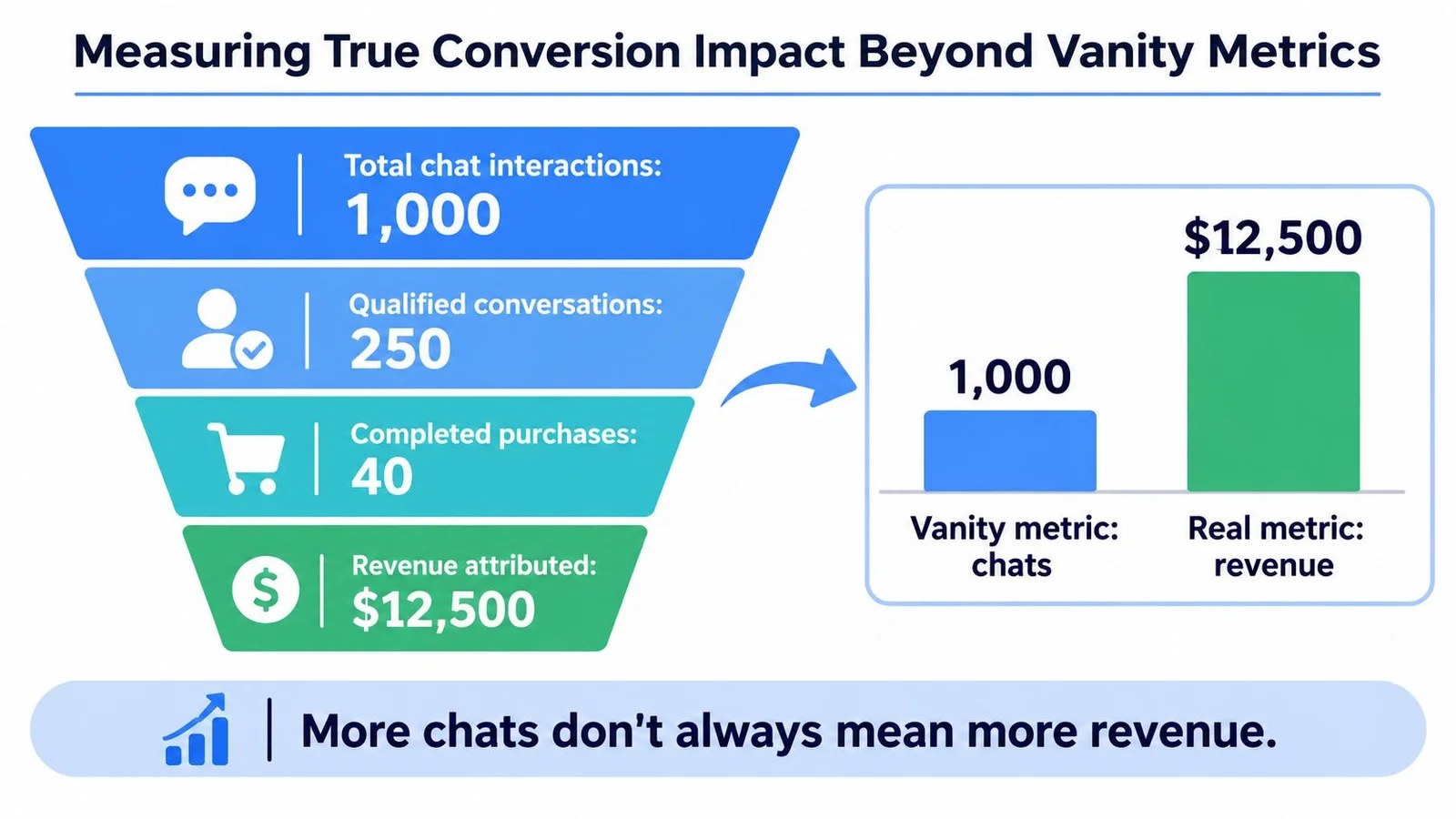
More chat activity doesn't establish conversion lift. Visitors may open a conversation because they're confused, curious, or unable to find information that should already be visible.
Use the funnel below as a conceptual distinction between interaction and business outcomes. Its displayed figures are illustrative artwork, not measured deployment results.
Make completed actions the decision metric
Choose a primary outcome such as completed signup, enrollment, or webinar registration before launching the experiment. Randomly assign visitors to control and treatment, keep acquisition conditions comparable, and avoid changing the landing-page offer during the test. Our guide to testing landing pages walks through setting that up.
Track widget exposure, first interaction, question resolution, CTA clicks, and assisted conversions as secondary metrics. Use the conversion-tracking guide to plan event definitions, and Next Point Digital's resource on how to connect ad spend to business growth for broader measurement planning.
- Predefine the decision rule. Set the minimum detectable effect and evaluate confidence intervals before interpreting apparent movement.
- Inspect relevant segments. Compare device, geography, acquisition source, visitor status, and funnel stage without treating every subgroup difference as conclusive.
- Protect against side effects. Include abandonment, support escalation, and the previously defined performance checks as guardrails.
Baymard's checkout research reports that 17% of online shoppers have abandoned because checkout was too complicated or too long. That finding doesn't prove anything about chat effectiveness, but it supports a sensible constraint: answering objections shouldn't introduce another obstacle.
Scale the embed only when completed outcomes justify it. If interactions rise while registrations decline, investigate the distraction rather than celebrating engagement.
FOMOchat offers an embeddable AI support and social-proof chat widget for product pages, courses, launches, and webinars. Visit the site to explore its setup, then pilot it on a focused landing page with the security, accessibility, performance, and conversion checks above.