
The most popular advice on widget vs plugin is simple and wrong. It tells you to pick the option that's easiest to install. That's how teams end up with a chat tool they can't remove cleanly, a checkout slowed by site-wide scripts, or a vendor outage they can't diagnose during a launch.
The Real Question Behind Widget vs Plugin
You're not shopping for a definition. You're choosing where code runs, who can break it, and how fast you can reverse the decision when something goes wrong on a revenue page.
That's the widget vs plugin question for a SaaS marketer, course creator, or webinar host. Installation takes minutes either way. Ownership lasts for every update, campaign, and traffic spike that follows.
Two Questions That Actually Decide It
Who owns failure is the first. If the feature disappears during a webinar, can your team fix it, or are you waiting on a provider's status page? If an update conflicts with your theme, can you roll back one component, or does the whole site carry the risk?
What gets slower as you scale is the second. Does the feature add work to your own server on every page view, or does it add browser work on your visitor's phone? Those costs land on different people and show up in different metrics.
The easier install is not always the safer install. Less of your code often means more dependence on someone else's release schedule.
Skip any comparison that ends at features. A feature list won't tell you the blast radius, the rollback path, or whether you can export your data when you leave. Judge both options on those terms first, then check features. If a vendor can't explain how its tool fails and how you remove it, you don't have enough information to buy it.
What Each Term Actually Means in Practice
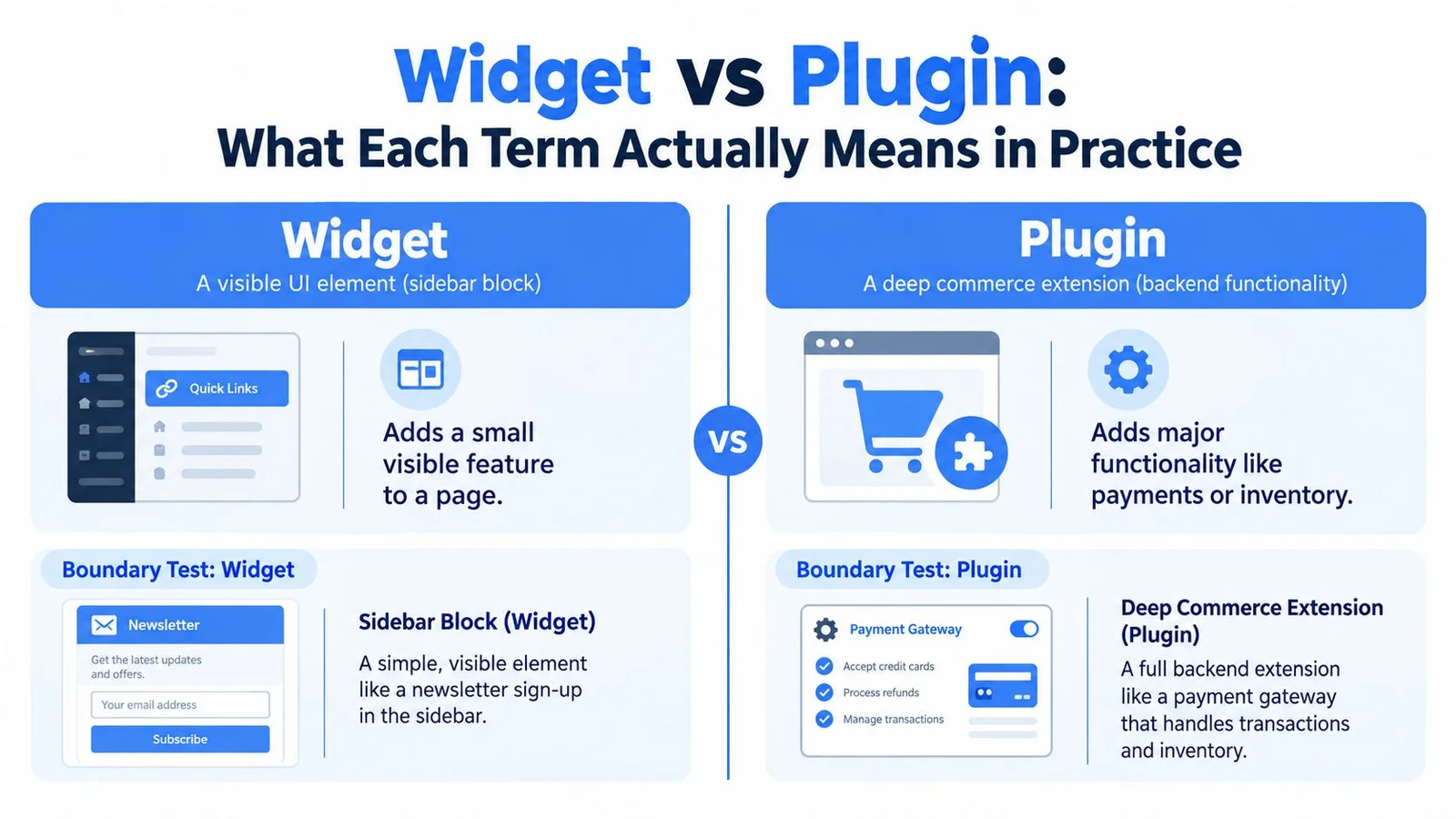
A plugin is an extensible software component that adds or modifies what a platform can do. A widget is a user-facing interface element that displays content or functionality in a defined area. One works at the capability layer, the other at the presentation layer.
WordPress made that split concrete. Plugin architecture was introduced with WordPress 1.2 in 2004 in the platform's early history, letting developers extend the system without changing core code. Widget support arrived later, in 2007, for placing reusable blocks like search, categories, or recent posts into designated areas.
A Boundary Test You Can Reuse
A sidebar block showing recent posts is a widget. It occupies a defined slot and renders a small, visible thing. A commerce extension handling payments, inventory, and checkout rules is a plugin. It changes what the platform itself can do, including work no visitor ever sees.
- Widget test: Can you point to the rectangle on the page where it lives?
- Plugin test: Does it still do useful work when nothing on the page is visible?
The two aren't mutually exclusive. A plugin can register several widgets, and a widget can expose only a sliver of a plugin's broader capabilities. That's why a chat window sitting on your page isn't automatically just a widget. The window is the presentation surface. The integration behind it, with its configuration, data handling, and platform hooks, may be plugin-style work.
If you're comparing form tools built this way, contact form plugins for WordPress show the pattern clearly. The visible form is small. The storage, validation, and notifications behind it are not.
Comparing Capability, Presentation, and Code Surface
Plugins became a platform pattern because the ecosystem scaled. By the end of 2022, the WordPress directory offered more than 60,000 plugins while WordPress powered approximately 43% of all websites, according to the historical account of that ecosystem growth. Widgets never grew an ecosystem like that because they're a narrower, visible mechanism, not a distribution model.
Widget vs Plugin at a Glance
| Criterion | Widget | Plugin |
|---|---|---|
| What it extends | A defined area on a page | The platform's capabilities |
| Where it runs | Mostly in the visitor's browser, often from a provider | Inside the host platform's runtime |
| What it needs from the host | A placement slot or embed snippet | APIs, hooks, permissions, configuration |
| How a visitor experiences it | Directly, as a visible component | Often indirectly, through changed behavior |
How to Read the Table
Capability favors plugins. Commerce, forms, analytics, security, and editorial tools all need data processing, persistence, or administration. That's plugin territory because the work happens whether or not anything renders.
Presentation favors widgets. When your requirement is a compact, interactive element on an existing page, a widget-style embed gets you there with minimal code. Placement, sizing, and visual fit matter most here, which is why strong widget design principles focus on the surface a visitor touches.
Code surface is where teams get surprised. A plugin's code runs inside your platform, so you inherit its compatibility and maintenance burden. A widget's code often arrives from a provider, so you inherit that provider's decisions instead. Neither option removes code. Each one puts the code, and the responsibility for it, in a different place.
Use this rule when a colleague asks which one you need. If the feature needs configuration, persistence, permissions, or platform hooks, think plugin. If it needs a visible surface on pages you already have, think widget.
Performance and Load on Your Site
Neither option is automatically lighter. A plugin runs inside the host platform's runtime and can affect server-side and client-side performance. A widget can look tiny and still stall your page if its JavaScript runs in the critical rendering path and delays document parsing.
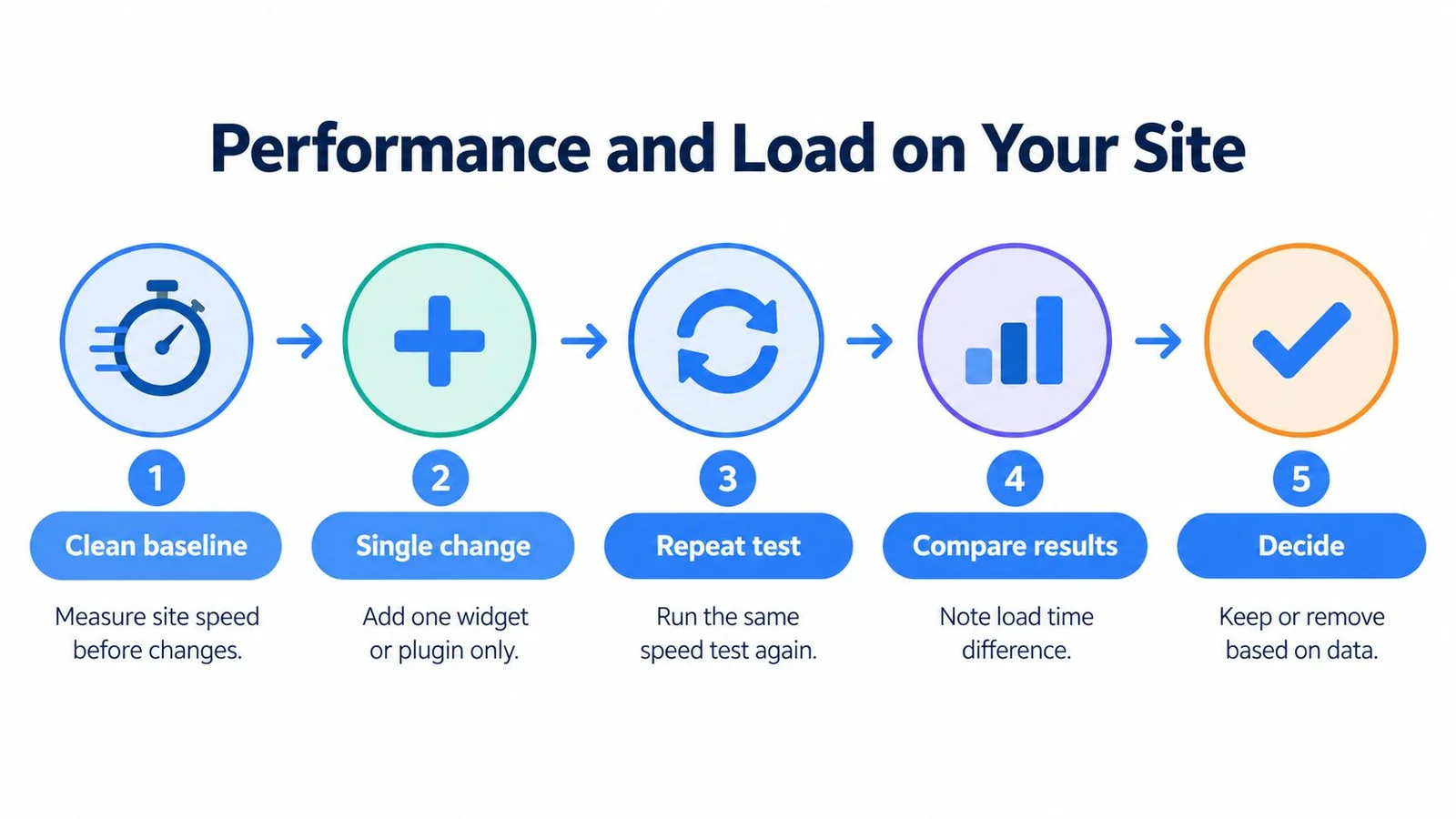
Measure instead of guessing. A neutral methodology recommends measuring a clean baseline, activating one plugin, repeating the same test, and calculating the delta, using the same site version, database, theme, content, and configuration, as described in the WordPress benchmark methodology. Apply the same discipline to widgets.
What to Measure for Each Option
For a plugin, watch peak PHP memory, SQL query count, and server response time (TTFB). Then check whether it enqueues JavaScript and CSS globally, including on pages that never display the feature. Site-wide asset loading is the most common plugin performance failure I see.
For a widget, watch Largest Contentful Paint (LCP) and total browser work. Additional DNS lookups, redirects, secure connections, and requests to other servers all add latency. Check whether the script loads asynchronously or lazily, and reserve layout space so the widget doesn't shove content around after it appears. If chat is the widget in question, our walkthrough on how to embed a chat widget covers async loading and placement in more detail.
- Test on mobile conditions: Desktop results hide the cost your visitors feel.
- Scope loading to relevant templates: Don't pay for the feature on every page.
- Retest after vendor releases: Third-party code can change without your deploy.
Practical rule: If you can't name the metric a feature is allowed to worsen, and by how much, you don't have a performance budget. You have a hope.
Accessibility belongs in the same test. Chat and social proof components introduce dynamic, animated content that affects focus order and screen reader announcements. Verify keyboard navigation and labeling before you ship. For the broader cleanup work, practical steps to improve page performance pair well with this testing protocol.
Who Owns the Risk and How It Fails
Risk ownership, not installation time, should decide this choice. A widget commonly depends on third-party JavaScript and remote APIs, while a plugin usually runs inside the site's CMS and inherits its update, compatibility, hosting, and security lifecycle, a distinction laid out in this breakdown of widget dependence on external providers. Widgets shift risk to vendor governance. They don't remove it.
How a Widget Fails
A provider outage hits every page carrying the embed at the same moment. An expired certificate or a blocked script can break the feature without any error in your own logs. A vendor API change can force urgent work on the vendor's schedule, not yours. Your rollback is simple, remove the snippet, but your diagnosis options are limited because the failing system isn't yours.
How a Plugin Fails
A plugin fails closer to home. A bad update can conflict with your theme or another extension. Poorly scoped code can slow pages that never needed the feature. Because the plugin runs with platform access, permissions matter, and it's worth understanding what plugin permissions control before you grant a tool deep access to your CMS. Your team can inspect, patch, or roll back the code, but you're also the team responsible for recurring compatibility testing.
Ask which failure your business can contain, diagnose, and reverse fastest. That's a better question than which option is easier.
Before signing off on either path, get written answers to four governance questions. What's the blast radius if this breaks at peak traffic? How do we roll back, and how long does it take? How will we know it's broken before customers tell us? How do we exit, including data export and clean removal? A vendor that answers all four clearly is safer than a lighter tool that answers none.
Matching the Choice to Real Scenarios
A SaaS pricing page lives or dies on conversion, and visitors arrive with specific objections about plans and limits. A widget-style embed wins here. You need a visible, interactive surface on one high-intent page, scoped to that page, without adding server work across your marketing site. The exception is account-aware behavior. If the tool must read billing state or user permissions from your platform, you need deeper, plugin-style integration.
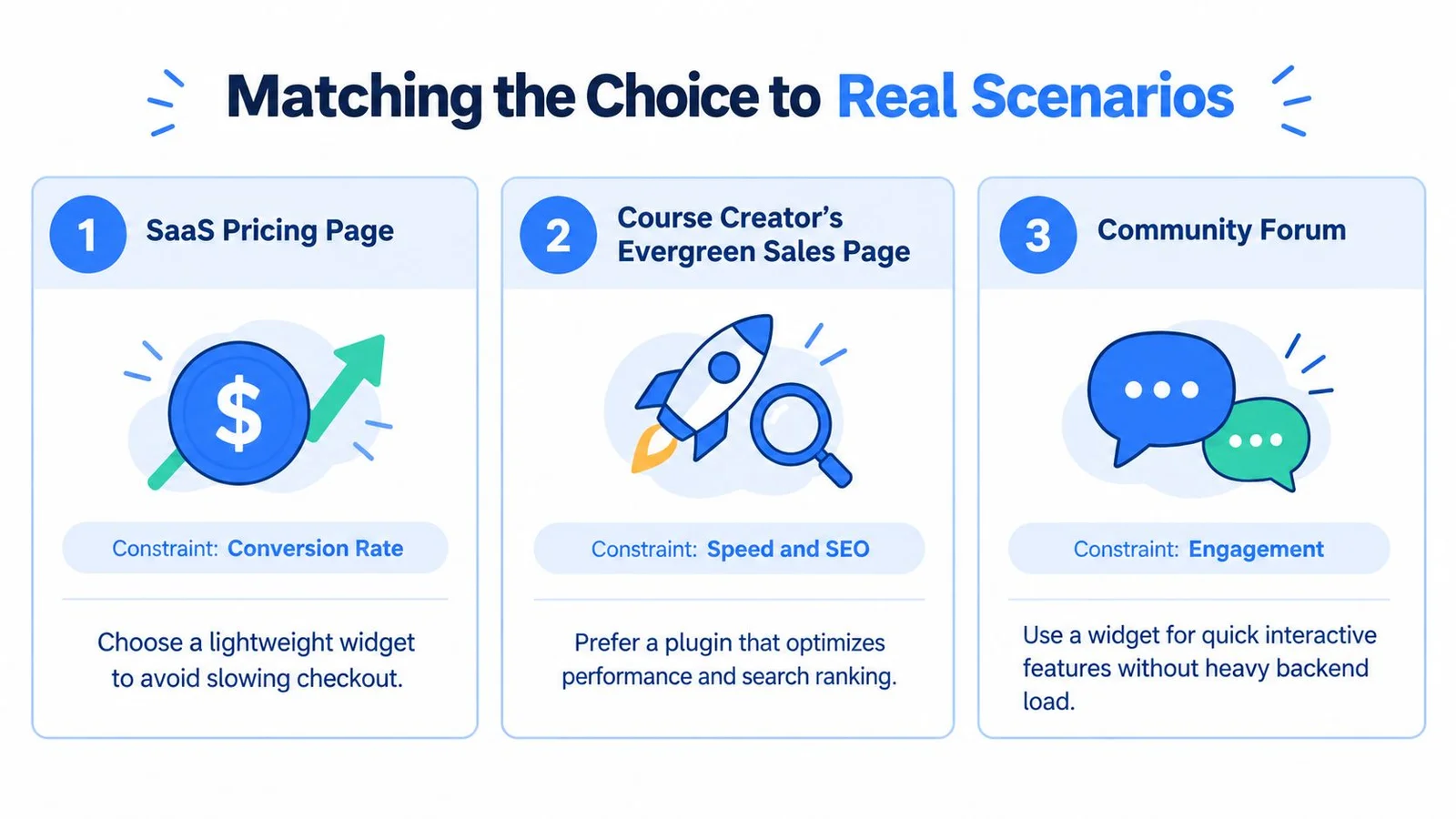
A course creator's evergreen sales page depends on search traffic and page speed over months, not a single launch day. Start with a widget embed, lazy loaded and restricted to the sales template, so your lesson pages and blog stay untouched. Creators running membership access on other platforms face the same scoping logic, and LearnStream's Squarespace membership guide is a useful companion for that side of the stack. The answer flips if enrollment, payments, and content gating must live inside your CMS. That's capability work, and it belongs in a plugin.
A live webinar registration page runs on timed engagement. Interest peaks around the event, and the page may only matter for a short window. A widget wins again because you can deploy it fast, aim it at one page, and remove it cleanly afterward. Large plugin ecosystems create substantial variation in versions, dependencies, and update practices, which is exactly the maintenance surface you don't want to debug an hour before a live session. The exception is registration data that must sync with your CMS or CRM in real time. That integration depth justifies plugin-style hooks. For the engagement side of that page, our roundup of webinar engagement tools compares lighter options.
Embedding FOMOchat the Code-Light Way
FOMOchat takes the widget-style path for a specific reason. Social proof and chat are presentation problems with a timing component. You need a visible conversation on pages you already have, reacting at the right moments. You don't need your CMS to learn new capabilities. It's also why FOMOchat leans on conversations instead of notification popups. A “someone just signed up” toast can't answer the question a visitor actually has, which we dig into in why social proof notifications don't work for complex products.

The Implementation Sequence
- Define the AI persona. Train the company representative on your site content so answers match what your pages say.
- Set guardrails and confidence qualifiers. Fix the facts the assistant must use and where it should hedge or hand off.
- Generate multi-person conversations. Tie dialogues to specific pages or video timestamps so proof appears when objections peak.
- Customize branding and positioning. Match colors and placement to your page instead of accepting a generic bubble.
- Paste the embed snippet. One small script goes into your page HTML, scoped to the pages you choose.
That last step is where the widget model earns its keep. The snippet pattern is the same one other interactive tools rely on, and JavaScript snippets for virtual fitting room integrations show how much functionality a small embed can carry without a platform install. Your blast radius stays isolated to pages carrying the snippet, and removal is a paste in reverse.
You still get depth where it matters. Persona configuration, guardrails, page-specific visibility, and analytics on paid plans give you plugin-style control over behavior without plugin-style maintenance. For deployment discipline across tools like this, integration best practices worth standardizing cover the scoping and testing habits to pair with the embed.
My recommendation is direct. Ship the code-light embed first, measure its performance delta on your highest-value page, and only consider deeper integration if you hit a real capability limit.
A Short Decision Checklist You Can Reuse
Run these four questions on any vendor, not just chat tools. Comparing chat vendors specifically? Start with our shortlist of the best website chat widgets.
- Does it need CMS hooks and persistence, or just a visible surface? Hooks mean plugin. Surface means widget.
- Who owns the failure path? Name a person on your team and a contact at the vendor before you launch.
- What's the rollback story? If removal takes more than deleting a snippet or deactivating one extension, reconsider.
- What's the performance budget on mobile? Set the LCP and load limits you're willing to accept, then test against them.
Start with the option you can remove in minutes. Earn your way into deeper integration only when a measured limit demands it.
For SaaS marketers, course creators, and webinar hosts, the default is clear. A code-light widget embed is the right starting point for engagement and social proof work. A heavier plugin is justified only when the product genuinely needs CMS-level integration, stored data, or platform permissions. Most conversion features don't. They need to appear in the right place, at the right moment, without taxing every page on your site.
If your next step is adding social proof and instant answers to a pricing, course, or webinar page without a heavy platform install, FOMOchat gives you an AI representative and timed group conversations through one small embed you can scope, test, and remove cleanly. Set up your persona and guardrails, paste the snippet on your highest-value page, and measure the result before you roll it out further.