
You've tightened the landing-page copy, made the pricing easier to understand, and put the registration button where visitors can find it. Yet someone still pauses at the offer, scrolls back to the details, and leaves. You never hear the question that stopped them.
Embedded chat for website conversion should address that moment, not just add another contact channel. The useful version helps visitors judge whether your offer fits, see relevant questions being answered, and decide how much confidence to place in those answers. That makes it a credibility system, with installation only part of the work.
Why Visitors Leave Before Asking the Question That Converts
A visitor evaluating software might wonder whether a feature works with their existing workflow. A prospective student might worry about keeping up with the course. A webinar attendee might understand the pitch but remain unsure whether the offer applies to their situation.
Those are different from support requests. Asking can feel like starting a sales conversation, exposing a knowledge gap, or committing to an email exchange. A prominent contact button doesn't necessarily remove that friction.
Make the unanswered objection visible
Start by reading your page as a skeptical buyer. Identify where the visitor has to make an assumption, especially around fit, eligibility, effort, and what happens after signup. Those are useful places to offer a relevant conversation rather than a generic greeting.
Static FAQs still have a job: they provide stable, searchable answers. Chat adds value when visitors need to connect a published fact to their circumstances, or when a visible question helps them recognize an objection they hadn't articulated. Still picking a tool? Our shortlist of the best website chat widgets is a good starting point, and the guide to embedding a chat widget covers the install itself.
- Product pages: Surface questions about workflow fit and implementation requirements near the relevant feature explanation.
- Course funnels: Clarify prerequisites, learning format, and access policies before asking for enrollment.
- Webinars: Make the offer's conditions easy to inspect while viewers are considering the next step.
The distinction between support and sales isn't new. Historical industry data reports that, among organizations using live chat, 78% used it for sales and 63% for customer support, according to the customer-communications summary citing ICMI and Forrester. Those figures establish the channel's commercial role, not a guaranteed conversion lift for your page.
Separate useful conversation from manufactured proof
A conversation can show visitors that a question is reasonable to ask. But generated dialogue isn't evidence of customer demand or customer success. Treat illustrative exchanges as demonstrations, clearly distinguish them from genuine visitor activity, and use actual customer evidence only when you have permission and supporting records.
A useful conversation makes the offer easier to evaluate. It shouldn't make the audience look larger or happier than it really is. This is where conversations beat notification popups: a “12 people just signed up” toast can't answer the question a visitor actually has, which we cover in why social proof notifications don't work for complex products. FOMOchat is built around that idea, with real answers in place of a ticker.
This also creates a boundary between pre-sale assistance and post-signup help. Figr's resource on AI-powered in-product guidance is a useful companion when you're planning how assistance continues inside the product. On the landing page, the immediate task is narrower: answer the decision-blocking question without forcing the visitor into a sales process.
Setting Up Your First Embedded Chat Widget
Choose a high-intent page before choosing a persona name. A focused launch on a product, pricing, or registration page gives you a clearer set of questions to test than a site-wide rollout. Keep the widget away from checkout controls and consent notices.
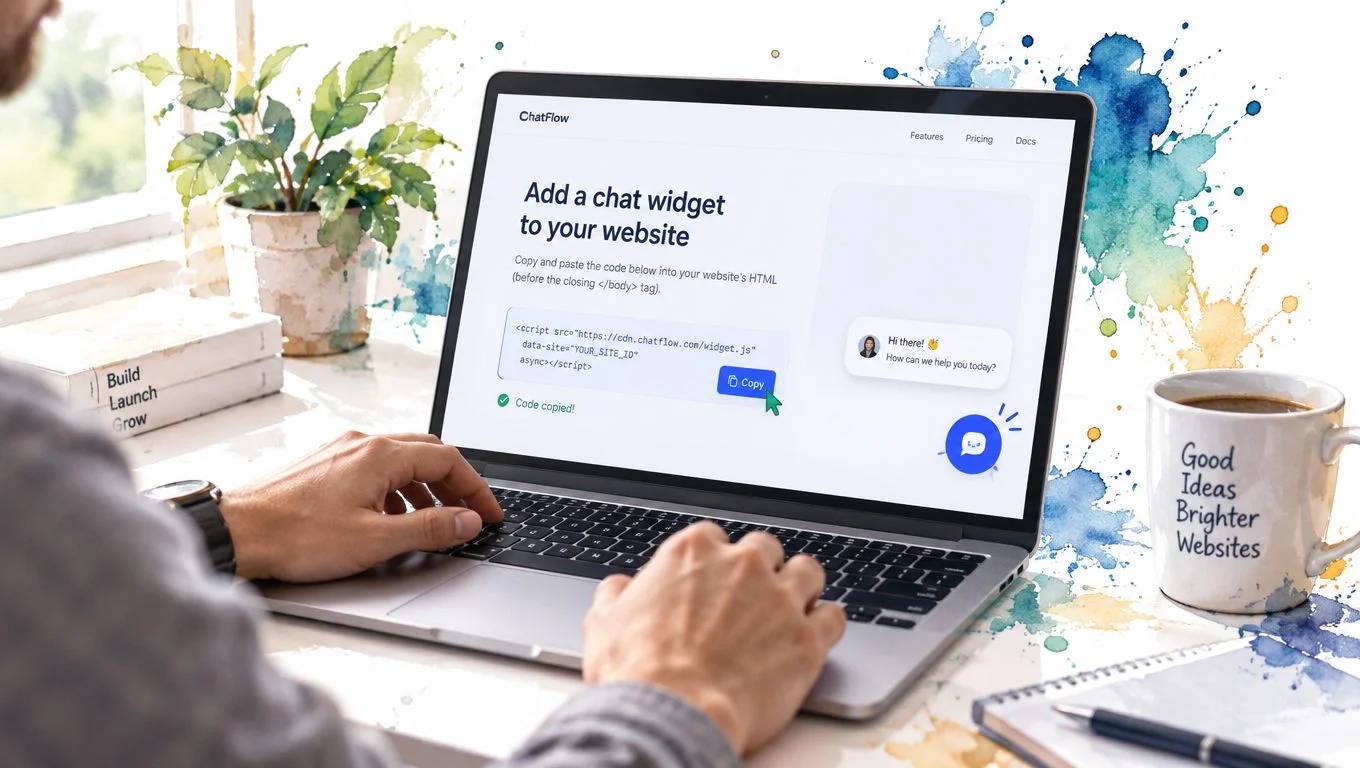
The installation step is straightforward; the content preparation deserves more attention.
Configure the representative before publishing
FOMOchat is one code-light option that combines a website-trained AI representative with interactive group conversations. Configure its role as a company assistant, not an invented customer or an employee whose identity could mislead visitors. Give it a concise voice that matches your page without copying the urgency of your sales copy.
Build its knowledge from approved product information, pricing, policies, course details, and event logistics. Organize material by visitor intent, preserve canonical page references, and record when information was updated. Define what the assistant must do when information is missing or contradictory.
Draft illustrative multi-person conversations around actual objections gathered from sales calls, contact forms, or support logs. Review every answer against the approved material, and label generated participants appropriately. Don't insert fabricated purchases, results, or endorsements to make the exchange feel active.
For another concrete use-case reference, see how the chatbot tracks subscriptions from Chartsy. Use it as a prompt to define your own assistant's scope precisely, rather than treating every business question as something it should answer.
This video provides a visual companion to the setup process.
Test the experience, not just the embed
Copy the provider's snippet into your page's supported custom-code area or deployment tool. Test it on staging before publishing, including mobile layouts and returning visits.
Your acceptance test should include:
- Answer boundaries: Unsupported promises, conflicting policies, and requests to ignore instructions should produce appropriate uncertainty or refusal.
- Source accuracy: Any displayed reference should support the answer visitors receive.
- Conversation continuity: Resizing the page shouldn't discard the visitor's question or hide the response.
Keep response status explicit during processing. Research on live-chat satisfaction found that displaying estimated response time positively moderated the relationship between perceived waiting and satisfaction, as described in the study of live-chat customer experiences.
After launch, revisit answer scope, visibility rules, and fallback behavior before polishing personality. Those settings determine whether the assistant is useful enough to earn attention. For a deeper look at keeping answers inside the lines, see how to prevent AI hallucinations.
Choosing the Right Integration Path for Your Stack
Choose the integration your team can inspect, update, and remove reliably. A script pasted into a page template can be appropriate for a focused campaign, while a centrally managed tag may suit a governed rollout. Neither path excuses testing.
For a SaaS growth lead working in Webflow, the page's custom-code area is a sensible starting point when placement is limited. A course creator using WordPress should first check whether their selected chat provider offers a maintained integration. A Shopify team should investigate supported app blocks before modifying theme code.
Choosing the right integration path
| Integration path | Best for | Typical setup time | Watch out for |
|---|---|---|---|
| Direct script embed | Webflow, custom sites, focused landing pages | Short when custom-code access is available | Publishing to the wrong template or loading synchronously |
| Shopify app block | Store teams using a supported provider integration | Short if the app and theme are compatible | Overlap with cart drawers and existing support apps |
| WordPress plugin or block | Course creators managing pages through WordPress | Depends on plugin approval and theme testing | Duplicate installation through a plugin and theme |
| Google Tag Manager | Teams needing centralized triggers and staged deployment | Depends on review and consent requirements | Broad triggers, repeated firing, and consent-state behavior |
| Webinar-page embed | Hosts controlling registration and replay pages | Depends on the platform's embed permissions | Restricted scripts and unavailable player events |
These are planning estimates, not promises about installation speed. Access permissions, security review, and platform restrictions can take longer than copying the snippet.
Match deployment to ownership
Google Tag Manager is useful when marketing operations owns deployment rules. Set an explicit page allowlist, test preview mode, and confirm the widget doesn't initialize repeatedly during navigation. Have the consent owner review which conditions must be met before loading it.
For webinar funnels, distinguish an ordinary page embed from video-timeline integration. A platform may let you display chat without exposing the playback events needed for synchronized conversations. Verify those capabilities before building a timed sequence, and use an external replay page only if you can preserve the intended viewing experience.
Deployment rule: Assign one installation owner and one loading method. A plugin, theme snippet, and tag-manager container shouldn't each inject the same widget.
On staging, inspect the page for duplicate launchers and network requests. Test logged-in and logged-out states, campaign parameters, navigation between pages, and the removal procedure. Keep the existing contact route available if the script fails.
The embedded chat integration best practices provide a useful deployment reference. Your final decision should still follow your stack's permissions and maintenance model, not whichever installation method looks quickest in a demo.
Configuration Choices That Actually Lift Conversions
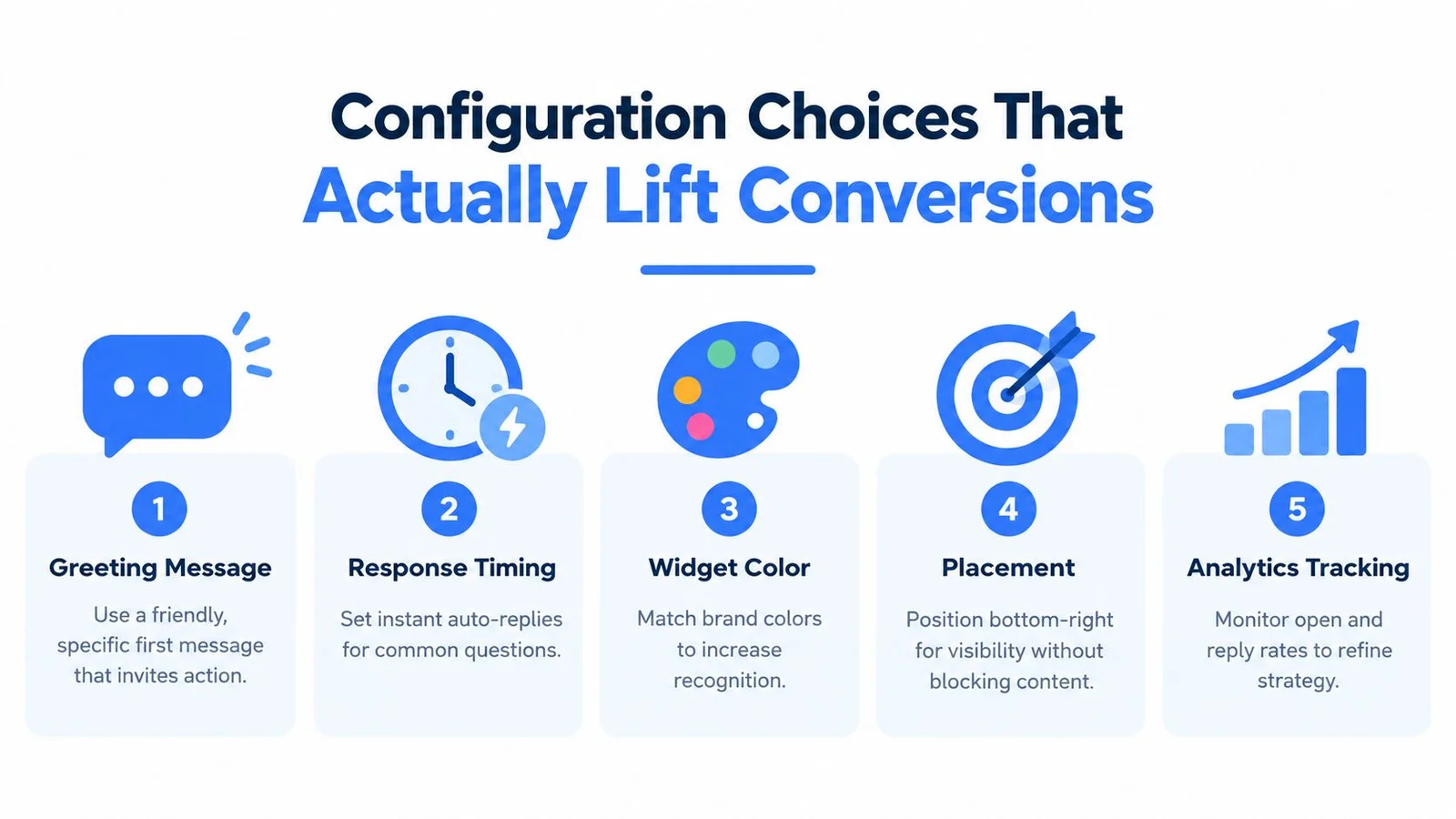
Treat configuration choices as conversion hypotheses, not proven improvements. A greeting that works on a course sales page may interrupt visitors comparing technical plans. Your task is to reduce uncertainty without taking attention away from the offer.
Use this visual as a configuration shortlist, then validate each choice on your actual page.
Tune the invitation and response behavior
Write a greeting tied to the page's decision. On a course page, invite questions about prerequisites or workload. On a software page, offer help checking a specific use case. Avoid opening with a sales pitch before the visitor has expressed interest; the website welcome-message guidance can help you develop page-specific alternatives.
Separate an immediate acknowledgment from the substantive answer. Historical benchmarking reported an average first response time of 48 seconds in an analysis of 23,487 businesses, according to the LiveChat customer service report. That's context for measuring latency, not a target an AI assistant should automatically adopt.
Measure message submission to the first useful visible answer, separately from launcher loading. Test slow networks and constrained mobile devices, defer nonessential assets, and provide a clear fallback when retrieval takes too long. A fast greeting doesn't compensate for an unanswered question.
Use brand colors for recognition, but preserve text contrast. Bottom-right placement is a starting hypothesis, not a universal rule. Check it against sticky buttons, mobile navigation, captions, and the offer itself.
Synchronize to the decision, not the clock
For webinar replays, associate conversations with playback position, rather than elapsed time since page load. If a viewer pauses or seeks, the conversation should stay relevant to what they're watching. Verify the player can expose those events before relying on synchronization.
Place a pricing clarification alongside the pricing explanation, or a prerequisite question alongside the audience-fit segment. Don't flood the pitch with reactions, and don't display generated exchanges as live audience activity.
- Grounded answers: Mark information supported by approved content and provide its reference where practical.
- Missing details: State what can't be confirmed rather than filling gaps with a persuasive guess.
- Human follow-up: Offer a contact route for exceptions or questions outside the assistant's scope.
The WebinOne contact form guide is a useful reference when designing that alternative.
Test the invitation and visibility before changing multiple cosmetic settings together. Judge each version by whether visitors complete the intended action and receive dependable answers, not whether the widget attracts more clicks.
Trust, Privacy, and Accessibility Without Killing the Vibe
A lively widget can still make a cautious buyer uncomfortable. The relevant question isn't whether the chat feels human. It's whether visitors understand what it is, can inspect its claims, and can leave the interaction without losing access to the page.
A 2025 study covering 11,628 respondents in Poland, Italy, and Sweden identified privacy, data security, transparency, trust, and explainability as barriers to chatbot acceptance, particularly in emotionally sensitive interactions, in the research on social resistance to AI chatbots. That finding supports caution, not an assumption that every landing-page visitor will distrust AI.
Give visitors control over the interaction
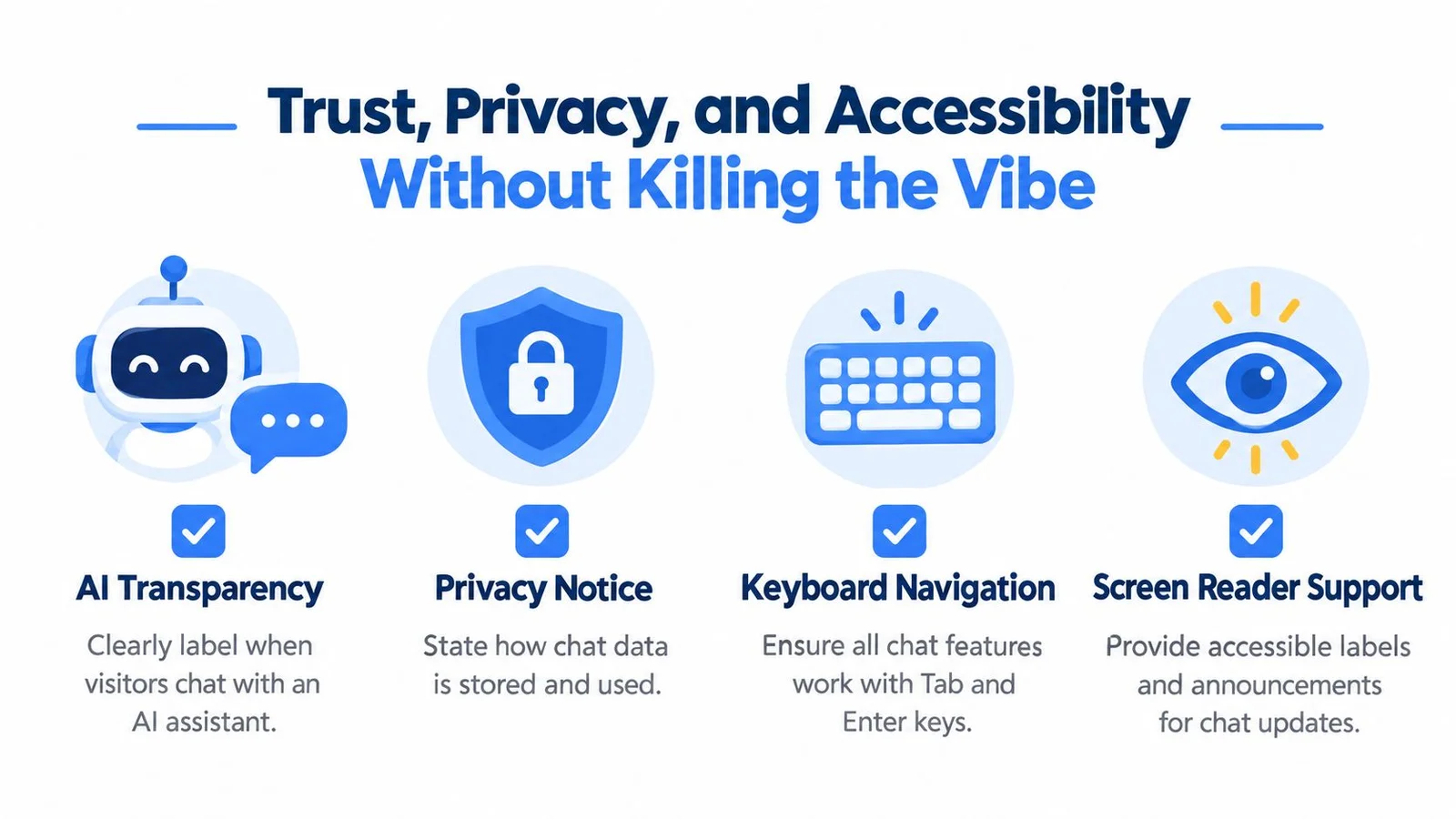
Label the AI at the point where people start chatting. Distinguish generated sample conversations, replayed audience messages, and current visitor activity through visible labels, not a disclosure buried in your terms. Don't use invented customer identities or experiences as testimonials.
Summarize the privacy choices in plain language: what chat data you collect, why you retain it, who can access it, and how visitors can request help without submitting a transcript. Have your privacy reviewer confirm retention and deletion behavior before launch.
Use this checklist to review the visible experience.
Test whether everyone can use it
Accessibility requires more than a readable launcher. Test the full path from opening chat to reading an answer, closing the dialog, and returning to the original page task.
- Keyboard operation: Every control should be reachable, with visible focus and predictable movement.
- Screen-reader behavior: Inputs need accessible names, and new answers need appropriate announcements without overwhelming the reader.
- Zoom and mobile layouts: Messages, controls, and page actions should remain usable without overlap.
- Focus return: Closing chat should return focus to a sensible location rather than leaving the visitor stranded.
The chat-widget accessibility checklist covering WCAG requirements highlights keyboard operation, visible focus, accessible names, status messages, and protection against obscured focus. Use those requirements as acceptance criteria, not optional polish.
Trust includes the ability to decline the assistant and still get help.
Test with ad blockers and consent denied so that chat failure doesn't remove essential information. Keep your contact path outside the widget. Log anonymized unanswered intents and correction reasons where possible, rather than retaining unnecessary personal details.
The guide to building customer trust can support the broader messaging review. The widget itself should make its boundaries understandable through behavior, not reassuring slogans.
Driving Signups and Registrations From Product Pages and Webinars
Give each useful conversation a relevant next action. A visitor checking software compatibility may need a demo; someone confirming course eligibility may be ready to enroll. Don't attach the same sales button to every answer regardless of intent.
Pin approved answers to recurring pricing and fit questions on product pages. For webinar funnels, use the timed-conversation settings already tested, and keep the registration or purchase action visible. The webinar landing-page examples offer a reference for reviewing the surrounding page.
Run a launch-cycle experiment
Start with a focused page set and a no-widget holdout. Define the primary conversion before launch, then track assisted conversions, abandonment before an answer, and unanswered-intent rate using available paid-plan analytics or your own instrumentation. Keep complaints and disengagement visible alongside signup results.
Chat users may already be more motivated than other visitors. Don't interpret their higher conversion rate alone as evidence that chat caused the improvement. Our breakdown of live chat conversion rate explains how to read those numbers without fooling yourself.
- Prepare: Record baseline behavior, approve conversation content, and verify analytics events.
- Launch: Check real transcripts for gaps and technical failures before expanding placement.
- Refine: Change a clearly defined variable, compare it with the holdout, and retain changes only when the evidence supports them.
Expand only what earns its place
Review unanswered questions with the people who own pricing, curriculum, or product policy. Update the knowledge base and re-test affected answers before publishing changes.
If visitors keep asking for the same clarification, improve the page itself. Successful chat shouldn't become a permanent workaround for unclear offer copy.
FOMOchat offers a website-trained AI representative, interactive group conversations, and video-timeline synchronization for product pages, courses, and webinars. Visit FOMOchat to preview a widget, configure it around an approved offer, and test it on a high-intent page before expanding your rollout.