A visitor lands on your pricing page, understands the offer, and still doesn't buy. They have one question about implementation, billing, compatibility, or what happens after signup. The FAQ doesn't answer it, your sales team isn't available, and the visitor leaves with the doubt unresolved.
That's the situation an AI chat widget should fix. But many widgets create a new problem by answering confidently when they're wrong, hiding the human support route, or covering the page at the exact moment someone needs to read it. Conversion comes from reducing uncertainty, not from adding a chat bubble because the technology is fashionable.
What Is an AI Chat Widget and Why It Matters
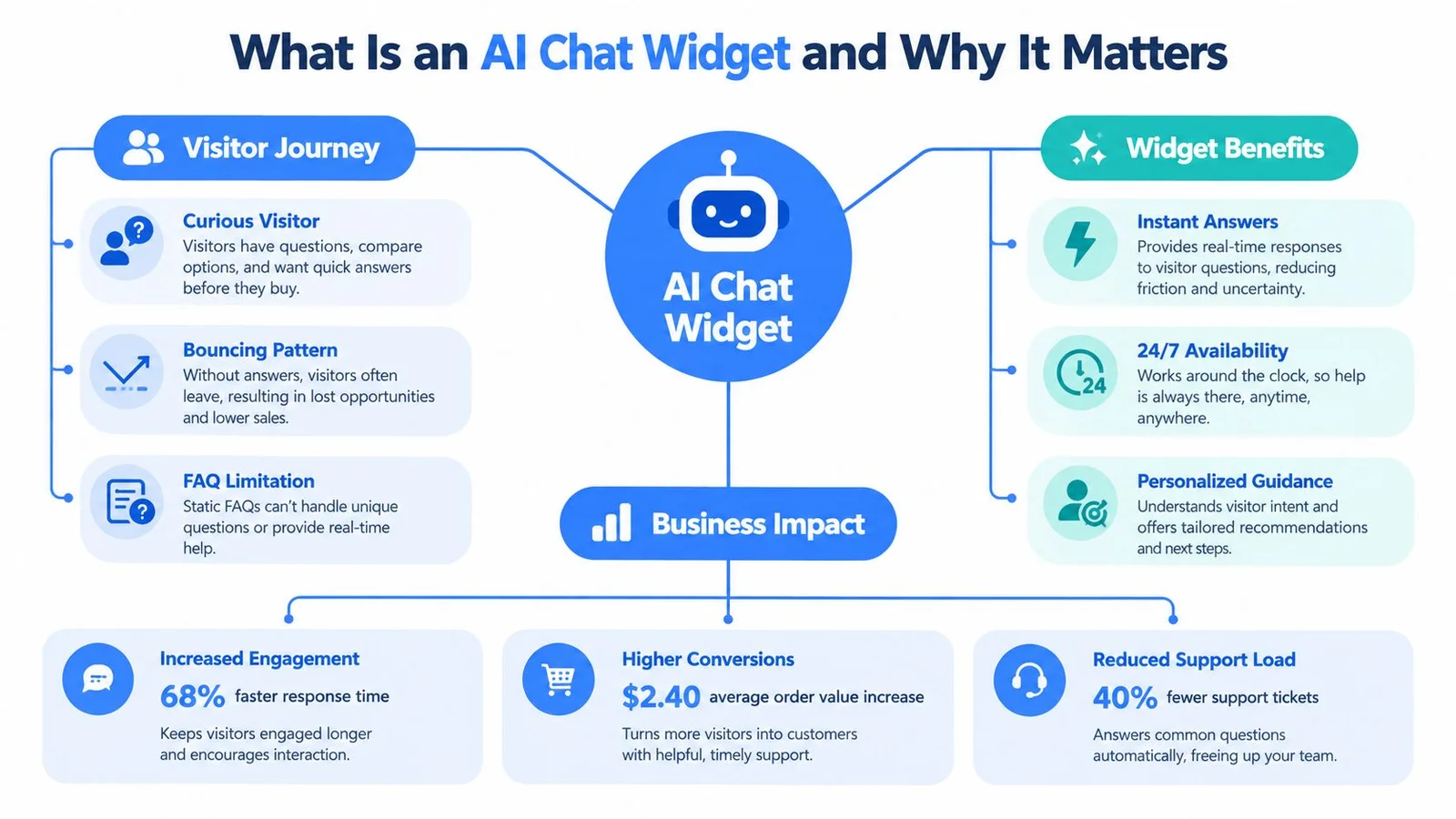
A visitor comparing two software products rarely follows a neat path. They skim the headline, jump to pricing, open a feature comparison, return to the homepage, and search for an answer about integrations. A static FAQ forces them to predict the question your content team expected. A conversational interface lets them ask the question in their own words.
An AI chat widget is an embedded interface that sits inside a website and responds to visitor questions using artificial intelligence. It can explain a product, direct someone to a relevant page, clarify a course module, answer questions about a webinar, or collect context for a human representative. The useful version feels less like a pop-up and more like a knowledgeable host who helps visitors find the right information without taking control away from them.
The widget is part of the buyer journey
A product page widget might answer, “Does this work with our existing tools?” A course widget might explain who the program is for. A webinar widget might clarify whether the recording will be available. Those answers matter because they remove friction at the moment intent is already visible.
The implementation still matters. A practical overview of how SupportGPT chat widgets work is useful for understanding the relationship between the front-end interface, the knowledge source, and the response experience. The same principle applies whether the widget is used for support, sales, education, or event registration.
The business case isn't “AI replaces support.” It's that a visitor can get immediate help while the company reserves human attention for questions that require judgment, account context, or reassurance.
Why novelty doesn't convert
A widget that produces generic answers adds another layer of friction. Visitors quickly notice when it doesn't understand the page they're viewing, invents details, or asks them to repeat information to a human later. Invented details do the most damage, and our guide on how to prevent AI hallucinations covers the grounding work that keeps answers honest.
The stronger approach combines website-trained answers, bounded claims, visible uncertainty, and a clear escalation path. FOMOchat's AI customer support chatbot guide offers another relevant perspective on using conversational assistance as part of the broader customer experience. Treat the widget as a conversion assistant, not as decoration.
Core Features That Drive Conversions
Most chat widgets can accept a question and return text. That baseline isn't enough for a conversion experience. The useful features are the ones that connect a visitor's context to a credible next step.
Context beats generic conversation
A widget should know which page the visitor is reading and which facts are safe to use. On a pricing page, it should explain plans, limits, billing, and implementation. On a course page, it should answer questions about lessons, prerequisites, access, and outcomes. On a webinar page, it should help with registration and event logistics.
This requires more than a broad prompt. Build a controlled knowledge source from approved website content, product documentation, policies, and frequently reviewed answers. Then define what the assistant must not claim. A response that says, “I don't have enough information to confirm that” is more valuable than a polished invention. If you're building that source from scratch, our walkthrough on how to train an AI chatbot is a good place to start.
Handoff is a conversion feature
CRM and helpdesk integration matters because the conversation shouldn't become a dead end. When a visitor asks for a quote, reports a technical problem, or requests account-specific information, the widget should collect the relevant context and pass it to a person or workflow. Still deciding how much to automate? Our chatbot vs. live chat comparison lays out the trade-offs.
Proactive prompts can help, but restraint wins. Triggering a message on every page makes the site feel aggressive. Use page intent instead. A visitor who pauses on a pricing section may welcome help with plan differences. Someone reading a long technical article may prefer a quiet launcher and suggested questions. For openers that fit the page, borrow from our list of website welcome messages.
Analytics should reveal:
- Question themes: Which objections appear repeatedly?
- Unanswered requests: Where does the knowledge base fail?
- Escalation reasons: Which conversations need people?
- Next actions: Do visitors reach pricing, registration, checkout, or contact forms?
- Answer quality: Can a reviewer verify the response against approved content?
For ecommerce teams, Magnitude Marketing's discussion of ecommerce automation provides useful context for connecting conversational tools with shopping journeys. For response quality, review AI-generated responses as a controlled content problem, not merely a model capability problem.
The following video can help teams visualize how conversational interfaces fit into a broader customer journey:
Implementing Your AI Chat Widget
Start with the page, not the software. Decide which visitor question the widget must answer, what action should follow, and when a human should take over. A widget deployed everywhere without a defined job usually becomes an expensive FAQ with a distracting interface. Pick one job first.
1. Choose the operating model
Select a provider that supports your content source, brand controls, analytics, and escalation process. Check whether it can use page-specific context, restrict answers to approved information, expose confidence qualifiers, and preserve a useful transcript for handoff.
Don't evaluate providers only through a demo. Ask how the system behaves when the answer isn't in its knowledge base, how you update outdated content, and how you export conversation data. Those details determine whether the widget remains reliable after launch.
2. Prepare the knowledge base
Gather the pages and documents the assistant is allowed to use. Remove contradictory pricing, expired launch language, unsupported claims, and internal notes that visitors shouldn't see. Create explicit answers for the objections your sales and support teams hear repeatedly.
Write rules in plain language:
- Allowed claims: State which product facts, policies, and outcomes the assistant can explain.
- Uncertainty behavior: Require the widget to identify missing information instead of guessing.
- Escalation rules: Define when it should offer email, booking, live chat, or a support form.
- Privacy boundaries: Prevent it from requesting sensitive information in an open conversation.
3. Configure the experience
Match the widget to the page without making it invisible. Set the launcher position, color, greeting, suggested prompts, and mobile behavior. Keep the first message specific. “Ask about integrations, plans, or setup” is more useful than “How can I help?”
For a practical implementation reference, review this guide to embedding a chat widget. The code may be simple, but the surrounding decisions are not. Test the widget on the actual landing pages where visitors make decisions.
4. Test before exposure
Run questions that are easy, ambiguous, adversarial, and outside scope. Check factual accuracy, citations or source references, escalation behavior, transcript quality, and visual rendering. Test mobile devices, slow connections, keyboard navigation, screen readers, zoom, and reduced motion.
Google's Interaction to Next Paint guidance defines good INP performance as 200 milliseconds or less, while 200 to 500 milliseconds needs improvement and above 500 milliseconds is poor. A widget should acknowledge opening, sending, and selecting a prompt quickly, even if the answer streams afterward. Load the interface shell first, defer nonessential analytics, and avoid heavy main-thread work during interaction.
Choosing the Right AI Chat Widget for Your Business
The right widget depends on the job it must perform. A support bot, a sales assistant, and a social-proof conversation may all use similar technology, but they require different controls and success criteria. If you're already shortlisting tools, our roundup of the best website chat widgets compares specific options.
| Widget approach | Best fit | Main strength | Main risk |
|---|---|---|---|
| Knowledge-base assistant | Documentation, SaaS support, product education | Direct answers from approved content | Weak performance when the source material is outdated |
| Lead qualification widget | Sales pages and service businesses | Collects intent and routes prospects | Can feel like a form disguised as a conversation |
| Embedded support interface | Customer portals and account areas | Keeps help inside an existing workflow | Requires stronger authentication and data controls |
| Social-proof conversation | Launches, courses, products, and webinars | Combines questions with visible peer-oriented context | Simulated activity can mislead if it looks like real customers |
| Human-first hybrid | High-consideration purchases | Offers automation with clear expert escalation | Needs careful ownership between AI and human teams |
Match the tool to the decision
A documentation assistant should prioritize retrieval quality, source visibility, and accurate limitations. A lead widget should ask only for information that improves routing or qualification. Every extra question adds friction, so don't turn a visitor's first request into a sales interrogation.
A social-proof widget needs a stricter standard. Real testimonials, simulated group dialogue, and live customer activity are not interchangeable. If conversations are generated or staged, label them clearly. Visitors may accept guided assistance while rejecting persuasion that pretends to be independent customer behavior. If you use FOMOchat or any AI-led format, hold it to that same bar, and see our piece on authenticity in marketing for why the line matters.
Compare control, not feature count
Ask vendors to demonstrate four moments:
- A question answered directly from your approved content.
- A question the system cannot answer.
- A request for human assistance.
- A visitor who wants to stop interacting.
The best choice is rarely the widget with the longest feature list. It's the one your team can govern. FOMOchat is one option for teams that want an embedded AI company representative trained on website content alongside interactive group-chat experiences for product pages, launches, courses, and webinars. Its fit depends on whether your audience will understand the conversation format and whether your team can make its disclosure unmistakable.
The real difference from a notification popup is the conversation itself. A popup can say someone just signed up. It can't answer the question that's stopping the next visitor. We dig into that gap in why social proof notifications don't work for complex products.
For enterprise workflows, consider authentication, access controls, retention, and integration requirements before choosing an overlay. A public marketing widget and an account-specific assistant shouldn't share the same assumptions about data access.
Building Trust with Your AI Chat Widget
Trust isn't a compliance layer you bolt on after the widget is built. It affects whether visitors ask questions, believe the answers, and continue toward purchase.
Gartner reported that 64% of surveyed customers preferred companies not use AI for customer service, and 53% said they would consider switching if they learned a company planned to use AI for customer service. The reported leading concern was difficulty reaching a human, followed by concern about job displacement and incorrect answers. At the same time, Gartner found that 45% of surveyed respondents had used generative AI in personal life, at work, or in both settings. Familiarity hasn't removed skepticism about business automation. (Gartner's survey release)

Make the boundaries visible
Name the assistant as AI. Explain what content it uses, avoid implying that every response comes from a person, and show visitors how to contact a human. A short disclosure near the launcher or greeting is better than burying the information in a privacy page.
Use confidence qualifiers in the response itself:
- Certain: “According to our current pricing page, this plan includes…”
- Limited: “I can explain the public options, but I can't check your account.”
- Unknown: “I don't have enough information to confirm that.”
- Escalated: “A team member can verify this for you. Here's the fastest contact route.”
A clear guardrails explanation helps teams translate those principles into operational rules. Guardrails should restrict claims, protect private information, and stop the assistant from improvising promises.
Accessibility is part of credibility
WCAG 2.2 requires functionality to work through a keyboard interface, and its guidance includes keeping focused content at least partly visible. For an AI widget, that means moving focus into the dialog when it opens, keeping focus inside a modal interaction, providing a reachable close control, and returning focus to the launcher when the dialog closes. The WCAG 2.2 guidance provides the relevant accessibility foundation.
Test live announcements carefully. Screen-reader users need to distinguish visitor messages, AI replies, loading states, and errors, but streaming every token can create an exhausting experience. Check contrast, zoom, reflow, touch targets, and whether the launcher obscures important page controls.
Measuring Success and Optimizing Performance
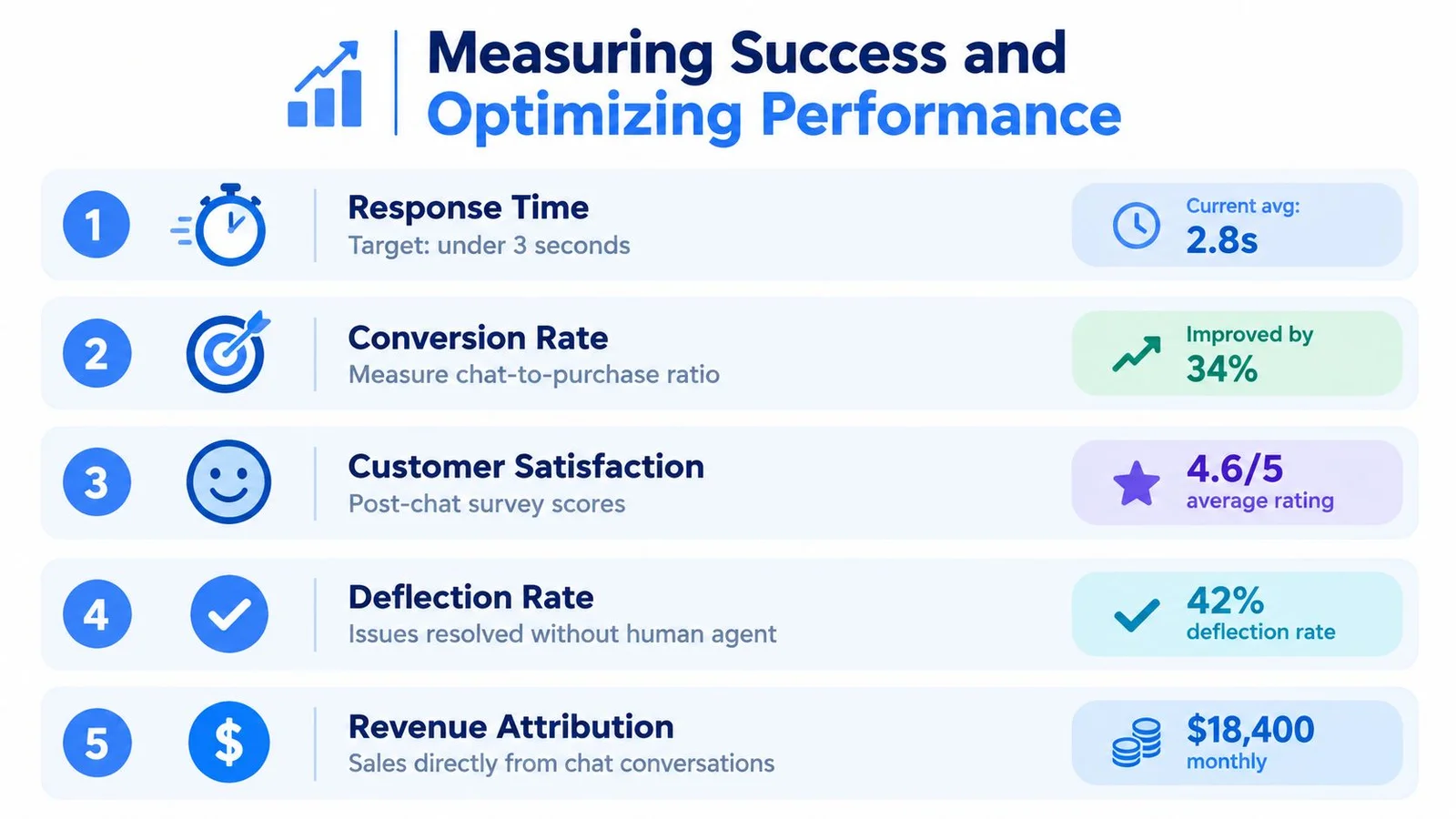
A chat widget can produce impressive engagement numbers while damaging trust. Someone may open it because the launcher is intrusive, click a suggested prompt out of curiosity, and leave after receiving an irrelevant answer. Measure the complete journey from interaction to useful resolution and business action.
Gartner's customer-service research found that 85% of 187 surveyed service and support leaders said they would explore or pilot a customer-facing conversational generative-AI solution during 2025. The same research reported 44% exploring customer-facing generative-AI voicebots, 11% piloting them, and 5% having deployed them. It also found that 61% had a backlog of knowledge-base articles requiring edits, while more than one-third lacked a formal process for revising outdated articles. (Gartner's customer-service adoption findings)
That combination points to a practical optimization loop: improve the content before blaming the model. Review unanswered questions, update the source material, adjust guardrails, and test the revised experience against the original intent. To tie the loop to revenue, track your live chat conversion rate next to answer quality.
Measure four layers of performance
1. Interface responsiveness
Track INP with real-user data over a 28-day window, segmenting results by mobile device, browser, and page template, as recommended in Google's guidance. The metric captures the delay between an interaction and the next rendered frame, not the model's server response time. A visible submitted message or loading state can reassure the visitor while the answer arrives asynchronously.
2. Answer reliability
Review the rate of unanswered questions, unsupported claims, incorrect answers, and unnecessary escalations. Create a sample of conversations for human review. Categorize each failure by source problem, prompt problem, interface problem, or missing policy.
3. Trust and inclusion
Track disclosure comprehension, opt-out use, handoff completion, accessibility defects, and whether visitors can move through the entire experience without a mouse. Aggregate conversion can hide failures affecting keyboard users, screen-reader users, mobile visitors, or people who need more time to read and respond.
4. Business movement
Connect conversations to the action the page is designed to produce. For a product page, that may be a trial or demo request. For a course, it may be enrollment. For a webinar, it may be registration. On webinar replays, FOMOchat's timeline sync keeps the chat tied to the moment in the video, so questions come up right when the offer does. Compare assisted journeys with comparable non-chat journeys, but don't treat correlation as proof that the widget caused the outcome.
Use a disciplined review cycle
Build a weekly or monthly review around questions, not vanity metrics:
- What did visitors ask? Add recurring topics to the knowledge base or page copy.
- Where did the assistant hesitate? Improve source content, confidence rules, or escalation prompts.
- Which answers created doubt? Rewrite vague claims and expose relevant limitations.
- Where did accessibility fail? Re-test focus order, live regions, contrast, zoom, and mobile positioning.
- Did the widget help the page's job? Compare qualified actions, not just opens and messages.
Practical rule: If a visitor cannot tell whether the response is AI-generated, where the information came from, or how to reach a person, the widget is not ready for conversion traffic.
The final checklist is straightforward:
- Content: Approved, current, page-relevant source material.
- Controls: Explicit claims, uncertainty behavior, privacy boundaries, and escalation rules.
- Experience: Fast visual feedback, restrained prompts, and a readable mobile layout.
- Accessibility: Keyboard operation, focus management, semantic labels, selective announcements, and visible controls.
- Measurement: Answer quality, trust signals, inclusion, business actions, and real-user responsiveness.
- Governance: A named owner who reviews conversations and updates the knowledge base.
Treat the AI chat widget as a living part of the buying experience. Its value grows when your team learns from real questions and removes the reasons visitors hesitate. Its risk grows when nobody owns the answers.
FOMOchat combines an AI company representative trained on your website content with interactive group chats for products, launches, courses, and webinars. Visit FOMOchat to configure the context, guardrails, branding, and embed experience before putting a trust-focused chat widget in front of your visitors.