
You spent two weeks filling the registration page. The ads ran, the confirmation email went out, and the form looked tidy. Then the webinar starts and the attendee list is much shorter than the registrant list. Someone asks for the webinar conversion rate, and you hear three answers: signups, show-ups, and sales.
That mismatch is the whole problem. Webinar conversion rate is not one percentage you can paste into a forecast. It is a chain of stages, and people step off at different points, the way passengers leave a train at different stations. A reminder can fill the live room and still leave the offer untouched.
Name the numerator and the denominator every time you share a figure. Attendees divided by valid registrants is a different claim from buyers divided by attendees. Replay viewers belong on their own line, or a quiet live room will look full.
If you're planning the bigger program around these numbers, our webinar marketing strategy guide covers the promotion side. This one sticks to the math.
Webinar Conversion Rate Formulas and Benchmarks
Treat each stage as its own ratio. The people who completed the action sit on top. The people who had a chance to take that action sit on the bottom. If you skip the formula, a teammate will treat an attendance rate as a purchase rate.
The same discipline shows up in conversion rate optimization explained simply. A page test only means something when the denominator matches the action you care about. A webinar funnel works the same way.
Recent platform datasets put live attendance near half of registrants, with a higher share once on-demand viewing is included. Presengage's summary of webinar statistics notes that Livestorm analyzed 33,786 webinar sessions from 3,199 organizations during 2025 and reported a 47.7% average live show-up rate, down from 48.9% in 2024. Separate 2025 ON24 reporting cited a 60% registration-to-attendee rate when live and on-demand viewers were combined.
Qualified-lead rates sit much lower, and they split by how someone watched. Visionary Marketing's 2026 webinar statistics report a median 14.7% registrant-to-MQL rate within 90 days, a 38.2% live-attendee-to-MQL rate, and a 9.6% replay-viewer-to-MQL rate. The same benchmark found that same-day follow-up can produce SQL-conversion rates 2–4 times higher than waiting three to five days.
Reference values by stage
| Funnel stage | Formula | Reference value |
|---|---|---|
| Landing-page visitors to registrants | registrants ÷ landing-page visitors | No reliable public benchmark; measure your own baseline |
| Registrants to live attendees | live attendees ÷ registrants | 33% (B2B average, 2024) to 47.7% (2025) |
| Registrants to any viewing | live and replay viewers ÷ registrants | 60% (ON24, 2025) |
| Registrants to MQLs within 90 days | MQLs ÷ registrants | 14.7% median |
| Live attendees to MQLs | MQLs ÷ live attendees | 38.2% |
| Replay viewers to MQLs | MQLs ÷ replay viewers | 9.6% |
| Attendees to buyers | buyers ÷ attendees | No reliable public figure; track buyers ÷ attendees on your own offers |
A live show-up in the high 40s is an ordinary mixed-audience result, not proof that the promotion failed. Compare a number only with the same stage on a similar webinar. A cold product demo and an internal training session do not share a target.
Practical rule: Write the formula beside every number you publish, so a 60% any-viewing figure is never read as a purchase rate.
How to Calculate Each Stage Without Mixing Numbers
Pick one stage and finish it before you touch the next. Mixing page visits into an attendance rate, or replay viewers into a live-room rate, is how clean funnels turn into arguments.
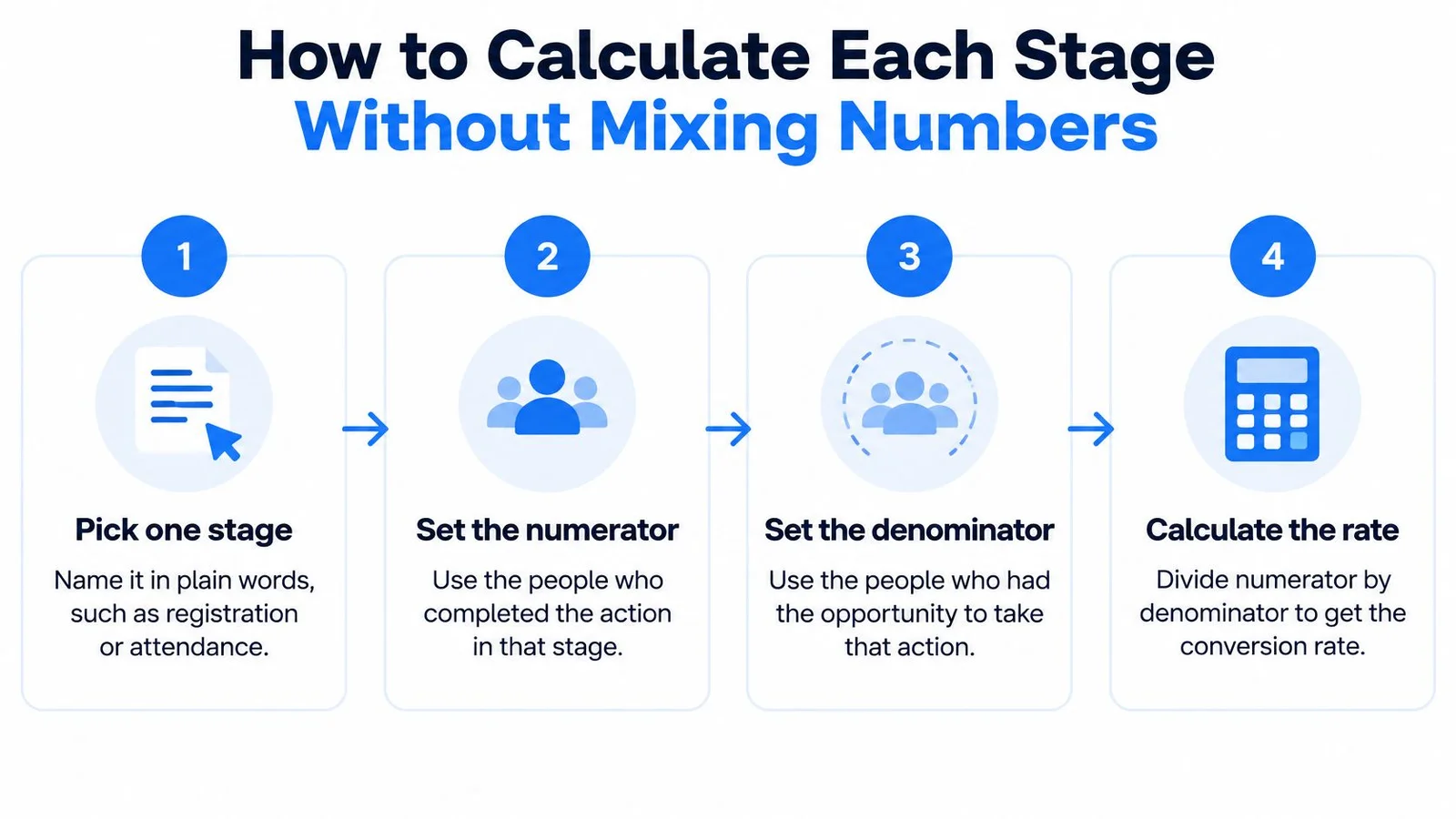
- Name the stage in plain words. Say registration, live attendance, or purchase. If the name needs a footnote, you are about to blend two stages.
- Set the numerator. Count only people who completed that action. A buyer is someone who paid, not someone who clicked the offer.
- Set the denominator. Count people who reached the previous stage, once each. Live attendance uses valid registrants, not every page hit.
- Set the time window. Live attendance usually closes on the session day. Marketing-qualified leads often need a 90-day window, because the sales conversation continues after the room empties.
- Decide on replays, then label the result. Write live only or any viewing. A replay viewer who watches on Thursday is not a Wednesday attendee.
- Split traffic sources. Paid ads, email, and partner lists bring different intent. One blended rate hides which source showed up.
- Write the formula in the report. A usable label looks like this: attendees ÷ valid registrants, live only, paid traffic.
The usual slip is a fat denominator. Total page visits include bots, teammates, and people who bounced in two seconds. Duplicate registrations from the same email do the same damage from the other direction. Deduplicate before you divide.
A clean worked example
Say the page had 200 visitors and 50 registrants. Registration is 50 ÷ 200, or 25%. Those 50 registrants produced 20 live attendees, so attendance is 20 ÷ 50, or 40%. Four of those attendees bought, so buyer conversion is 4 ÷ 20, or 20%. None of those three rates is "the" webinar conversion rate.
A clean report is one row per stage. Each row carries the formula, the time window, and the traffic source. If a row is missing one of those three, leave it out of the forecast.
Where Webinar Funnels Leak and How to Spot Each Leak
A leak is a stage whose drop-off is much worse than the reference value for that stage. The fix depends on where the leak sits. Changing the slides will not help if the calendar invite never went out.
Attendance is the leak teams feel first. Orrjo's webinar pipeline calculator notes that Goldcast reported a 33% average webinar attendance rate in 2024 across B2B webinars. At that rate, about two registrants in three never join live. Check reminder timing, time-zone coverage, and whether a calendar invite landed.
Fix reminders before slides. The longer checklist lives in our webinar best practices guide.
Leaks in the order a viewer hits them
The pitch leak shows up inside the session, not in the registration file. Attendance by minute falls before the offer appears. People heard the lesson and left. Move the offer earlier, and put a short proof moment next to it, such as one customer result on screen while you state the price. A bit of honest urgency helps too, as long as the deadline is real.
The CTA leak is quieter. Viewers stay until the end and do not click. The offer was vague, or you mentioned it once while someone was typing a question. Say the specific thing they get, and repeat the button at the close.
The replay leak happens on a different page. Someone finishes the recording and never reaches the sales page. The replay needs its own button, the chat transcript, and visible proof. A recording with no next step is a library item, not a funnel stage.
| Leak point | Warning sign | First fix |
|---|---|---|
| Landing page | Low visitor-to-registrant rate, high bounce | Rewrite the headline around the outcome and cut form fields |
| Reminders | Many registrants, low live attendance | Send reminders 24 hours and 1 hour before, with a calendar invite |
| Time zones | Attendance drops for one region | Offer a second session time for that region |
| Pitch | Attendance falls before the offer | Move the offer earlier and add a short live proof moment |
| CTA | Viewers stay but do not click | Make the offer specific and repeat the CTA at the end |
| Replay page | Viewers finish but do not reach sales | Add a clear CTA, the chat transcript, and visible proof |
Read the stage numbers before you change anything. SourceLoop's funnel analysis walkthrough is a practical way to see which step is thin. If reminders are the weak row, a new headline will not fill the room. A fuller look at funnel conversion rates helps you keep each stage's math separate while you test.
Check the leaking stage first. A fix on the wrong step spends a full promotion cycle and teaches you nothing.
Improving Registration Pages and Signup Flow
The registration page should sell the outcome, not the topic label. See how three SaaS teams cut churn in 30 minutes beats Webinar on retention. The first line tells a visitor what they leave with, plus the date shape of the commitment. The second line could be anything. Our roundup of webinar landing page examples shows how other hosts pull this off.
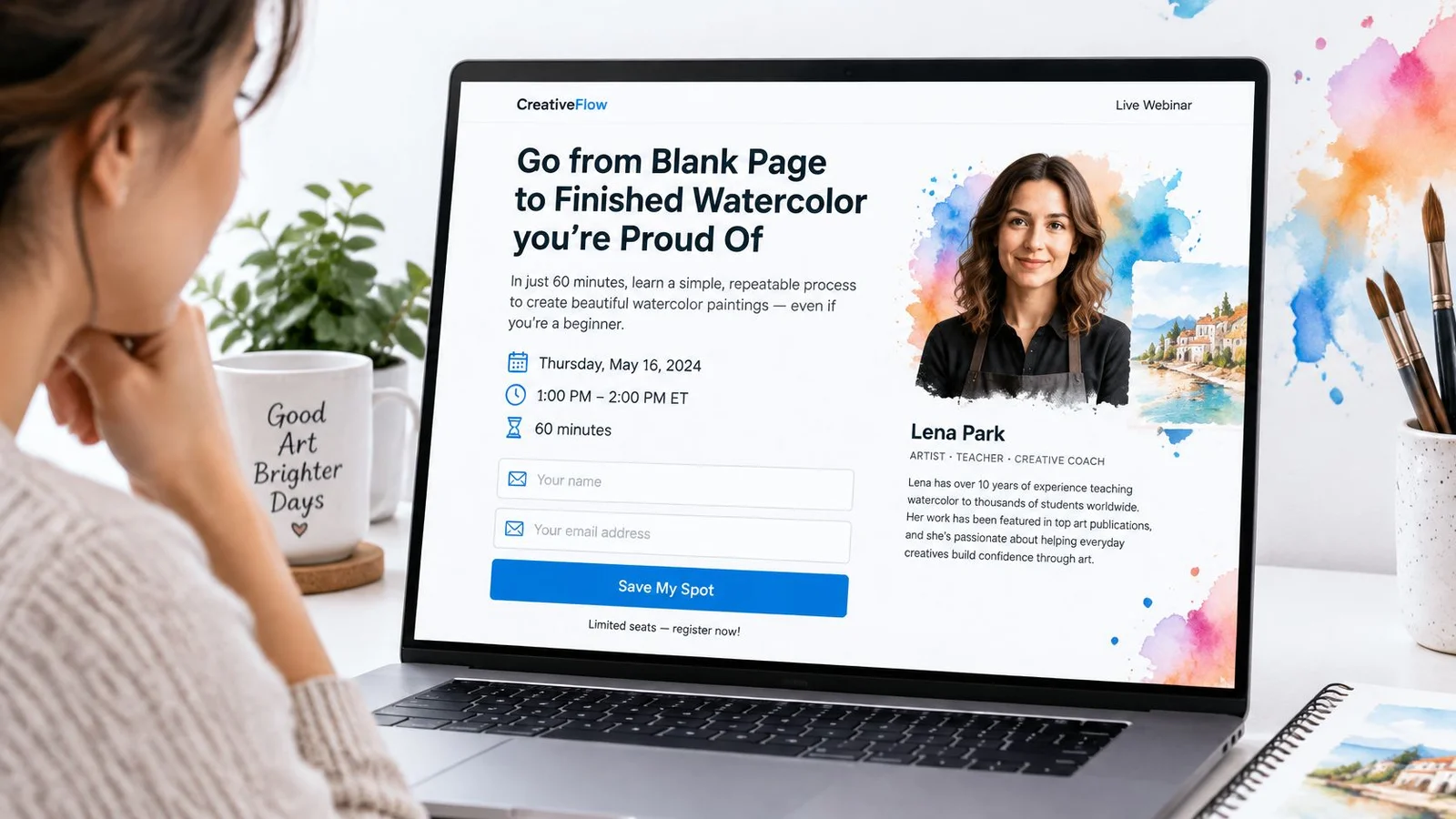
Copy, form, then proof
Name the date, the time with a time zone, and the length in the first screen. Show who is speaking and why their experience matters. A title without a person reads like a brochure.
Keep the form to what you need to send the link. Name and email are enough for most sessions. Extra fields feel like a survey, and surveys lose people who were ready to register. Put an add-to-calendar button on the confirmation page so the session lands in their week before the tab closes.
Proof belongs next to the form, not in a footer. Show how many people have already registered, and add one short quote from a past attendee about what they used the next day. For paid seats, choosing a secure checkout system matters as much as the headline, because a clumsy payment step undoes a strong page. The same page habits show up in landing page optimization best practices.
Answer the questions that stall a signup
Collect the five questions your sales team hears most. Is it free? Is it recorded? How long is it? Do I need to install anything? Will there be a pitch? Answer each one on the page in a sentence.
A chat widget with an AI representative trained on that page can answer the same questions while the visitor is still looking. They do not leave to search, and they see that other people asked the same thing. That is support and proof in one place.
That's the idea behind FOMOchat on a registration page: a real conversation instead of a notification popup flashing signup counts. If you're curious why peer questions persuade better than a ticker, our piece on social proof psychology walks through it.
This short walkthrough shows how a registration page frames the promise before the form:
Change one element at a time. Measure visitor-to-registrant for each version, on the same traffic source. If you rewrite the headline and cut two fields in the same week, you will not know which change filled the list.
Keeping Attendees Engaged During the Live Session
People who ask a question or answer a poll are easier to follow up with, and they are more likely to click the offer. Passive viewers can like the lesson and still do nothing. Engagement is how you tell those two groups apart.
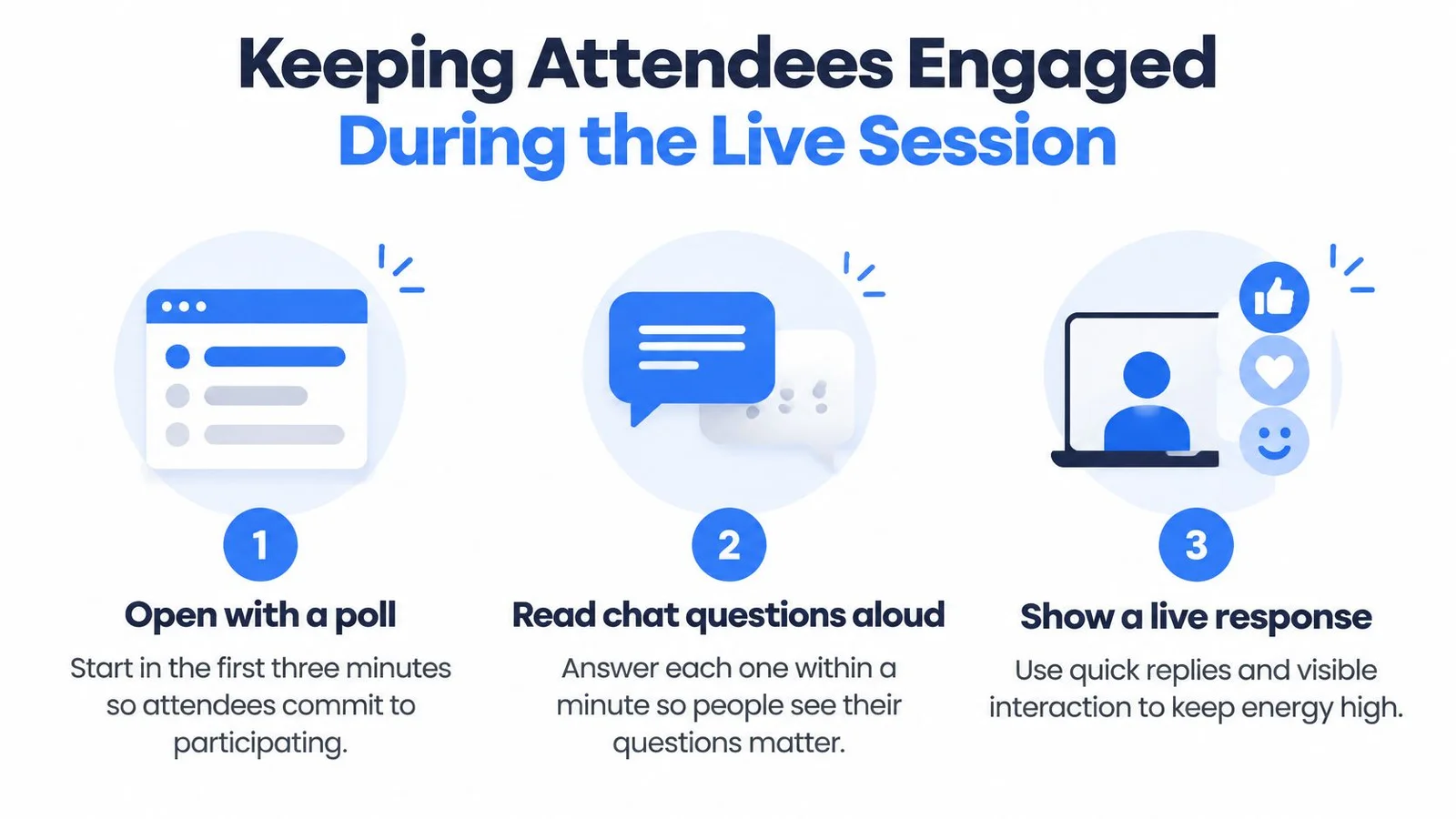
- Open with a poll in the first three minutes. Ask one question they can answer without thinking, such as which CRM they use. The click is a small commitment to stay.
- Read each chat question aloud and answer it within a minute. Say the person's name. The rest of the room sees that typing is worth it. More on audience participation if you want prompts that fit a teaching block.
- Show a running question count. A visible tally tells a quiet attendee that other people are asking too. Curiosity spreads faster when it is public. Some webinar engagement tools handle this out of the box.
- Place the offer before the midpoint, then repeat it at the end. Waiting until the last five minutes means the people who had to drop for another meeting never hear it.
- Let a few realistic chat questions carry the objections. You do not need a second pitch. You need a peer saying the awkward part out loud, then a straight answer.
Say it is minute 20 of a pricing webinar. Someone asks whether the product works with a common CRM. You answer with the exact connection steps. A peer adds that they connected it in an afternoon. The doubt is handled in the order it appeared, and the offer you already stated still has a reason to be clicked.
If attendance falls sharply before the offer, move the offer earlier next time. Adding more slides gives leavers more reasons to leave.
Turning Replay Viewers and Attendees Into Pipeline
Replay viewers are part of the audience, not a footnote. Digital Applied's 2026 attendance write-up reports that ON24 found 60% of webinar registrants became attendees in 2025 when live and on-demand viewers were included.
They usually convert at a lower rate than people who sat through the live pitch, so the replay page needs its own CTA, the chat transcript, and visible proof. Send the recording within a day. Keep replay buyers in their own report row so they do not inflate the live room.
This is a big part of why we built FOMOchat the way we did. Conversations from the live session can replay on the recording's timeline, so someone watching on Thursday still sees the questions Wednesday's crowd asked. Our guide to webinar chat covers how that works on a replay page.
Four groups, four notes
Send a same-day message that answers the question that person asked. Waiting several days cools the intent you just earned.
- Full session: Recap the offer and the one result you showed on screen.
- Asked a question: Answer that question in the first line, then link the relevant page.
- Clicked the CTA: Skip the recap. Send the next step, such as a calendar link.
- Partial replay: Point them at the minutes they missed, plus the offer, without pretending they attended live.
A viewer who watched most of the replay and asked about pricing gets a pricing-page link and an offer to book a call. A generic thank-you email wastes that signal. Templates for each note live in this webinar follow-up email template.
Count no-shows as registrants minus live attendees, not as lost demand. Livestorm's 2026 benchmark report recorded 92 no-shows for an average of 175 registrations in 2025, and other benchmark reporting found that 45% of attendees watched on demand. Mark Studios' webinar statistics put on-demand conversion near 9.5% in a separate B2B set. Forecast the live room with live attendees ÷ registrants. Use live plus on-demand ÷ registrants only for total reach.
Your operational target is the share of registrants who become engaged attendees and get a relevant note within 72 hours.
Choose the Forecast Number and Test One Stage
Use three forecast lines. Never one blended webinar conversion rate.
- Registration. Use your own visitor-to-registrant baseline. No public benchmark is reliable enough to borrow.
- Live room size. Multiply registrants by a live show-up near 48% for a mixed audience, nearer 33% for B2B programs, or about 40% inside the older 35%–45% band. A 2017 ON24 EMEA benchmark reported 40% registrant-to-attendee conversion and called 35%–45% a strong historical range. Training and internal sessions usually land higher than marketing ones. Do not put the 60% any-viewing figure into a live-room forecast.
- Pipeline. Registrants times 14.7% estimates 90-day MQLs. Live attendees times 38.2% fits people who showed up. Replay viewers times 9.6%.
Run one change on the weakest line for a full cycle. Hold traffic source, offer, and length constant. Judge that stage's rate and revenue per registrant.
A chat layer belongs only on the stage you are testing, registration questions or live objections, not as a blanket fix. Setup takes about 5 minutes. You enter the website URL, let the AI analyze it, generate a conversation, and paste the code. Copy the snippet onto the page and the chat is live in under 5 minutes. You can also book a demo if you want to see the flow on a webinar page first.
FOMOchat is an on-page chat that pairs an AI representative trained on your site with visible group questions, so webinar visitors get answers while they see other people raising the same objections. You can sync those conversations to a live or replay timeline and test them on one funnel stage at a time. Visit FOMOchat to set it up on your registration page or session.