

If you want to improve your ecommerce conversion rate, you need a solid game plan. It’s all about a systematic process: first, you figure out where the friction is, then you roll out changes backed by actual data, and finally, you test everything relentlessly. The whole point is to understand why people are leaving without buying and then tear down those barriers, one by one, to build a smoother and more trustworthy path to purchase.
Establishing Your Baseline Conversion Rate
Before you can start making improvements, you need to know exactly where you stand. Trying to boost sales without a clear baseline is like driving blindfolded. You might be moving, but you have no clue if it's in the right direction. This first phase is all about building your diagnostic dashboard and looking past that single conversion rate percentage to see the real story your data is telling.
Your main metric, of course, is your overall ecommerce conversion rate: the total number of sales divided by the total number of visitors. But that number alone doesn't tell you much. The real magic happens when you start digging into the smaller steps (the micro-conversions) that lead up to a final purchase.
Key Metrics for Your Diagnostic Dashboard
To get the full picture, you'll want to track several key performance indicators (KPIs) that map directly to your sales funnel. Think of these metrics as your early warning system, flagging the specific spots where potential customers are getting stuck or just giving up.
I always recommend starting with these essentials in a tool like Google Analytics 4:
- Add-to-Cart Rate: This tells you the percentage of visitors who add at least one item to their cart. If this number is low, it’s a strong hint that something’s off with your product pages, pricing, or calls-to-action.
- Cart Abandonment Rate: This is a big one. It measures how many people add products to their cart but bail before paying. High abandonment often points to surprise shipping costs, a clunky checkout process, or a lack of trust signals.
- Checkout Completion Rate: This is the percentage of users who start the checkout and actually finish it. A steep drop-off here is a major red flag, often signaling technical bugs or serious friction in your payment and shipping forms.
To make this easier to digest, here's a quick look at the most critical metrics you should be tracking from day one.
Key Ecommerce CRO Metrics to Track
This table summarizes the essential metrics for diagnosing your conversion funnel and what each one tells you about user behavior.
| Metric | What It Measures | Why It Matters |
|---|---|---|
| Overall Conversion Rate | The percentage of site visitors who complete a purchase. | Your top-level success metric, but it lacks detail. |
| Add-to-Cart Rate | The percentage of visitors who add an item to their shopping cart. | Indicates if your product pages and pricing are persuasive. |
| Cart Abandonment Rate | The percentage of shoppers who add items to a cart but don't buy. | Highlights issues in the final stages, like shipping costs or checkout friction. |
| Checkout Completion Rate | The percentage of users who start the checkout process and complete it. | Pinpoints specific problems within the checkout flow itself (e.g., forms, payment options). |
| Average Order Value (AOV) | The average amount spent each time a customer places an order. | Helps you understand purchase behavior and opportunities for upselling. |
| Bounce Rate | The percentage of visitors who leave after viewing only one page. | Signals a disconnect between your ads/messaging and the landing page experience. |
Tracking these numbers gives you a much clearer map of where your biggest opportunities are hiding.
Understanding the Device Disparity
It’s also absolutely critical to segment your data by device. The global average e-commerce conversion rate hovers somewhere around 2-4%, but there's a huge gap between how people behave on different screens.
Desktop conversions average around a respectable 4.8%, but mobile conversions are stuck at just 2.9%. This is a massive problem when you realize mobile traffic now accounts for 73% of all ecommerce visits. The gap points to a huge opportunity. To make matters worse, mobile cart abandonment is a staggering 77.2%. You can learn more about these e-commerce benchmarks and how they should shape your strategy.
This infographic really drives home the disconnect between where users are browsing and where they're actually buying.
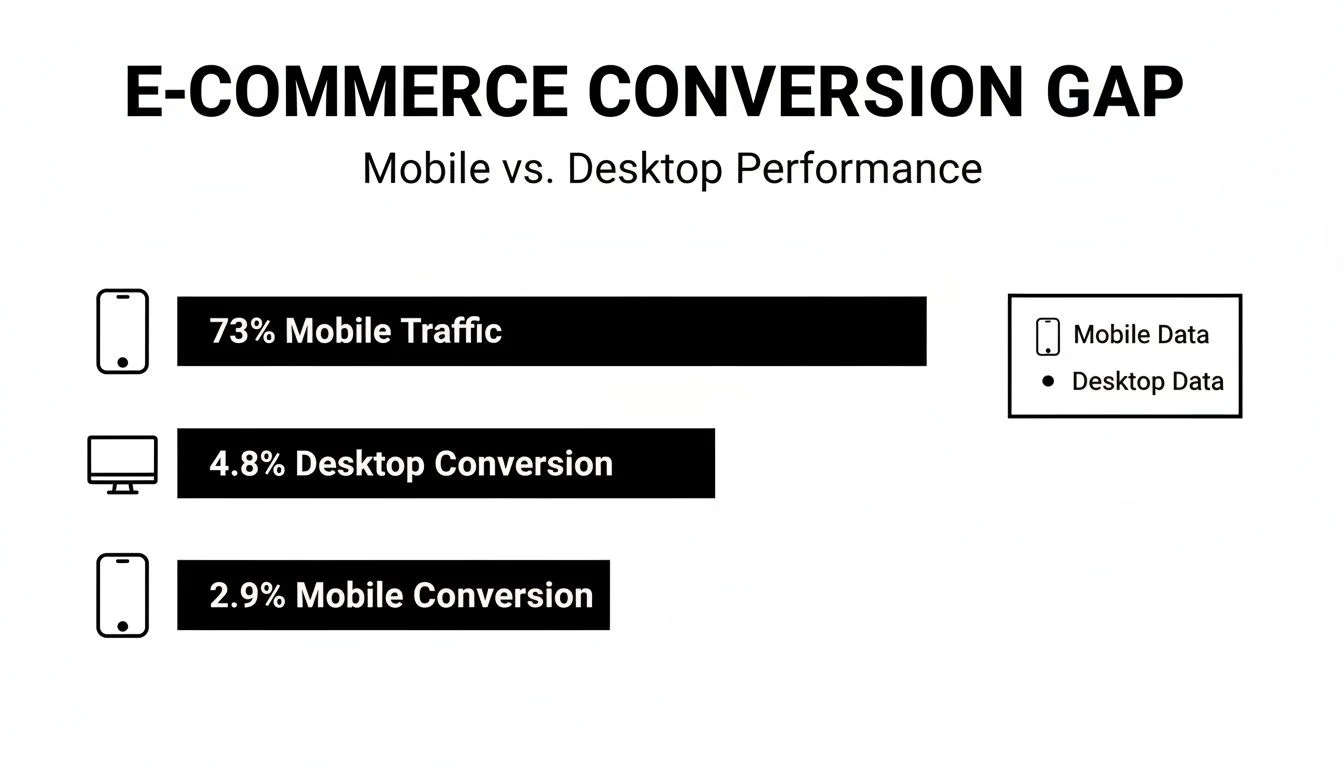
The data tells a clear story: most customers are shopping on their phones, but they're far more likely to pull the trigger on a desktop. This is a classic sign of friction in the mobile experience.
Key Takeaway: A low overall conversion rate is just a symptom, not the disease. The real diagnosis comes from analyzing each stage of your funnel, from adding an item to the cart to finalizing the payment, to find the exact source of the friction.
By establishing this detailed baseline, you create a solid foundation. Every optimization idea, A/B test, and design tweak you make from here on out can be measured against these initial numbers, so you know for sure if your efforts are actually moving the needle.
Finding and Fixing Leaks in Your Sales Funnel
Alright, you’ve got your baseline numbers. Now for the fun part: playing detective. The data tells you what's happening (e.g., a terrifyingly high cart abandonment rate), but it almost never tells you why. This is where we go hunting for the leaks in your funnel, those specific drop-off points where you’re losing money.
Your first move should be to segment your audience inside your analytics platform. Looking at sitewide averages is a rookie mistake; they hide the real story. The gold is in comparing different user groups.
For example, do first-time visitors bail on their carts way more often than returning customers? That’s a classic sign of a trust issue. Your regulars already know you're legit, but new folks might be getting spooked by a lack of security badges or a clunky payment form.
Digging into these segments helps you form solid hypotheses. Is your paid traffic from Instagram bouncing right away while organic search visitors browse for minutes? Maybe your ad creative is writing checks that your landing page can't cash. This is how you turn a vague problem like "high bounce rate" into a specific, solvable question.
Going Beyond the Numbers with Qualitative Insights
Analytics data is critical, but it’s only half the story. To truly get the "why" behind the clicks, you need to add some qualitative analysis into the mix. This is where you get to see your site through your customers' eyes and feel their pain.
Two of the best tools I've ever used for this are session recordings and heatmaps. They beautifully bridge the gap between cold, hard data and real human experience.
- Session Recordings: Think of these as a screen recording of a user's entire visit. You see every mouse movement, every hesitation, and every frustrated "rage-click" when something doesn't work. I promise, watching just a few of these will be one of the most eye-opening (and sometimes cringey) things you'll ever do.
- Heatmaps: These tools overlay your pages with a visual map of where people are clicking, moving their mouse, and scrolling. They immediately show you which buttons are hot and which critical calls-to-action are being completely ignored.
A heatmap might reveal that dozens of people are clicking on a beautiful lifestyle image, expecting it to be a link. That’s a dead-simple fix for user frustration that can instantly improve your ecommerce conversion rate.
Connecting Data to Real-World Problems
The goal here is to connect the dots. You're looking for patterns that scream "friction!" Maybe you spot a massive drop-off on your shipping page in Google Analytics.
So, you fire up a few session recordings for users who left at that exact step. You watch them try to enter a coupon code that fails, or you see their mouse hovering back and forth between two confusingly-worded shipping options.
Just like that, the abstract "checkout abandonment" problem has a name: your coupon system is buggy, or your shipping tiers are a mess.
Expert Tip: Don't just hunt for the bad stuff. Look for what’s working unusually well. If traffic from a specific blog post converts at 3x the site average, you need to understand why. You might've stumbled upon a winning formula you can replicate across the entire site.
By combining the what from analytics with the why from tools like Hotjar or Crazy Egg, you can build a prioritized hit list. This isn't just a random to-do list; it's a data-backed roadmap to making more money. You'll know exactly what your biggest conversion blockers are: whether it's a technical glitch, a confusing menu, or a checkout form that feels like an interrogation.
Build Trust with Social Proof and Clear Messaging
Trust is the invisible currency of ecommerce. It doesn't matter how amazing your product is; a skeptical visitor won't even think about clicking "buy." If you want to move the needle on your conversion rate, you have to build a powerful sense of confidence and credibility from the moment someone lands on your site.
This goes way beyond just slapping a few star ratings on a product. It’s really about tapping into the psychological triggers that make people feel safe and assured. When a potential customer sees that other people have already bought from you (and loved the experience), that hesitation just starts to melt away. This is the power of social proof, and it's one of the most effective levers you can pull.
Go Beyond Basic Star Ratings
Let's be honest, standard five-star reviews are just table stakes now. Customers don't just want to see them; they expect to see them. To actually stand out, you need to showcase more authentic and compelling forms of social proof that tell a real story.
Think about weaving these into your pages:
- Detailed Testimonials with Photos: A quote paired with a real person's name and photo is instantly more believable than an anonymous review. Take it a step further by adding a headline that sums up the main benefit they got from your product.
- User-Generated Content (UGC): Get your customers to share photos or videos of them using your product on social media with a unique hashtag. Displaying this UGC on your product pages is gold because it shows your product in real-world scenarios, not just sterile, professional shots.
- "As Seen In" Logos: If your product has been featured by reputable media outlets or industry blogs, show off those logos. This lets you borrow credibility from established brands, giving new visitors an immediate sense of your authority.
Create a Live, Buzzing Atmosphere with AI
Static social proof is great, but dynamic social proof can make a real difference. Picture a visitor landing on a sales page and seeing what looks like a live, active chat where other people are asking questions, getting answers, and even making purchases. This creates a powerful sense of FOMO (Fear Of Missing Out) and community.
This is where AI-driven tools can make a huge impact. For example, a tool like FOMOchat can simulate this buzzing, trustworthy environment right on your page, making it feel alive.
What you're seeing here is a simulated chat on a webpage where potential buyers see others interacting. This creates a sense of shared interest and makes your site feel like a busy, trusted marketplace instead of a quiet, empty store.
From what I've seen, businesses that really nail this see their conversion rates jump. Some platforms have reported conversion lifts from 5.3x up to 40x just by building this kind of instant trust. It's especially potent for launches and webinars, where deploying AI-powered chats that simulate live engagement can increase CVR by 15-30%. Why? Because prospects are literally witnessing their peers convert in real-time.
Key Takeaway: The goal of social proof isn't just to show that people have bought from you. It's to make new visitors feel like they're joining an active, intelligent group of buyers who are making a smart decision right now.
Use Microcopy to Crush Objections
Every visitor shows up with a list of unspoken questions and potential objections running through their head. "Is shipping free?" "What if I need to return this?" "Is my payment info secure?" Your job is to answer these questions before they even fully form them.
This is where microcopy comes in.
Microcopy is all about those small, targeted bits of text that guide users and answer questions at critical moments.
- On the Cart Button: Instead of just "Add to Cart," try "Add to Cart – Free Shipping on Orders $50+."
- At Checkout: Place a small lock icon and the text "Secure 256-bit SSL Encrypted Checkout" right next to the credit card fields.
- Below the Price: Add a reassuring line like "60-Day Money-Back Guarantee" to reduce purchase anxiety.
This proactive approach turns your copy into a silent salesperson, addressing concerns and building confidence with every word. It's a subtle but incredibly effective way to keep users moving smoothly toward the finish line. You can learn more about how to use educational social proof to build trust in our article on Proof alternatives.
When you combine authentic social proof with clear, reassuring messaging, you create an environment where trust is a given. That makes the decision to buy feel natural and easy.
Optimizing Product Pages and Checkout for More Sales

This is where the magic happens, or it doesn't. Your product page and checkout process are the final, critical steps where a browser becomes a buyer. The smallest bit of friction here can unravel all your hard work, sending potential customers bouncing away for good. The name of the game is ruthless simplification. You want the path to purchase to feel so seamless that clicking "buy" is the only logical next step.
Your product page is your best salesperson. It has to do more than just list specs; it needs to sell an experience. Since customers can't physically touch your product, your visuals have to do all the heavy lifting. We're talking high-resolution photos from every conceivable angle, 360-degree views, and quick videos showing the product in action. These aren't just nice-to-haves anymore; they're essential.
Then there’s your product description. Ditch the dry, technical jargon and focus on benefit-driven copy. Instead of saying a power bank has a “10,000 mAh battery,” try “Power through your entire day and then some without looking for an outlet.” Frame every feature in terms of how it makes the customer's life better.
Crafting a Frictionless Product Page Experience
A truly effective product page does two things at once: it builds desire while systematically eliminating doubt. It’s a delicate balancing act, but when you get it right, the results speak for themselves.
Here’s how to nail that balance:
- Crystal-Clear Pricing: No one likes a last-minute surprise. Show the full price upfront. If you have different tiers or options, make them incredibly easy to compare. Any hint of ambiguity is a major red flag for a cautious shopper.
- Visible Shipping Information: Don't hide shipping costs until the final step. That’s a classic conversion killer. Let people see estimated shipping times and costs right on the product page, even if it's with a simple zip code estimator.
- A Strong, Obvious CTA: Your "Add to Cart" or "Buy Now" button should be impossible to miss. Use a bold, contrasting color that pops off the page, and keep the text direct and urgent.
Getting these fundamentals right creates a sense of trust and transparency, giving users the confidence they need to move forward.
Ruthlessly Streamlining Your Checkout Flow
The moment an item hits the cart, the clock is ticking. The data doesn't lie: unexpected costs and clunky checkout forms are the top reasons people abandon their carts. Your mission is to make this final stage as quick and painless as possible.
One of the biggest wins? Offering a guest checkout. Forcing someone to create an account before they can give you their money is one of the most reliable ways to tank your conversion rate. In fact, nearly 25% of shoppers will ditch a purchase if they have to create an account first. Let them buy now, and then offer to save their details for next time after the sale is complete.
Key Insight: Treat every single form field as a potential obstacle. For each one, ask yourself: "Do I absolutely, positively need this information to fulfill this order?" If not, cut it.
Your goal is to reduce the mental effort required at every turn. Use address auto-complete to save keystrokes and ensure your forms are mobile-friendly with big, tappable fields. If you're looking for even more high-impact ideas, dive into these powerful conversion rate optimization strategies.
The table below breaks down the most common checkout headaches I see and the straightforward fixes that get results.
High-Impact Checkout Optimization Tactics
This table identifies common friction points that kill conversions during checkout and provides simple, actionable solutions to fix them.
| Friction Point | Why It Hurts Conversions | How to Fix It |
|---|---|---|
| Forced Account Creation | Creates a significant barrier for new customers who just want to buy quickly. | Offer a prominent guest checkout option. |
| Surprise Shipping Costs | The number one reason for cart abandonment; it breaks trust at the last second. | Display shipping costs upfront on the product page or in the cart. |
| Long, Complex Forms | Overwhelms users and makes the process feel like a chore, especially on mobile. | Remove all non-essential fields. Use auto-fill and single-column layouts. |
| Limited Payment Options | Customers have strong preferences; not offering their choice can be a dealbreaker. | Integrate digital wallets like Apple Pay, Google Pay, and PayPal. |
By tackling these common issues, you remove the final roadblocks standing between your customer and a completed purchase, directly boosting your bottom line.
Running A/B Tests That Drive Real Growth
Real, sustainable growth in e-commerce doesn’t come from gut feelings or chasing the latest design trend. It’s built on a foundation of methodical, data-backed experimentation. Once you’ve used analytics and user research to find the leaks in your sales funnel, A/B testing is how you systematically start plugging them.
This is what turns your optimization efforts from a high-stakes guessing game into a repeatable science.
It all starts with a strong hypothesis. And no, a hypothesis isn't just a random idea; it's an educated, testable statement built on the user behavior data you've already collected. A solid hypothesis always has a clear structure: "If I change [X], then [Y] will happen, because [Z]."
For instance, a weak hypothesis is just "Changing the CTA button color will get more clicks." A much stronger, data-informed version would be: "If we change the 'Add to Cart' button color from grey to a high-contrast orange, the add-to-cart rate will increase, because our heatmaps show the current button is blending into the page background and getting missed." See the difference?
Setting Up Your Experiment for Success
With a solid hypothesis ready, it's time to get practical. The golden rule of A/B testing is to isolate a single variable. You’ll show the original version of your page (the control) to one group of visitors and the modified version (the variation) to another.
It’s always tempting to change the headline, the main image, and the button copy all at once. Resist this urge. If conversions suddenly jump, you have absolutely no idea which change actually worked. True testing discipline means changing one thing at a time. That's the only way to know for sure what's driving the results.
Next, you need to figure out your sample size and how long to run the test. Running an experiment for just a day or two is a recipe for disaster, as you'll get skewed results from daily traffic fluctuations. You should let a test run for at least one full business cycle, usually one to two weeks, to capture a realistic mix of user behavior.
Key Takeaway: Whatever you do, don't stop a test early just because one version is pulling ahead. You need to reach statistical significance. Use a free online A/B test calculator before you start to figure out how much traffic each variation needs to hit a 95% confidence level.
Interpreting Results and Learning from Failure
Once your test has run its course and reached statistical significance, it's time to dig into the data. The outcome will always fall into one of three buckets:
- A Clear Winner: The variation crushed the control. Fantastic! Implement the change across your site and, most importantly, document what you learned for the next test.
- A Clear Loser: The variation performed significantly worse. This is still a win! You've just discovered what your audience doesn't respond to, which is incredibly valuable intel.
- Inconclusive: There was no statistically meaningful difference between the two. This usually means the change you tested wasn't impactful enough to actually influence behavior.
Even a so-called "failed" test gives you powerful insights. If a new headline didn't move the needle, maybe the problem isn't the copy but the underlying value proposition. These learnings are invaluable: they feed right back into your research and help you build a much smarter hypothesis for your next experiment. For more on this, you can find extra tips on how to increase website conversion rates in our related guide.
This process creates a powerful growth loop: research behavior, form a hypothesis, run a disciplined test, and analyze the results. Whether you win or lose the individual test, you learn something that makes your next move smarter. This is the engine that drives long-term, sustainable growth in e-commerce.
Your Top CRO Questions, Answered
Diving into conversion rate optimization always brings up a few key questions. Let's tackle some of the most common ones I hear from store owners, so you can move forward with confidence.
What’s a Good Ecommerce Conversion Rate, Really?
This is the big one, but the honest answer is: it depends. People love to throw around the global average of 2-4%, but that number is almost meaningless without context. A "good" rate is completely relative to your industry, how much your products cost, who you're selling to, and where your traffic is coming from.
Instead of chasing a vague industry benchmark, focus on your own numbers. The real goal is steady, ongoing improvement. For example, if you see that your organic traffic converts at 4% while your paid social ads only convert at 1.5%, that’s a much more useful insight than comparing yourself to a global average.
Stop asking what a "good" conversion rate is. Start asking, "Is our conversion rate better today than it was last quarter?" If you're consistently dipping below 1%, that's a clear sign you have some major friction points on your site that need fixing, fast.
How Long Should I Run an A/B Test?
The right timeline for an A/B test comes down to two things: how much traffic your site gets and the level of statistical significance you need. A high-traffic store might get a reliable result in just a week. A smaller shop might need to let it run for a month or more to get enough data.
One non-negotiable rule is to run any test for at least one full business cycle, usually one or two full weeks. This is critical because it smooths out the daily fluctuations in shopping behavior (think a sleepy Monday versus a busy Saturday).
And please, don't stop a test early just because one version is pulling ahead. It's a classic rookie mistake. Before you even start, use a good A/B test calculator to figure out the sample size you need to hit 95% statistical confidence. Let the test run until you reach that number. Only then can you trust that your results are real and not just a fluke.
Where Should I Start Optimizing My Store?
When you’re just getting started, go for the low-hanging fruit. You want to make the changes that deliver the biggest impact with the least amount of effort. This gets you some quick wins and builds momentum for the bigger projects down the line.
Here are the first places I always look:
- Your Main CTAs: Are your "Add to Cart" and "Buy Now" buttons impossible to miss? They need to use clear, action-driven words and a color that pops right off the page.
- Product Page Headlines & Photos: Your images have to be crisp, clear, and show the product from every conceivable angle. The headline needs to scream the product's main benefit in a split second.
- The Checkout Funnel: This is where so many sales die. Kill any unnecessary form fields, and for the love of all that is good, offer a guest checkout.
- Site Speed: A slow website is a conversion killer, plain and simple. Use a tool like Google's PageSpeed Insights to see where the bottlenecks are and get them fixed, especially for mobile users.
How Can AI Social Proof Actually Boost Conversions?
AI-powered social proof tools are so effective because they tackle buyer hesitation head-on, right when it's happening. Think about it: static reviews are great, but a customer has to go looking for them. These new tools bring that proof of life directly into the shopping experience.
Take a tool like FOMOchat. It creates a buzzing, trustworthy atmosphere by simulating a live group chat on your product pages. When a new visitor lands and sees other people asking questions and showing interest, it instantly lowers their guard and makes the store feel more credible.
This active engagement creates a powerful sense of FOMO: the fear of missing out on a great product that others are discovering. The AI can also be trained on your site's info to answer common questions instantly, acting like a perfect sales assistant that never sleeps. By showing this authentic-feeling activity and clearing up doubts on the spot, these tools help nudge passive browsers into becoming confident buyers. The result is a real, measurable lift in sales.
Ready to see how dynamic, AI-powered social proof can lift your sales? FOMOchat turns passive visitors into confident buyers by creating a buzzing, trustworthy environment right on your page. See it in action and start your free trial today at fomochat.com.