You're getting visitors to your product page, but too many leave without buying. A countdown or signup counter seems like an obvious fix. Then comes the harder question: will it help people choose, or pressure the wrong people into a purchase they'll regret?
FOMO marketing uses the possibility of missing something valuable to encourage action. The useful version helps visitors understand a real opportunity. Judge it by conversions, but also by refunds, complaints, and whether customers stay.
FOMO Marketing Tactics at a Glance
| Format | What Visitors See | Best For | Main Risk |
|---|---|---|---|
| Social proof | Reviews, testimonials and customer logos | Product pages and trust-building | Looks generic when unverified |
| Live counters | A visible count of signups or current viewers | Launches and sign-up pages | Stale or inflated numbers erode trust |
| Scarcity | Limited seats, stock or batches | Cohort courses and limited batches | Fake limits trigger distrust |
| Countdown deadlines | A timer tied to a closing date | Launch bonuses and early-bird pricing | A timer that resets looks fake |
| Social chat | A group conversation about the offer | Webinars and product questions | Simulated replies must stay accurate |
These formats address different reasons for hesitation. A review helps someone evaluate an unfamiliar provider. A capacity notice helps someone understand availability. A conversation can answer a question that would otherwise stop the purchase.
Don't treat every format as a deadline. Social proof can reassure a visitor without suggesting that anything is running out. A signup count indicates participation, not remaining stock. Mixing those meanings can make a factual message misleading.
Say you sell a self-paced course with open enrollment. Customer reviews and curriculum questions fit the offer. A limited-seat message doesn't fit unless there's a capacity-limited component, such as instructor feedback.
Choose by the visitor's obstacle
Start with what prevents a confident decision, rather than which widget looks most persuasive. If buyers don't understand implementation, show useful answers. If they understand the offer but need to plan around enrollment, make the schedule prominent.
Run this check before choosing:
- What's the goal? Name the action you want, such as a qualified registration or completed checkout.
- What proof exists? Identify the review record, registration database, inventory system, or published event schedule behind the message.
- What happens if someone verifies it? Make sure support staff and the checkout experience can confirm what the visitor saw.
Choose the smallest intervention that addresses the obstacle. You don't need a counter, countdown, low-stock badge, and chat thread beside the same button. Give visitors something useful to evaluate, not a collection of reasons to feel rushed.
Why Fear of Missing Out Changes Buying Decisions
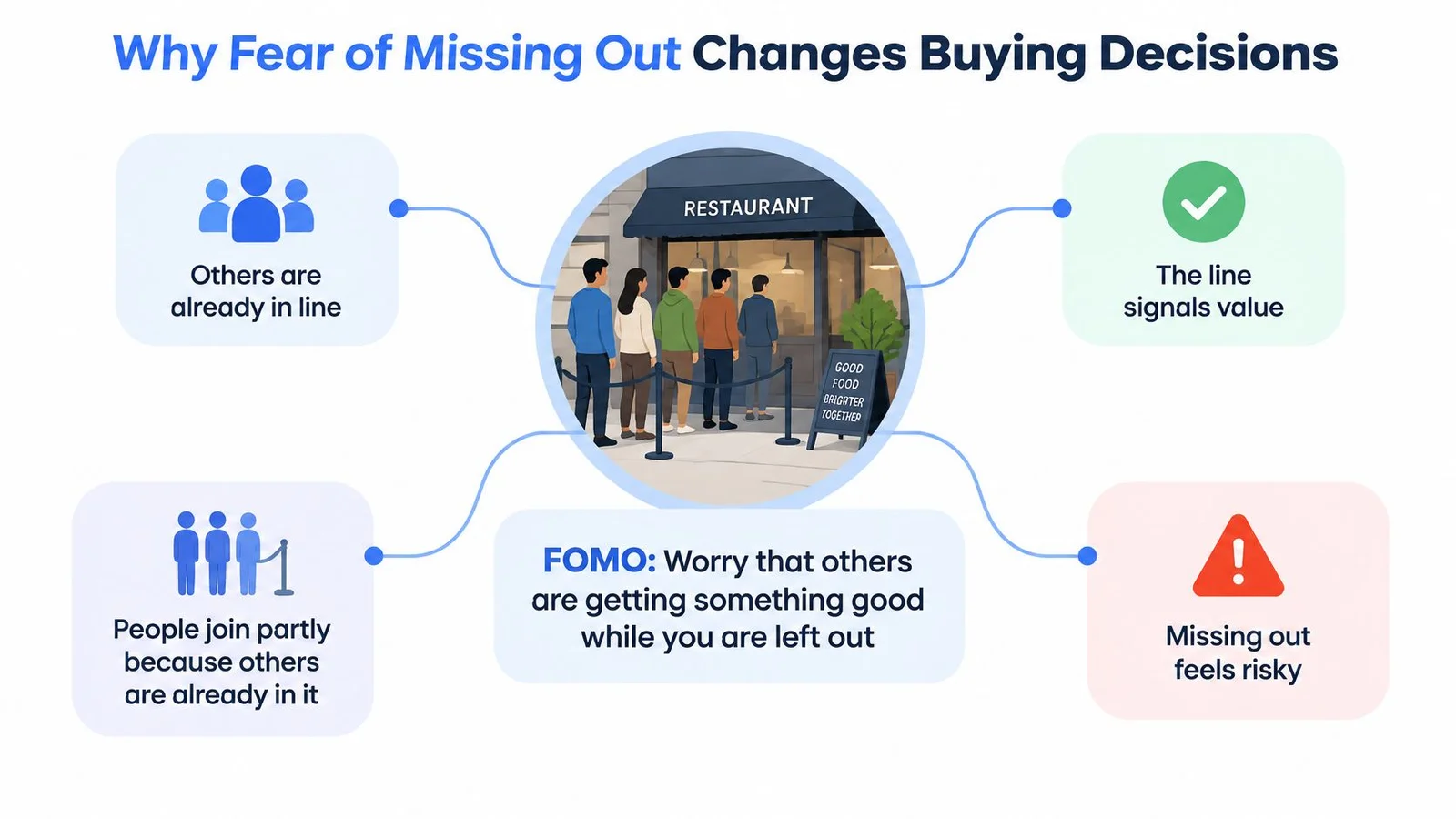
Fear of missing out is the worry that others are getting something good while you're left out. Consider walking past a restaurant with a queue outside. You might wonder what everyone knows that you don't, even before you've checked the menu.
The queue provides a shortcut for judging the restaurant. Other people appear willing to wait, so you may infer that the meal is worthwhile. If the restaurant is about to stop accepting diners, that interest can become concern about missing the experience.
The restaurant example makes the mechanism easier to see.
Separate the triggers
Marketers use related signals, but they aren't interchangeable:
- Scarcity means availability is limited, like the remaining tables.
- Urgency means the opportunity has a time boundary, like the kitchen closing.
- Peer activity means other people are participating, like diners joining the queue.
A 2023 systematic literature review covering 42 empirical studies identifies FOMO as a mediator between scarcity and impulsive purchasing: believing an opportunity may disappear can heighten concern about exclusion and encourage faster decisions.
In plain language, scarcity can change how someone feels about postponing a purchase. Waiting no longer seems neutral. It starts to feel like a choice that could mean losing access. Our breakdown of fear of missing out marketing goes further into that psychology.
FOMO can accelerate a decision when someone fears losing a meaningful opportunity. It doesn't establish that the opportunity is right for them.
That distinction matters. Someone joining the restaurant queue might still dislike the menu or find the price unsuitable. Likewise, a campaign can attract attention without resolving product fit, affordability, or confidence in the seller.
Quikly's guide to using FOMO to turn browsing shoppers into immediate buyers offers a useful tactical companion. Evaluate any tactic against the opportunity you can substantiate, rather than treating urgency as a substitute for value.
Sort your current offer by the trigger it has. A scheduled workshop may have both timing and capacity constraints. An always-available software subscription may have neither, so drop those triggers instead of manufacturing them. For a gut check, these real-life scarcity examples show what a genuine limit looks like.
How to Build Urgency That Holds Up
Build urgency from an operational fact, then write the copy. Starting with a countdown and searching for a justification afterward reverses the process.
- Find a real constraint. Use an event start time, cohort intake, delivery capacity, planned price change, or launch-period end. Confirm who owns that constraint and how it will be enforced.
- Explain the reason. Enrollment closes before instruction begins because learners need onboarding. That explanation is more useful than an unexplained demand to hurry.
- State what changes afterward. Distinguish the end of a bonus from the end of product availability. Buyers shouldn't have to guess whether they're losing a discount, support access, or the entire offer.
- Synchronize every touchpoint. Use the same deadline and time zone on the landing page, in emails, in chat answers, and at checkout. Keep the campaign details in a shared document.
- Test expiration behavior. Refresh the page, revisit it in another browser, and inspect the expired state. Remove timers that restart or continue advertising an unavailable benefit.
Make the justification visible
The American Marketing Association's summary of research on online limited-time offers reports that scarcity promotions can underperform non-limited offers when shoppers recognize the seller's persuasive intent, while time limits work better when an external occasion justifies them. Those findings concern online retail, not a guaranteed outcome for software or education.
Use the following as hypothetical campaign examples, not recommended capacity or timing benchmarks.
| Urgency Source | Example | Why It Holds Up |
|---|---|---|
| Event start time | Webinar starts Tuesday at 6 pm ET, shown on the event page | Visitors can confirm it on the calendar |
| Cohort start date | Enrollment closes the day before week one | Tied to real instruction timing |
| Launch period end | Launch bonus ends when the launch window closes | Ends with a stated, public event |
| Capacity limit | 40 workshop seats, with the count shown | Holds only if seats are truly capped |
| Price change | Early-bird rate rises on a stated date | Visitors see the new price on that date |
For campaign execution, SendX's guidance can help you make email deadlines more compelling. Use the same underlying terms when applying these practical approaches to creating urgency in sales, so channel-specific wording doesn't change the offer.
Compare the campaign against an unchanged offer without urgency. Inspect cancellations, refunds, and activation alongside immediate signups. A deadline that produces more purchases but fewer satisfied customers isn't an automatic improvement.
Social Proof and Live Signals on Product Pages
Put relevant social proof beside the price and purchase decision, rather than stacking every signal at the top of the page. Match the evidence to the doubt: a setup testimonial near implementation details, or a verified customer review near the purchase button. Our guide to product page optimization covers the rest of the layout.
A product-page layout helps illustrate where that reassurance belongs.
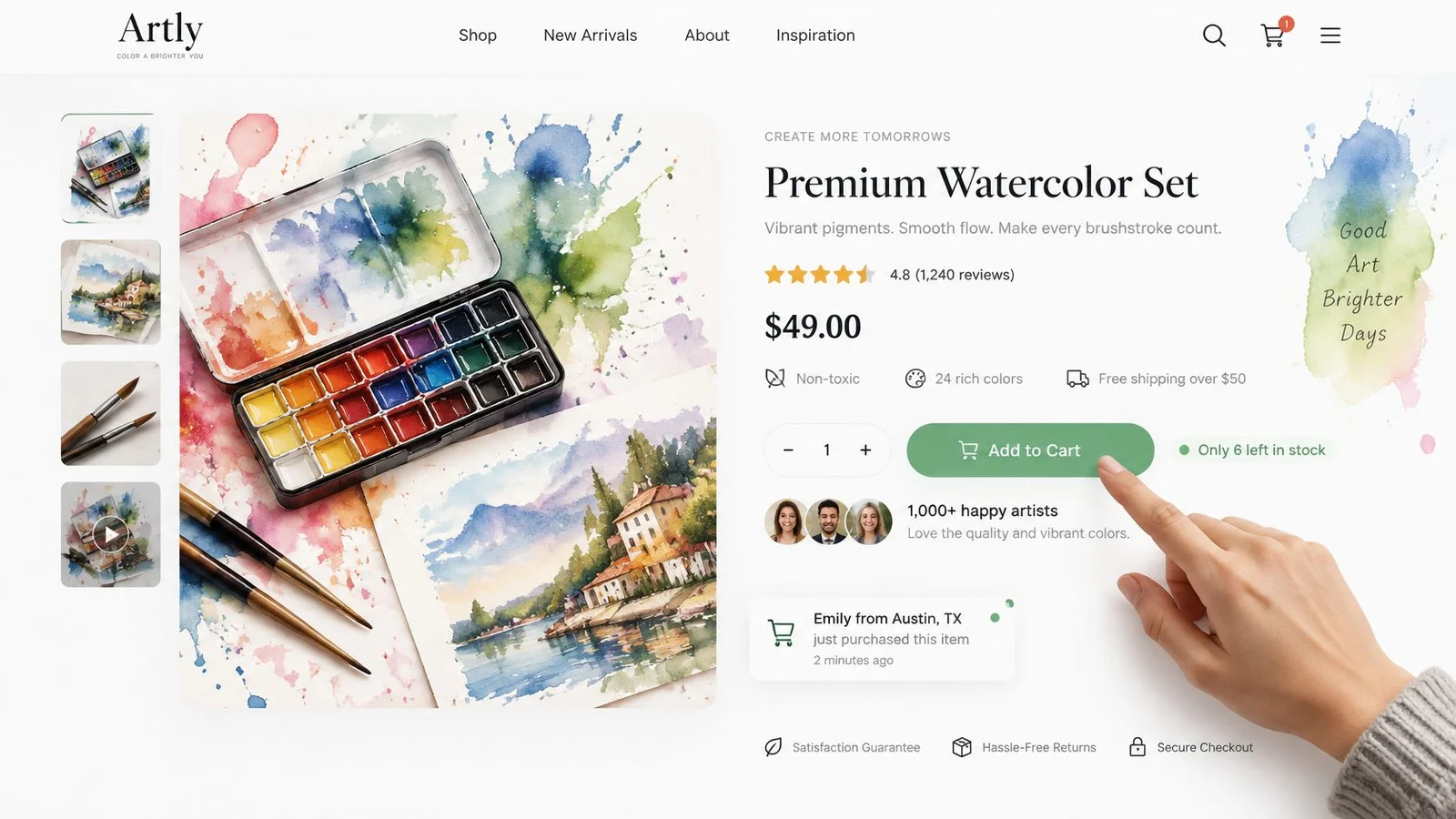
Reviews deserve attention: 70% of global consumers reported using social media to seek reviews that validate a company before purchasing, according to PwC's 2024 Voice of the Consumer Survey. In Reputation.com's 2024 Prodege survey of 2,000 U.S. consumers, 54% named online reviews their most trusted purchase source, ahead of friends and family at 24%.
Show information, not just excitement
On a course page, a useful conversation could raise refund eligibility, prerequisites, and instructor access. The reply should state the actual policy and link to its terms, rather than offer vague reassurance.
An academic discussion of FOMO-related marketing mechanisms highlights the tension between persuasive engagement and skepticism. For high-consideration purchases, treat question-led conversation as a testing hypothesis, not proof that visible activity always increases demand.
Use these adaptable copy patterns:
- Participation: Join [verified enrollment count] teachers enrolled during [stated period].
- Availability: Workshop capacity is [seat cap], with [confirmed bookings] reserved.
- Pricing: Early-bird pricing ends [date and time zone], then the price becomes [published amount].
For reviews, these five-star review examples can help you identify useful detail about customer goals and outcomes. Keep the reviewer's meaning intact rather than rewriting their experience into stronger praise.
For a visual companion to the product-page discussion:
Avoid counters that rise without corresponding activity and threads that display questions without answers. Label a historical count with its reporting period, and label simulated dialogue as simulated. Neither should imply that current visitors are purchasing or participating when they aren't. This is where conversations beat notification popups. A FOMOchat thread can answer the refund question; a ticker can only announce that someone bought.
Ethical Guardrails That Keep FOMO Honest
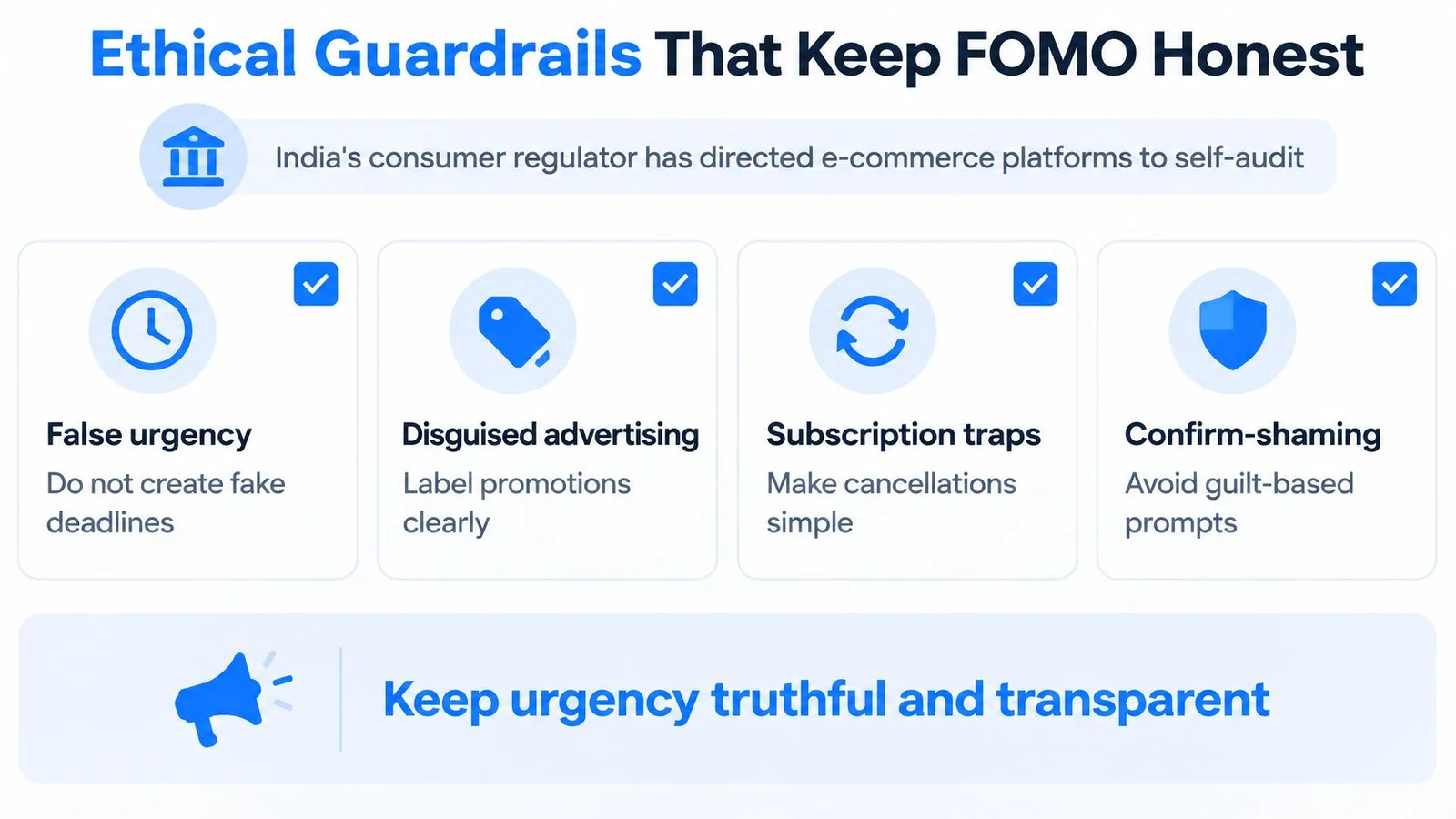
A countdown can raise signups and still damage trust if the deadline is invented. Regulators in several markets scrutinise practices such as false urgency, disguised advertising, subscription traps, and confirm-shaming. The European Parliament's briefing on dark patterns flags fake countdowns and emotional manipulation as concerns and describes EU rules as fragmented.
Use these categories to review a campaign, not as a substitute for jurisdiction-specific legal advice. Judge urgency by what happens after the click, too: refunds, complaints, and retention matter alongside conversion lift.
Run a pre-launch truth check
Review the impression a reasonable visitor would take from the whole page, not just whether each sentence is technically accurate.
- Define activity counters. Say whether they measure page views, registrations, purchases, or another event. Engagement is not inventory.
- Disclose simulated conversation. Label simulated dialogue where visitors can see the label before interpreting messages as real customer activity.
- Qualify uncertainty. Separate estimates from confirmed facts. If an answer needs human confirmation, say so.
- Reject invented demand. Do not fabricate buyers, locations, testimonials, or claims about people watching.
- Protect visitor data. FOMOchat never shares visitor data, and the data belongs to the customer alone. Set customer-controlled rules for collection and use before launch.
Trust constraint: If you would hesitate to explain a message plainly to a customer requesting a refund, revise it.
Check the refusal path as carefully as the offer. Visitors should be able to dismiss it without guilt, understand renewal terms, and find cancellation information easily.
Use authenticity in marketing as an operating standard. Assign someone to review both the first message and the post-purchase experience.
Compare conversions with refunds, then review complaints and repeat purchases separately. A rise in signups is not a win if customers say they misunderstood what they bought.
Launch and Webinar Templates to Copy
Match the evidence to the campaign phase. Before a launch, show actual waitlist participation. When selling begins, use approved beta-customer feedback. During a webinar, prioritize questions related to what the presenter is explaining.
The schedule below is an illustrative planning template, not a tested timing benchmark. Adjust the intervals to your buying cycle and production schedule.
| Phase | FOMO Message | Proof to Show |
|---|---|---|
| Launch pre-launch, 7–14 days out | Waitlist count and launch date | Real signups on the waitlist |
| Launch day | Launch bonus ends at a stated hour | Quotes from beta users |
| Launch final 24 hours | Remaining bonus slots, if capped | Questions answered in the chat |
| Launch after close | Reopen date and what changes | Results from existing customers |
| Webinar 3 days before | Date and time with a reminder | Questions from registrants |
| Webinar live session | Chat reacts to slides in real time | Answers pulled from the FAQ |
| Webinar replay offer | Replay access ends on a stated date | Attendee feedback |
Adapt the wording to the offer
Launch day: Enrollment is open. Register before [closing date, time, and time zone] to receive [specific bonus]; purchases afterward won't include it. Read the curriculum and eligibility details before choosing.
Final-day reminder: The launch bonus closes at [published deadline]. [Verified remaining count] bonus appointments remain because each includes individual feedback. Standard enrollment [continues or closes] afterward.
Webinar reminder: Your session takes place on [full date] at [time and time zone]. Add it to your calendar and send your question about [session topic] before the presentation.
Prepare the evidence and the handoff
Beta-user quotes support claims about experience, but they don't prove bonus availability. Pair each message with the record that verifies its specific claim. Get permission to use identifiable feedback and preserve any relevant context.
Use a product launch marketing plan template to assign owners for page updates, reminder emails, chat answers, and the closing state. Someone should also handle visitors who arrive after enrollment ends.
For webinar replays, explain whether expiration affects the recording, a purchase incentive, or both. If chat follows recorded playback, don't describe it as a live audience. When you compare webinar engagement tools, check how each one labels replay messages.
Every deadline should correspond to an event the visitor can check. After closing, publish the next available action rather than leaving an expired purchase prompt in place.
Run Your First FOMO Test This Month
Choose a test small enough to interpret. Changing the headline, price, chat, and countdown together might improve sales, but it won't tell you which change helped.
Define the test before publishing
- Week one: Pick a page and format. An objection-led conversation on a course page is a manageable starting point. Record the audience, hypothesis, primary metric, and person responsible for reviewing results.
- Week two: Randomly assign eligible visitors to the test or a no-urgency control with the same offer. Keep other page elements stable, and verify that exposure and purchase events are recorded.
- Weeks three and four: Review signups alongside refunds, cancellations, complaints, and support tickets. Classify support requests so ordinary setup questions aren't confused with complaints about misleading promotion.
Keep the tactic only if the improvement holds on customer-quality measures. Define acceptable changes before launch, using your existing economics and service standards rather than choosing a favorable interpretation afterward.
A test result is provisional until customers have had enough time to use, cancel, or return the purchase.
Give retention time to mature
Choose an activation or retention window suited to the product. If you use a thirty-day window, customers acquired near month-end won't have complete results when the initial test finishes. Schedule a later review instead of treating early activity as durable retention.
For a chat-based test, our AI-powered FOMOchat widget can answer visitor questions from your website content and display labelled simulated group conversation while real visitors ask questions. Setup requires pasting one line of code onto your website.
Write down the hypothesis, decision metric, and review owner now. That record will help you decide whether you improved the buying experience or merely accelerated purchases.
FOMOchat combines on-site social proof with instant support, helping visitors explore an offer while getting answers to their questions. Visit FOMOchat to book a demo and assess whether a clearly labelled chat experience fits your product page, launch, or webinar.