
The most popular advice about sales chatbots gets the goal wrong: automate the conversation until you no longer need a salesperson. A better goal is to remove the unanswered question that stops a buyer, then make expert confirmation easy when the decision gets serious.
An AI chatbot for sales should help visitors understand an offer, see that their questions are reasonable, and choose a useful next step. That might be a signup. It might also be a conversation with someone who can take responsibility for a custom promise.
What an AI Chatbot for Sales Does, Moment by Moment
An AI chatbot for sales is an on-page assistant that answers buyer questions from approved product, pricing, and policy content, so a signup, enrollment, registration, or demo request isn't stalled by an unanswered detail.
Think of a well-briefed floor associate. They know what's on the shelf, explain the labels, and ask what you're trying to accomplish. They don't invent a warranty or negotiate a contract. When the question gets expensive, they walk you to a specialist.
That role extends beyond basic support. In an IBM Institute for Business Value study, 67% of surveyed business leaders said their organization had already begun implementing AI in customer service. That's evidence of adoption, not proof of conversion lift.
Follow the buyer's question
Say a visitor reaches a software pricing page. They don't need a product tour yet. They need to know whether a plan supports their team.
The bot explains the published limit, then asks a relevant qualifying question about team size. If the plan fits, it offers signup. If the requirement falls outside the published plans, it offers a conversation instead of improvising a package.
The same approach applies throughout a buying decision.
Sales moments an AI chatbot should handle
| Buyer moment | Chatbot job | Hand to a human when |
|---|---|---|
| Product fit | Explain who it is for using site facts and ask one qualifying question | The use case is custom, regulated, or not on the site |
| Comparison | Contrast features and limits already published on the site | The visitor needs a competitor claim the site does not make |
| Objection | Answer price, timing, security, or refund questions from approved policy | The ask is a discount, legal exception, or security review |
| Next step | Offer the signup, enrollment, registration, or demo that matches intent | The buyer asks for a person or the deal value is high |
A comparison shouldn't become an invented competitive battle. If a visitor has another product open, explain your published capabilities and limits. Don't guess what the other company lacks.
The workflow connects a question to approved information, then to an appropriate action.
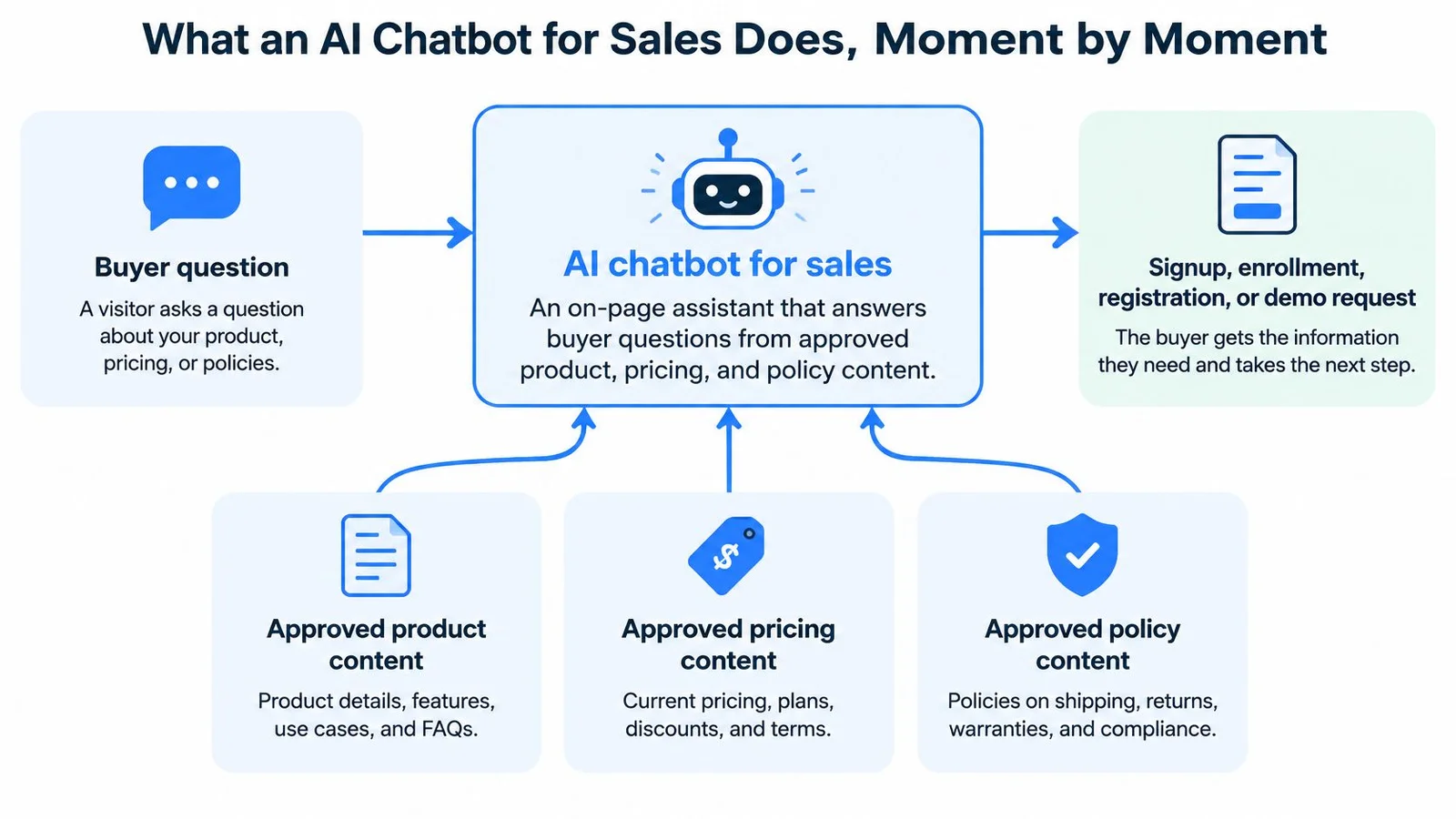
See how the page changes the conversation
On a course sales page, a prospective student asks whether the material suits beginners. The assistant uses the syllabus and prerequisites, then quotes the refund policy when asked. It doesn't promise that the student will finish, get hired, or earn back the tuition.
On a webinar registration page, questions about the intended audience and replay access belong beside the form. Answering them there lets someone decide whether registering makes sense without searching through an email archive. Teams that treat this as conversational AI for sales often keep replay and agenda answers visible in a group-style chat, which is how FOMOchat pairs real-time proof with support instead of another notification popup.
On a launch page, a question can appear alongside the relevant claim in a pitch video. A visitor wondering about implementation sees the clarification while that topic is being discussed, rather than after the pitch has moved on.
In each scene, the answer settles the fact. Visible questions can also reassure visitors that their concern isn't unusual. But label generated examples and replayed conversations appropriately. They aren't evidence that independent buyers are currently endorsing the offer.
Practical rule: Let the assistant explain the offer. Let a responsible person authorize exceptions.
For planning the sequence, a chatbot conversation flow helps connect questions to useful actions. For a broader view of how those conversations connect to sales operations, Stamina's guide to grow your pipeline with sales AI is a useful companion.
Keep procurement negotiations, custom quotes, medical or financial claims, and contract promises with qualified people. An assistant can collect the question and locate documentation. It shouldn't make commitments the business hasn't authorized.
The Conversion Lift a Sales Chatbot Can Produce
A randomized field experiment on a cross-border retail platform found that a generative-AI pre-sale chatbot increased sales by 16.3%, significant at the 1% level, and conversion rate by 21.7% versus no support, but found no statistically significant advantage over human replies.
That distinction matters. The business case is stronger coverage and consistent answers, not an assumption that a model persuades better than a capable representative.
Read the comparison correctly
What a pre-sale chatbot changed in a randomized test
| Outcome | Versus no support | Versus human replies | Practical reading |
|---|---|---|---|
| Sales | Increased in the experiment | No statistically significant advantage | Cover visitors who would otherwise get no answer |
| Conversion rate | Increased in the same comparison | No statistically significant advantage | Don't promise to outperform staffed chat |
| Why it moved | Immediate answers can remove information barriers before checkout | No demonstrated persuasion advantage | Ground replies in approved product content |
| How to test it | Randomize visitors against an identical page | Keep the offer and page the same | Segment by device, source, complexity, and familiarity |
The mechanism is straightforward: a visitor gets clarification before leaving to search elsewhere. Availability outside staff hours and support across languages can extend that coverage.
The supplied visual illustrates the direction of improvement. Its displayed absolute rates aren't established by the cited findings, so don't use them as a forecast or a baseline.
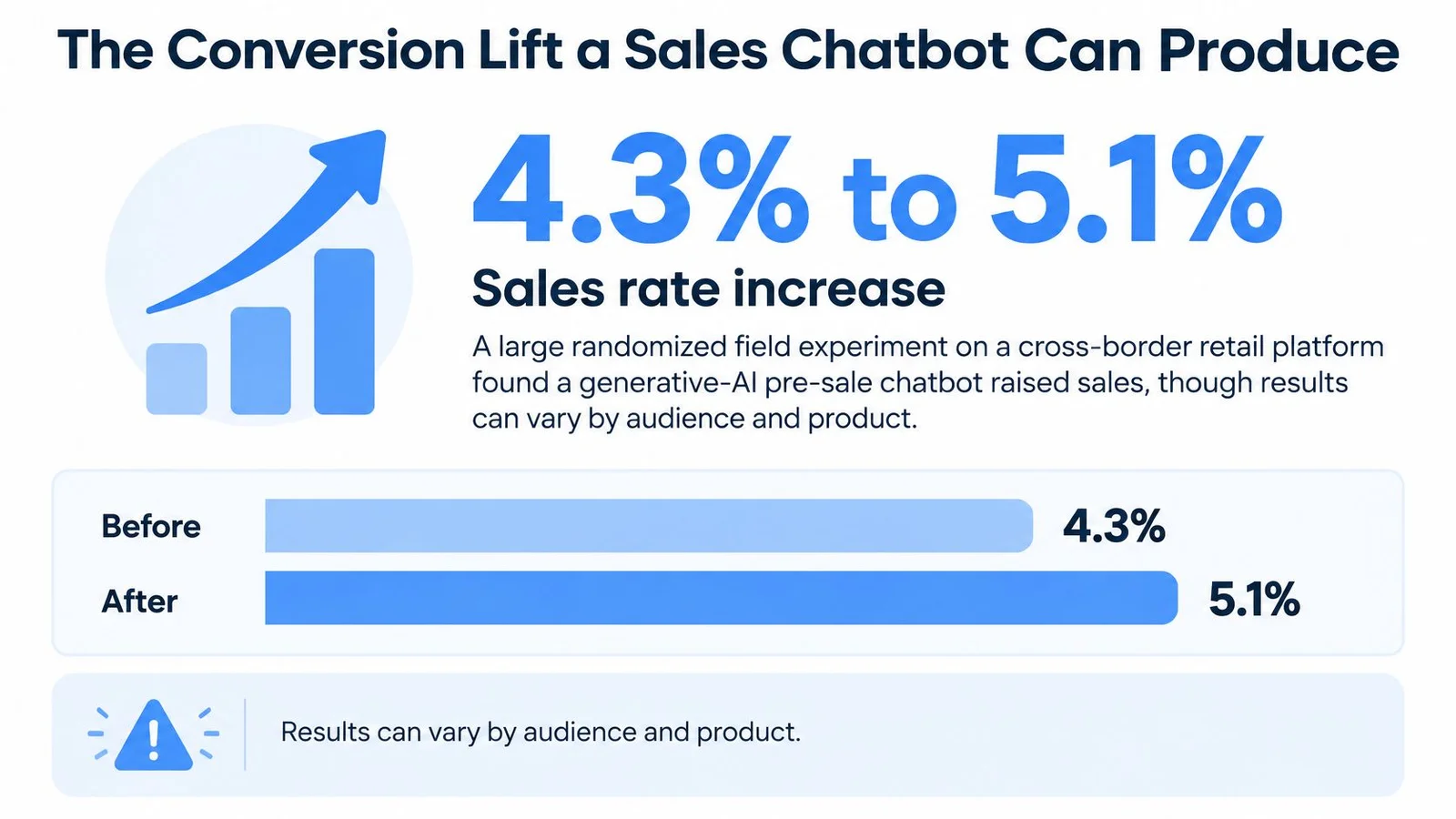
Measure purchases, not conversation volume
Define the primary conversion before enabling the widget. A SaaS team might choose a qualified demo request; a course creator might choose paid enrollment; a webinar host might choose completed registration.
Track these alongside it:
- Treatment-versus-control conversion: Compare visitors assigned to chat with visitors assigned to the otherwise identical page.
- Assisted revenue or registrations: Record outcomes following a conversation, without assuming the chat caused every outcome.
- Escalation rate: Check whether visitors reach people for legitimate exceptions or because the bot can't answer ordinary questions.
- Post-purchase satisfaction: Look for disappointment caused by inaccurate expectations, not just a successful checkout.
Randomize visitors rather than comparing unrelated calendar periods. Then inspect results by device, traffic source, product complexity, and new versus returning visitors. Keep assignment consistent so returning visitors don't repeatedly switch experiences.
For broader context, Salesforce reported that in 2025, 84% of sales professionals already using generative AI said it helped increase sales at their organization by improving and accelerating customer interactions. That's self-reported sentiment covering more than website chat, not causal evidence for your page.
Use the following video as supplementary context, not as a substitute for a controlled test.
Ignore a vendor's lift claim if it lacks a comparable no-chat or human baseline on the same offer.
Features That Qualify Interest Instead of Stalling It
A sales assistant needs a briefing, not just a friendly voice. Its features should help it establish fit without turning every question into a lead-capture exercise.
Retrieval from approved pages comes first. The assistant should locate the relevant product description, plan limit, or policy before composing an answer. Give it clear source priorities when an old FAQ conflicts with a current pricing page.
The feature hierarchy starts with information the business can stand behind.
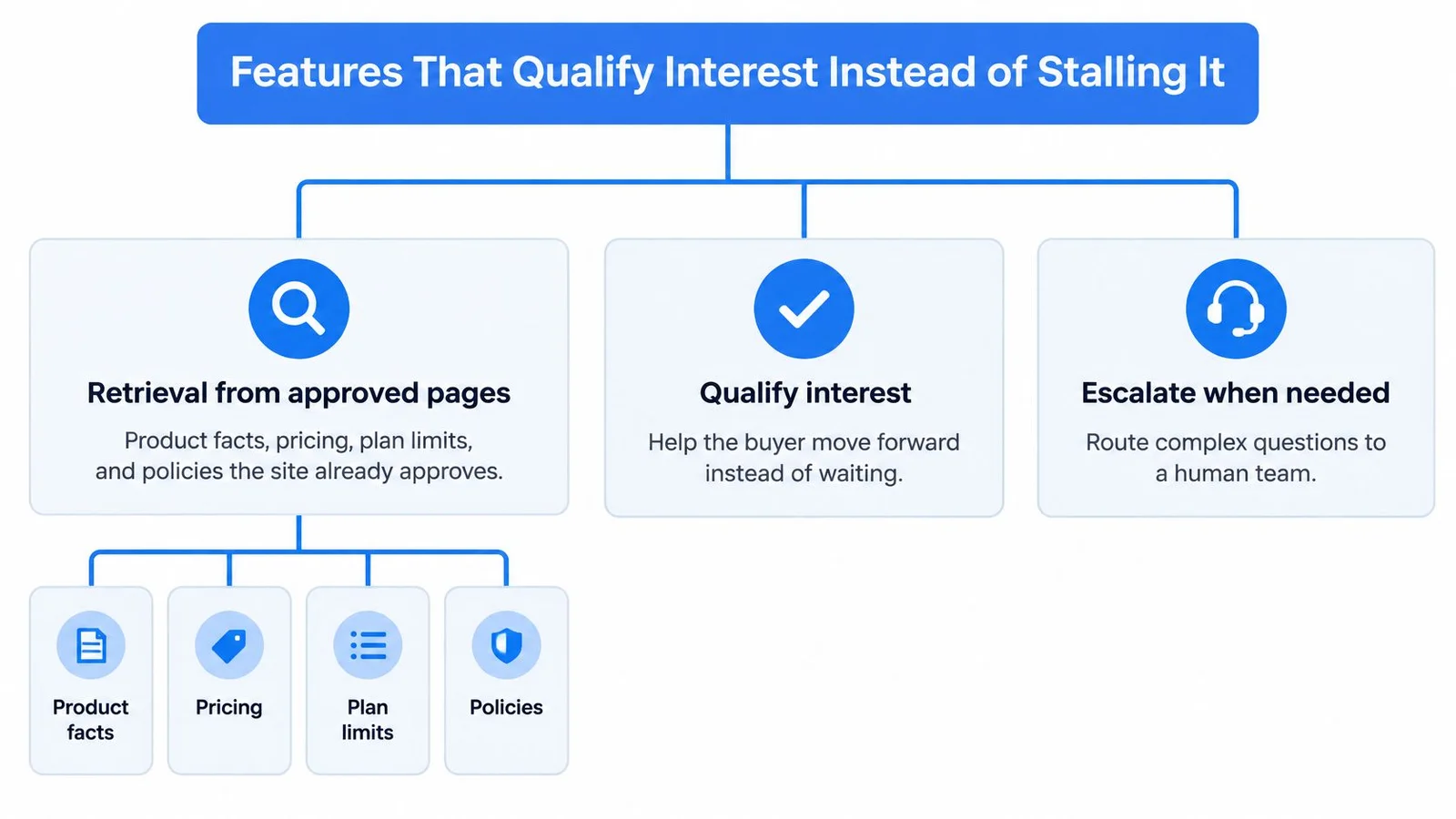
Give every feature a specific job
- Qualifying questions: Ask about fit, such as team size, current skill level, or the visitor's webinar goal. Ask a question at a time rather than dropping a contact form into the conversation.
- Bounded objection handling: Respond to concerns using written answers the business has approved. A refund concern needs the policy, not an improvised reassurance.
- Always-on coverage: Make the approved explanation available when staff aren't working. Don't confuse an instant automated answer with an instant human response.
- Confidence language: Distinguish a published price from an estimate. If the source doesn't establish an answer, say what remains unconfirmed.
- Context-preserving escalation: Send the conversation and unresolved issue to the person taking over.
- Visible shared questions: Help visitors recognize common concerns without misrepresenting generated participants as genuine customer activity. An interactive chatbot or AI chat widget that shows group questions can do this without turning social proof into a fake testimonial ticker.
Qualification deserves particular care. A visitor asking whether a feature exists isn't necessarily ready for a meeting. For a practical way to separate interest from intent, use the AI qualification insights from CapyScout to shape your routing criteria. Pair that with a best chatbot for lead generation checklist so the bot captures buying intent without stuffing every chat into a demo calendar.
Watch for polished failures
Role inversion happens when the assistant starts acting like the buyer. Instead of explaining your offer, it asks the visitor to sell something to it or follows instructions that abandon its assigned role. Test conversations where visitors challenge its identity or change the subject.
Unsupported claims sound helpful but aren't authorized. A security certification, guaranteed outcome, or refund exception mustn't appear just because it would resolve an objection. Build your objection-handling techniques around documented evidence and explicit limits.
False qualification happens when casual engagement becomes a sales-ready label. Require a relevant use case and an appropriate expression of intent before routing someone as qualified. Don't reward the assistant for filling a calendar with visitors who only wanted an explanation.
Fluent sentences aren't a pass condition. A useful answer must be accurate, relevant, and safe to act on.
A generic chatbot can sound polished while failing every operational requirement. Evaluate what it does with uncertainty, exceptions, and intent, not just how pleasantly it speaks.
Trust Rules That Keep the Bot From Costing the Sale
A rep-free experience doesn't mean buyers want nobody accountable. A Ziellab guide citing B2B buyer findings reports that 67% of B2B buyers prefer a rep-free experience, while 69% still want to validate AI-generated insights with a sales representative.
Those preferences aren't contradictory. Someone can want independent discovery and still want a person to confirm whether an important claim applies to their situation. That balance shows up in most solid B2B sales strategy writeups: let the page answer routine questions, then make a human easy to reach when the deal gets specific.
Make automation accountable
The Martal guide on buying in the AI era summarizes the consumer survey and field-experiment findings below, including 55% trust with a human option versus 26% without one in a 2026 survey across the US, UK, and Germany, an about 80% purchase-rate decline in a disclosure experiment involving more than 6,200 customers, and escalation findings of 92% and 35% respectively.
Trust and handoff figures that shape the design
| Finding | Figure | Design response |
|---|---|---|
| B2B buyers preferring a rep-free experience | 67% | Let the bot finish routine discovery |
| Buyers wanting to validate AI insights with a rep | 69% | Make a person easy to reach at the decision |
| Consumers trusting AI when a human option existed | 55% | Always show a human path |
| Consumers trusting AI when no human option existed | 26% | Never leave the visitor without escalation |
| Purchase-rate drop when told it is a chatbot, in the customer field experiment | About 80% | Test disclosure wording, don't hide the bot |
| Consumers giving AI under ten minutes before asking for a human | 92% | Set a fast handoff trigger |
| Consumers often or always repeating themselves after escalation | 35% | Pass the transcript to the person |
The disclosure experiment creates a dilemma, not permission to conceal automation. It doesn't establish that every transparent website assistant will suffer the same outcome.
Use a plain introduction that identifies the company and the assistant's limits. For example, describe it as the company's AI assistant, explain that it answers from published product information, and show how to contact the team.
Recover without another interview
When someone asks for a person, don't make them win an argument with the bot. Preserve the conversation, identify the unresolved question, and explain when a human will respond. If live staff aren't available, say so before collecting contact details.
Use guardrails that define the assistant's boundaries to prevent repeated reassurance when an exception needs authorization. Shared questions can support understanding, but generated dialogue mustn't masquerade as independent buyer testimony.
Measure qualified handoffs, objections resolved without later correction, and re-explanation after escalation. Those measures reveal whether buyers received accountable help, rather than merely stayed in the chat.
Implementation Checks Before Any Buyer Sees the Bot
A chatbot can answer from the right document and still create a poor experience if nobody owns that document or receives the resulting conversation. Treat launch readiness as an operating responsibility, not an embed-code task.
Assign owners before connecting systems
| Check | What must be decided |
|---|---|
| Content ownership | Name an owner for pricing, FAQs, refunds, and security pages, with a review date |
| Lead routing | Choose the CRM record, inbox, or calendar destination for qualified conversations |
| Transcript handling | Specify how the receiving person gets the visitor's context |
| Privacy and consent | Document storage, access, retention, and deletion procedures |
| Handoff staffing | Assign the person or rota responsible for the promised response window |
| Cost of ownership | Include setup, content maintenance, and conversation review time |
For routing, map only fields the visitor provides. A stated company size can populate a CRM field; an inferred budget should not become a fact. Keep unknown values empty and make the unresolved information visible to the receiving representative.
A useful transcript summary includes the visitor's goal, stated budget if offered, relevant constraints, and outstanding question. Distinguish the visitor's words from the assistant's interpretation so the next person doesn't treat a guess as confirmed qualification.
Check the operational promises
Review what personal information the chat collects and who can access it. Explain retention and deletion procedures in language that matches the actual configuration. If conversations appear publicly, prevent private commercial or personal details from being exposed to other participants.
Use an integration readiness checklist to verify field mapping, failed deliveries, and ownership of unattended conversations. Test what happens when the CRM connection fails or the assigned representative is unavailable.
Operating standard: Promise a response window only when someone is responsible for meeting it.
Include content upkeep and escalation review in the operating budget. A bot can't be more reliable than the pages it uses and the people assigned to catch exceptions.
How to Launch a Sales Chatbot on One Page
Choose a page where visitors already ask buying questions. A focused launch lets the team inspect complete conversations and understand mistakes before expanding coverage.
The visual shows the broad launch flow; the operational sequence below adds an explicit testing gate before embedding.
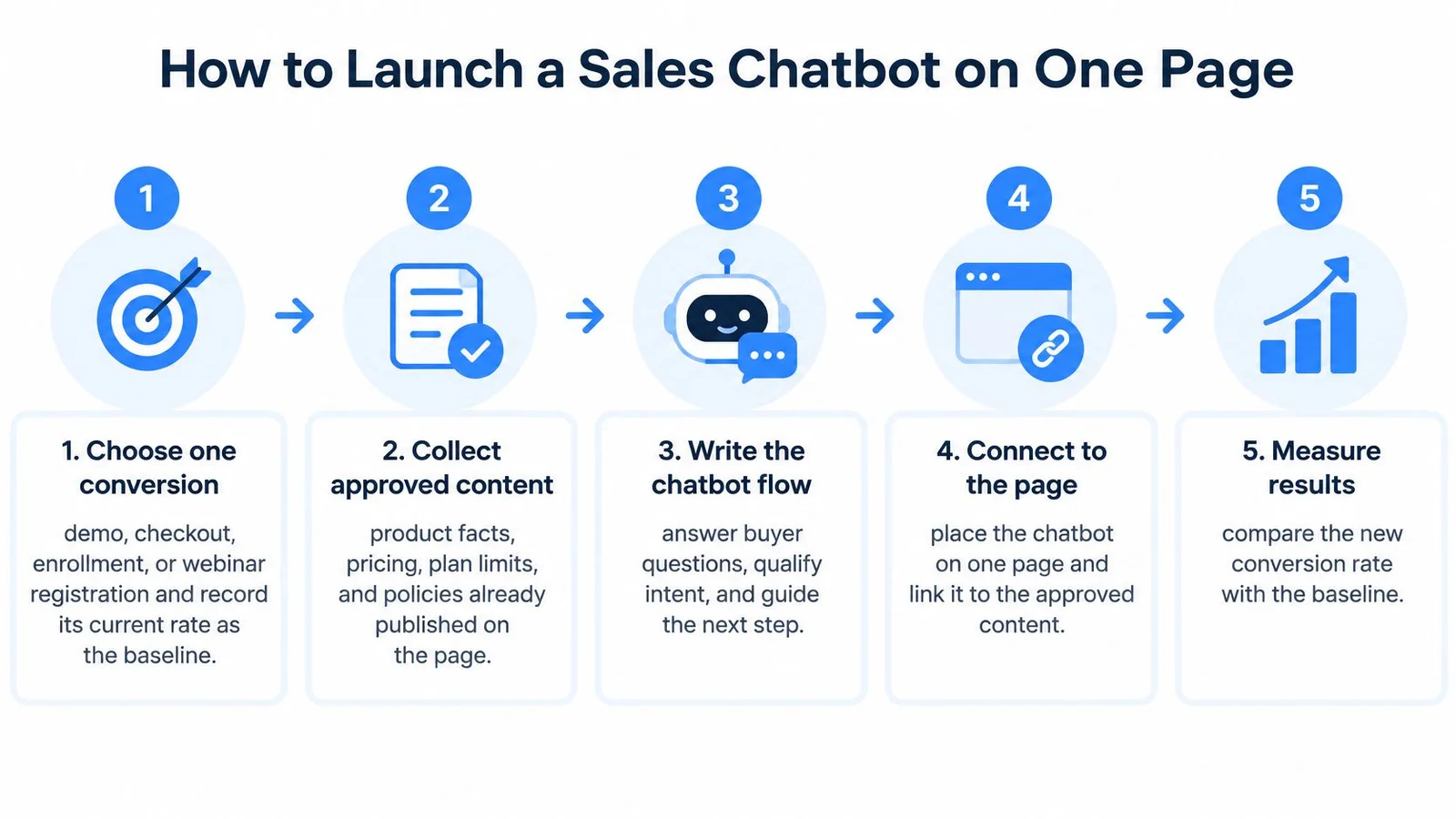
Prepare and test before embedding
- Choose the conversion. Select demo requests, checkout, enrollment, or webinar registration. Record the current conversion rate and define what makes the outcome qualified.
- Collect approved content. Include the chosen page, pricing, FAQs, refunds, and security documentation. Remove obsolete statements and resolve contradictions before giving the assistant access.
- Write plain-language guardrails. Specify no unauthorized discounts, competitor attacks, unpublished timelines, or invented guarantees. Write the response the assistant should use when it can't establish an answer.
- Run realistic conversations. Include follow-up questions, conflicting requests, and attempts to obtain exceptions. Score factuality, qualifying-question relevance, buying-intent detection, objection resolution, and handoff correctness separately.
A reported SalesLLM benchmark summarized by Cyndra used 1,805 curated multi-turn scenarios and reported that a specialized model reduced role inversion from 17.44% to 8.8% against its comparison model. The practical lesson is to test conversational behavior, not merely whether an opening answer reads well.
Five scenarios to pass before go-live
| Scenario | Must answer from | Pass check |
|---|---|---|
| Pricing objection | Pricing page and plan limits | Quotes the published price only, with no discount |
| Implementation time | Setup and onboarding page | States timing only when it is published |
| Security question | Security and privacy page | Cites documented controls and no certification the site lacks |
| Refund request | Refund policy | Quotes the refund window exactly as written |
| Ready-to-buy visitor | Offer or registration page | Offers one next step and a visible route to a person |
Keep the retrieved passage alongside each test answer internally. A reviewer should be able to trace a claim to its source without searching the entire website.
Release with a decision rule
- Embed on the selected page only. Keep the AI identification visible and verify the route to a person on mobile as well as desktop. Submit a test handoff and confirm that someone receives the context. Placement notes in our website chat widget guide are useful here, especially on mobile where the launcher can get covered.
- Run a randomized on-off experiment. Continue until the primary conversion has enough observations for a useful comparison. Record escalations, incorrect answers, false-positive qualification, and missed buying intent alongside the outcome.
Don't stop because the first conversations look encouraging. Investigate cases where a visitor converted after receiving a wrong answer, since that apparent success can become a refund or a disappointed customer.
If the assistant can't answer pricing and refund scenarios from the approved pages, it isn't ready for buyers.
Put Proof and a Human Path on the Same Page
Pick the URL that already attracts buying questions. That might be pricing, a course offer, or a webinar registration page. Leave the rest of the site alone until that page has a baseline and a credible comparison.
The standard is simple: answers come from the business's facts, the assistant is identified, shared questions are represented accurately, and a person can take over without another interview. Don't add conversational activity merely to make the page look busy.
Decide whether a shared chat fits the offer
FOMOchat is an AI-powered chat widget that creates social proof and gives visitors instant support. Visitors join a live group chat with an AI company rep and other participants, placing questions and answers together instead of separating a private help bot from a testimonial popup.
That format fits teams that want buyers to see relevant questions while exploring an offer. Distinguish live participation, imported conversations, and AI-generated dialogue so visitors understand what they're seeing. The value should come from useful clarification, not an ambiguous impression of crowd approval.
Our setup takes about five minutes: enter the website URL, let the AI analyze it, generate a conversation, and paste the code. That's the installation process, not a substitute for reviewing the content, testing exceptions, and arranging human follow-up. You can also book a demo to examine the experience before embedding.
Keep the widget only when it improves qualified outcomes without making human follow-up harder.
Run the chosen page against its no-widget version. If qualified conversions improve but visitors repeatedly need to correct the assistant or explain themselves again, fix those failures before extending the rollout.
FOMOchat brings an AI company rep and group-style questions together to help visitors understand your offer while they're on the page. Visit FOMOchat to explore the widget or book a demo, then test it on a buying page with a clear conversion goal and a visible human contact path.