In a 1999 survey, 69% of users said popups were annoying, and 23% said they wouldn't return to a site because of them. Later research found that people exposed to inline ads remembered 3.4% more website material than people shown popups, which is a blunt reminder that attention grabbed too hard often comes at the cost of attention kept. That's why the best web popup design is never just about visibility.
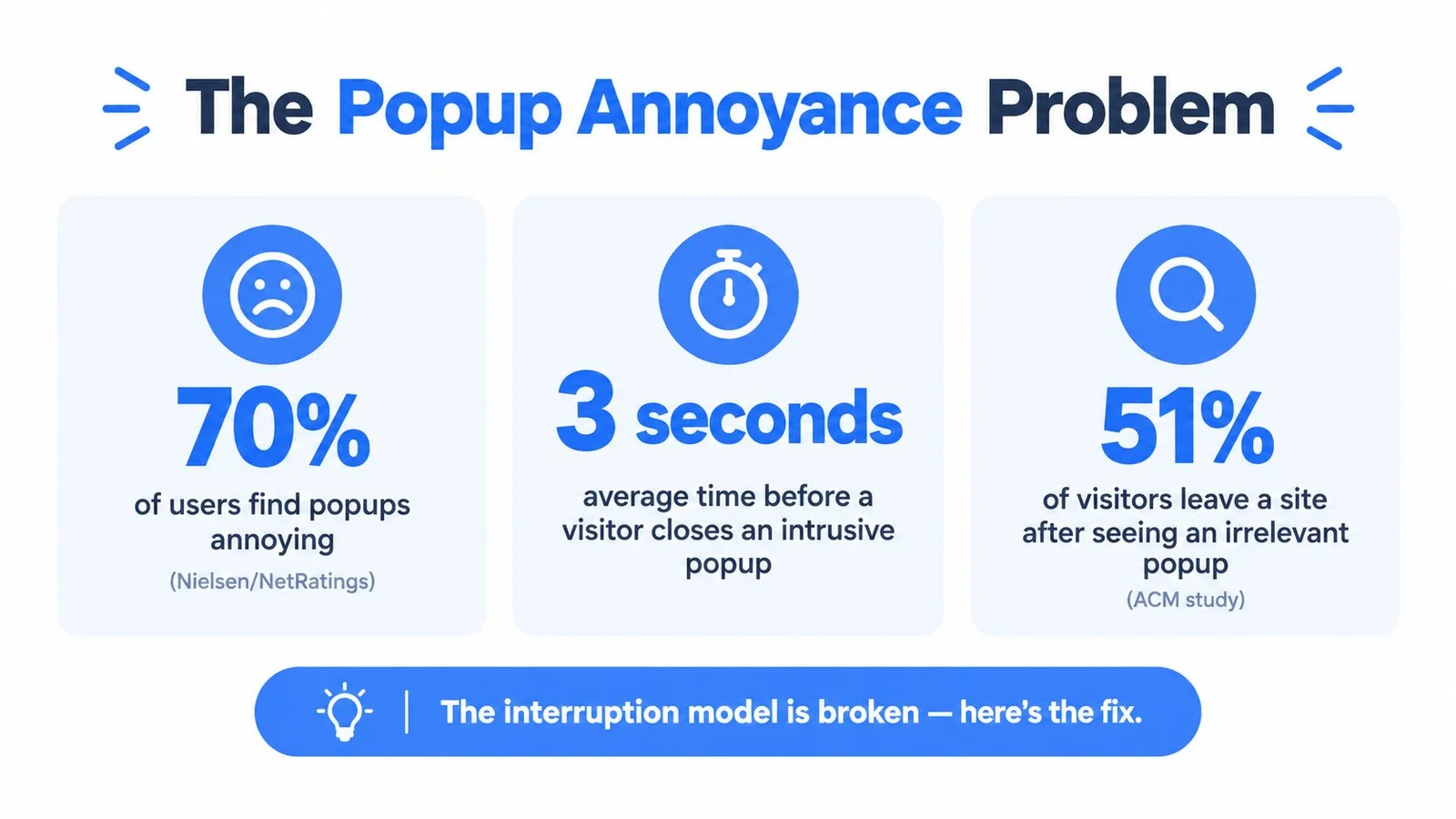
The early popup era makes the lesson even clearer. Nielsen/NetRatings recorded 11.3 billion popup-ad impressions between January and July 2002, yet fewer than 10% of companies advertising online used popups, and 63 advertisers generated about 80% of impressions. By the fourth quarter of 2002, popups made up 3.5% of all online ad impressions, up from 1.9% a year earlier, which shows how quickly a format can scale without becoming broadly loved or widely adopted. A practical opt in message guide for Shopify can be useful if you're thinking about consent and lead capture mechanics, but the bigger lesson is simple, don't confuse raw exposure with healthy engagement.
Practical rule: if the popup wins the impression but loses the visitor's trust, it's not doing its job.
A lot of teams still build popups as if more interruption automatically means more pipeline. It doesn't. Better practice is to treat every popup as a trade, one that asks for attention and must pay it back with relevance, speed, and a clean exit.
If you're auditing trust signals on the page, symbols of trustworthiness are a good lens. The right popup doesn't scream louder, it proves it belongs on the page. When the offer is complex, a flashing signup toast often falls short of a real answer, which is the gap we cover in why social proof notifications don't work for complex products.
Why Most Popups Annoy Visitors and What to Do Differently
The problem with most popup design is that it treats interruption like a feature instead of a cost. A popup can be visible, clickable, and still be wrong if it breaks reading flow, hides content, or forces a decision before the visitor is ready. The ACM research is useful because it ties that annoyance to deeper outcomes, not just irritation. People didn't only dislike popups, they had a harder time reading and using the page, and that's the part marketers miss when they obsess over click-throughs alone.
Raw exposure is not the same as effective exposure
The early 2000s numbers make a useful distinction. Popup impressions scaled fast, but adoption stayed concentrated among a small group of advertisers, which suggests the format spread through forceful distribution rather than through broad trust or elegant interaction design. That's still how bad popup strategy works today, it gets seen a lot and remembered for the wrong reason.
If you design a popup only to maximize views, you'll often get low-quality attention from people who were already distracted. If you design it to support the visitor's task, you'll usually get fewer complaints and better intent. That's the job of web popup design, not forcing a message, but earning a moment.
What should count as success
Success needs a downstream definition. A form fill is not enough if those leads don't turn into qualified conversations, signups, registrations, or revenue. The best teams I've worked with care about what happens after the submit button, because aggressive popups can attract the wrong people quickly.
That's why timing, relevance, and restraint matter more than dramatic animation or flashy overlays. A useful popup feels like a timely assist, not a roadblock. It respects the page's main task, especially on content-heavy pages where the visitor is still trying to read, compare, or finish something.
If the page is doing the persuasion work already, the popup should only support it.
The design takeaway is straightforward. Start by reducing interruption, then add persuasion. Use a message that maps to the visitor's intent, not a generic offer that could sit anywhere on the site.
Core Design Elements That Make a Popup Convert
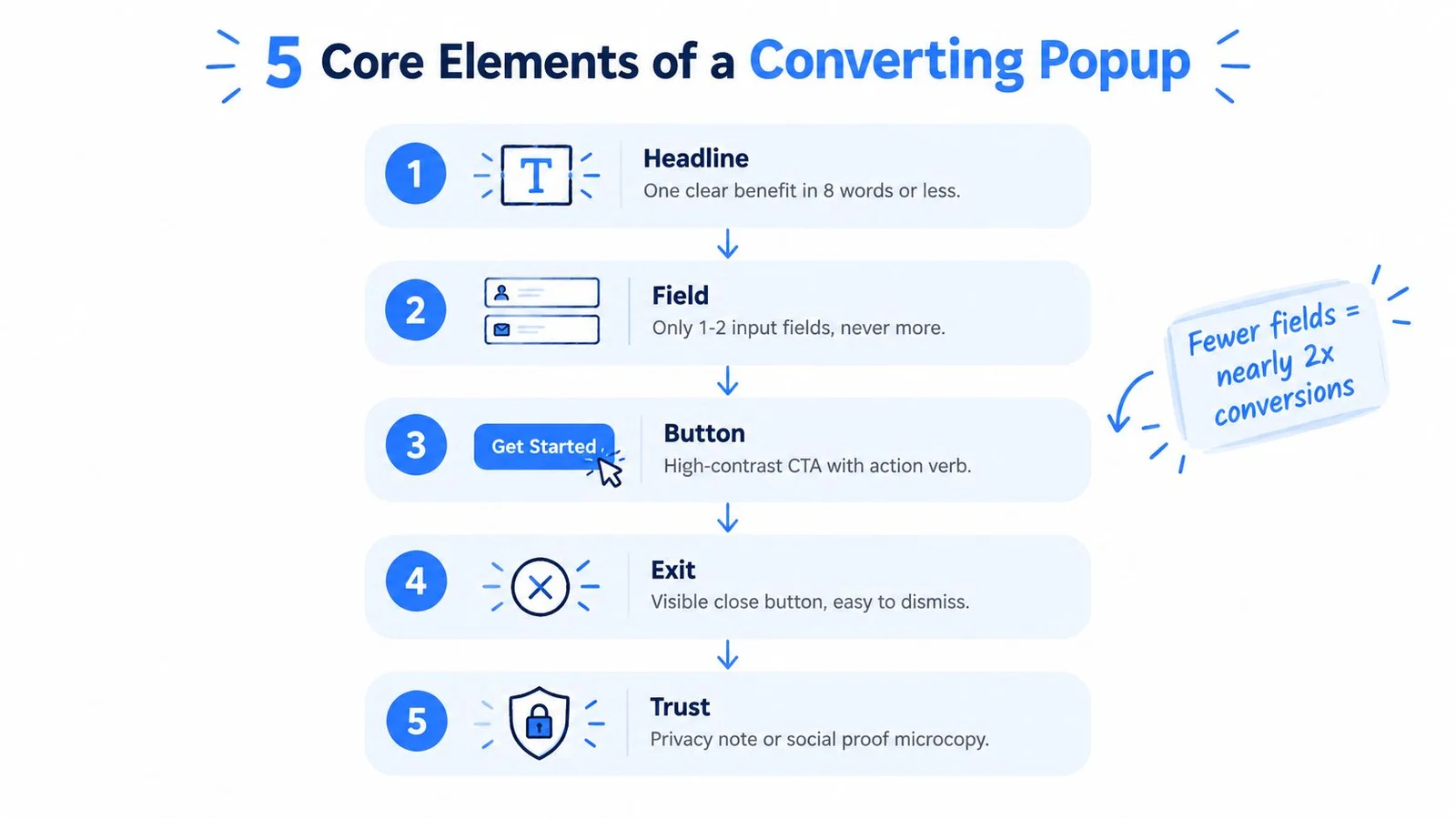
A high-converting popup usually isn't clever, it's disciplined. It gives the visitor one thing to do, one thing to understand, and one obvious way out. That sounds basic, but most poor-performing overlays fail because they stack too many jobs into one small box.
Start with a single action
The popup should have one primary action. If you want someone to sign up, don't also ask them to browse, compare, and read three paragraphs of brand story. Product pages usually do better with a direct offer tied to the item in view, course launches work better when the value is concrete, and webinar registrations need a clear reason to register now. On a replay page, a conversation that stays pinned to the pitch moment often converts better than another timed overlay, which is where FOMOchat fits as an AI social-proof alternative to interruption-heavy popups.
The headline should do the heavy lifting. The subhead should remove uncertainty. The button should make the next step obvious, with a verb that says what happens next, not generic filler.
Keep the layout light and readable
Viewport-safe sizing matters more than decorative styling. A popup that feels elegant on desktop can become cramped and hostile on a phone if it steals the entire screen or hides the close button. Scannable copy, strong contrast, and a clear hierarchy between headline, form, and CTA make the panel feel fast instead of busy.
Use form fields sparingly. The benchmark pattern in the research brief shows that fewer fields tend to win, which matches what most operators see in practice, every extra field is another reason to abandon. A practical guide on how to build an email list is useful if you're thinking through list growth, but the popup itself should still feel like a quick exchange, not an application.
Good popup copy does one thing well, it makes the value exchange feel smaller than the benefit.
Respect the exit
A visible close affordance isn't decorative, it's part of the persuasion. Visitors trust popups more when they can dismiss them easily, especially if they're comparing options or just not ready. The moment a popup starts trapping attention, it stops feeling like marketing and starts feeling like friction.
For teams that want an extra design reference, best widget design is a useful nearby concept because the same visual discipline applies to chat, support, and lead capture overlays. The best panels don't look louder, they look easier.
Mobile-First Popup Sequencing That Feels Natural

Mobile popup design fails when teams copy desktop behavior onto a smaller screen. The result is a panel that covers the content, hides navigation, or turns a simple prompt into a wrestling match. In a benchmark of 3,034 lead-collecting popups, forms with one or two fields achieved median conversion rates of 0.88% and 0.94%, compared with 0.56% for three fields, and mobile accounted for 63% of popup displays with mobile conversion at 1.02% versus 0.57% on desktop. That's a strong sign that mobile needs its own sequencing logic, not a shrunken desktop modal.
Use a layered flow instead of one hard interruption
Start with a non-blocking teaser or a chat affordance. Let the visitor acknowledge it on their terms, then reveal the full prompt only after an intent signal such as scrolling, returning, clicking a product, or spending time with the page. If you'd rather open with a conversation than a modal, our shortlist of the best website chat widgets is a useful companion, and the how-to on how to add pop-ups covers the lighter overlay patterns. That sequence feels calmer because it gives the visitor control before asking for contact details.
On mobile, the close action should be obvious and easy to hit. Large tap targets matter more than decorative icons, and the panel should stay within the viewport without covering every useful control. Covering checkout buttons or forcing a tiny dismiss action is how a light nudge turns into a support ticket.
Make the form earn its place
Ask for the minimum that still lets you follow up well. A compact form is usually enough for most lead capture use cases, and if you need more context, get it later after the first conversion. That's especially true on product pages and webinar signups, where speed matters more than collecting every possible detail up front.
The same logic applies to keyboard and touch interaction. A popup that's easy to complete on a phone and easy to dismiss on desktop is usually the one that gets the most respectful attention. Improve your page performance before you add more UI, because a slow page makes every interruptive element feel worse.
The key is sequencing, not force. A teaser, then an intent signal, then a full prompt is far easier to accept than a full form on arrival.
Matching Triggers to Visitor Intent on the Right Pages
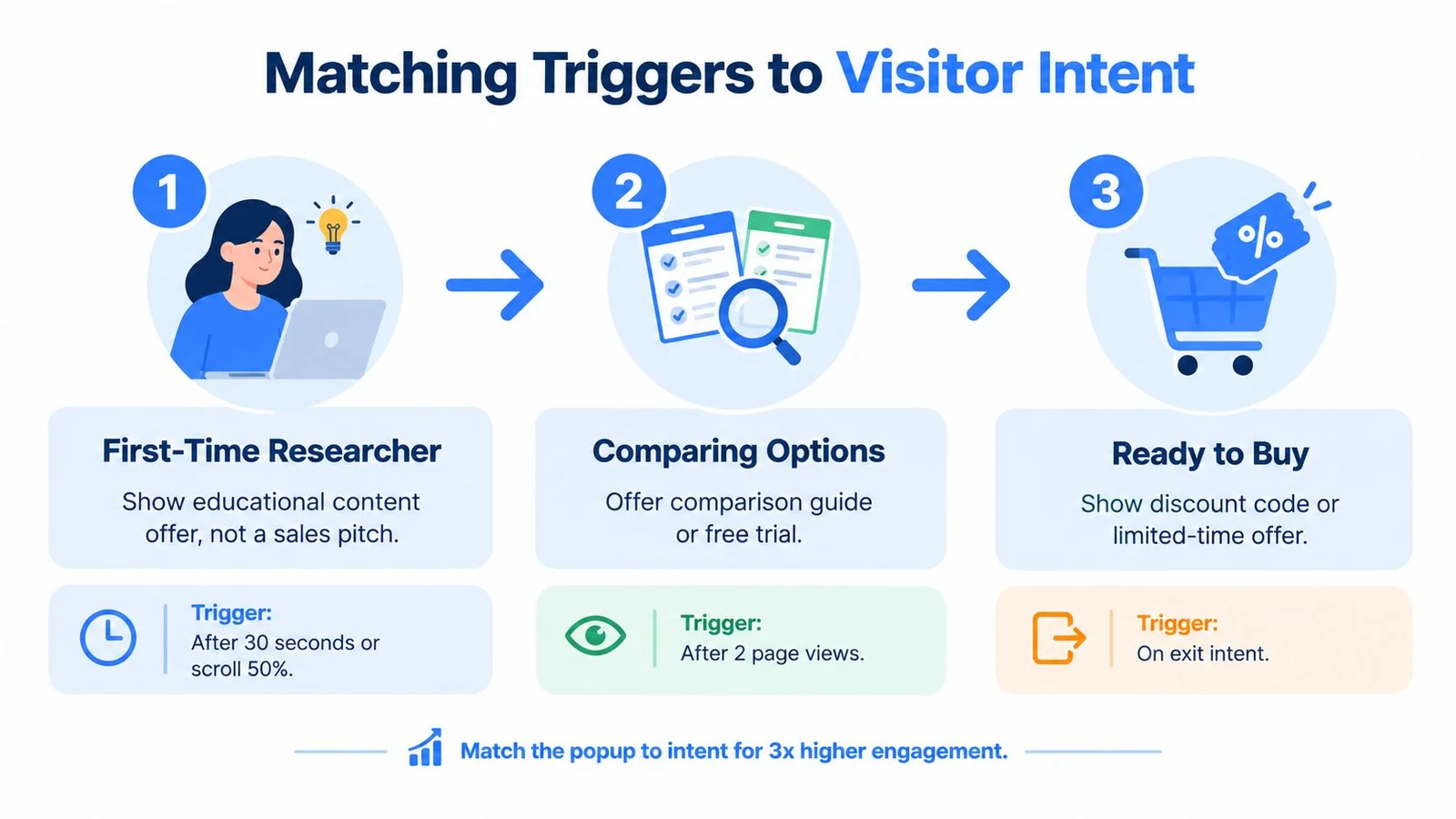
Timing should follow intent, not habit. A first-time researcher and a returning buyer should not see the same prompt at the same moment, because their willingness to act is different. The sharpest popup strategy maps the trigger to the page context, then matches the offer to the visitor's state of mind.
Use the page to tell you what kind of prompt belongs there
A home page usually needs a softer prompt than a cart or checkout page. The benchmark data in the brief shows a big gap between cart or checkout performance and home-page performance, which is exactly why generic timing rules fail. If someone has reached a checkout, a more direct prompt can make sense, but on the home page, you're still earning trust.
Search traffic deserves extra care. Google warns against overlays that show immediately on arrival or cover mobile content, so a prompt that appears too early can hurt both experience and visibility. A delay is not a weakness if it helps the right person decide.
Match trigger type to user intent
A time-based trigger works best when the visitor is reading and needs a little breathing room. A scroll trigger works when the visitor is already engaged with the page. Exit-intent belongs near the end of the journey, while click-based prompts work when the visitor has already chosen to open the conversation. For patterns that stay polite when someone is about to leave, see exit intent popup design notes alongside this guide.
For webinar pages, the trigger should often be tied to interaction with the pitch or agenda rather than a fixed timer. For product pages, look for signals like comparison behavior or repeated visits. For course pages, a prompt tied to a specific lesson preview or syllabus section is usually more natural than a broad sitewide modal.
Avoid duplicate pressure
Dismissed popups should stay dismissed. Repeating the same prompt after a close is one of the fastest ways to turn relevance into annoyance. If you need another touchpoint, change the message, the trigger, or the format so the visitor feels progression instead of harassment.
The best trigger is the one that feels like a response, not a demand.
If you work in launch or webinar flows, a lightweight widget can outperform a blunt modal. FOMOchat lets teams place on-site conversation widgets with customizable colors, positioning, and conversation style, which makes intent-matched placement easier to test without rebuilding the whole page. Real-time proof still helps, and our roundup of the best social proof tools covers the wider options when you need both conversation and lightweight notifications.
Designing for Accessibility as a Conversion Strategy
Accessibility gets treated like a checklist because that's the easiest way to talk about it. Add Escape-key dismissal, trap focus, return focus to the trigger, mark the overlay as a dialog, and move on. That's not wrong, but it's incomplete, because accessible design changes how a popup feels, and how it feels affects whether visitors trust it enough to convert.
Google identifies overlays that cover mobile content or require dismissal before access as frustrating and potentially harmful to search performance, which makes accessibility a conversion issue as much as a compliance issue. The interstitial guidance from frontend checklist is useful here because it reflects the practical reality that blocked content creates frustration before it creates leads.
Think beyond compliance
An accessible popup reduces hidden friction for everyone, not only for people using assistive technology. Keyboard users want an obvious dismissal path. Screen-reader users need predictable structure. People with motor impairments benefit from large controls and fewer target misses. Mobile users benefit from the same thing, fewer tiny precision tasks in a small space.
That's why a non-blocking prompt or a bottom-sheet panel can outperform a heavy modal in some situations. If the visitor is researching, watching a pitch, or filling out a form, the safest choice is often the one that interrupts least while still being discoverable. Visibility matters, but intrusive visibility isn't automatically persuasive.
Compare formats by task burden
Inline prompts are easier to ignore, but they're also easier to accept naturally. Banners are good for notices and light offers. Bottom sheets can work well on mobile because they preserve context. Traditional dialogs remain useful when the action needs focus, but they should be reserved for moments where interruption is justified.
A good test is simple: ask whether the popup helps the visitor finish the page's main task or gets in the way. If it gets in the way, the conversion rate you see may be paying for discomfort you didn't measure. That's how accessible patterns become better marketing, they make the right action easier without making the rest of the page unusable.
A One-Variable-at-a-Time A/B Testing Framework
A popup test only tells the truth when you change one thing at a time. If you alter the offer, the copy, the trigger, and the layout in the same experiment, you'll never know which piece mattered. The metric to use is simple, completed email or phone submission divided by popup displays, then segmented by device and page type.
What the benchmark numbers actually suggest
Across 28,674 campaigns covering 499.6 million popup displays and 1.84 million leads, the median lead-conversion rate was 0.83%, with the top 25% at 1.96% and the top 10% at 3.87%. The same benchmark found measurable differences for offer, form, and targeting, but not for button color or delay length. That's a good sign that substance matters more than polish.
Test the variables that can actually move intent
Start with the offer. Then test form length. Then test trigger logic or page targeting. If the popup is already strong, you can refine the headline or the CTA wording, but don't waste time pretending color alone will rescue a weak message.
Downstream quality matters too. A form that pulls in lots of low-intent leads can look good in the dashboard while hurting sales follow-up, registration completion, or revenue per thousand impressions. That's why I'd rather see a team track qualified conversations and signups than celebrate shallow captures.
| Variable | Median Conversion | Top Quartile | When It Matters |
|---|---|---|---|
| Offer | Not specified in the benchmark | Not specified in the benchmark | When the value exchange feels too weak or too generic |
| Form length | Higher with fewer fields | Not specified in the benchmark | When the ask feels too heavy for the visitor's intent |
| Targeting | Measurable differences observed | Not specified in the benchmark | When different pages or audiences show different readiness |
| Button color | No measurable difference reported | Not specified in the benchmark | Rarely, unless contrast is a usability problem |
| Delay length | No measurable difference reported | Not specified in the benchmark | Only after you've tested offer and targeting first |
Don't optimize the easiest variable just because it's visible in the builder.
If you want a working structure for experimentation, A/B testing should focus on one change per round and one downstream quality metric per cohort. That keeps you honest when the winner in clicks is not the winner in revenue.
Your 30-Day Rollout Plan and Anti-Patterns to Skip
Start with an audit. Identify every popup on the site, the trigger behind it, and the page context where it appears. Remove any prompt that blocks navigation, covers checkout, or shows too early on mobile, because those are the fastest ways to lose trust before you can earn a lead.
A simple rollout sequence
In week one, rewrite the popup's job in plain language, then cut the copy down until the headline, subhead, and CTA each have one responsibility. In week two, rebuild the layout for mobile first, with a visible close button, large tap targets, and a form that asks only for what you need. By week four, run one-variable tests on offer, targeting, and form length while keeping the rest of the experience stable.
If you're comparing your current approach against broader CRO patterns, how to improve your conversion rates is a helpful companion read because it keeps the focus on funnel quality, not just surface clicks. That's the right mindset for popup work too.
Anti-patterns worth cutting immediately
- Blocking core page actions: If the popup hides checkout, navigation, or key content, it's fighting the page.
- Making dismissal hard: Tiny close icons, hidden close paths, and trapped focus create resentment fast.
- Repeating the same prompt after dismissal: A dismissed visitor is giving you a signal. Respect it.
- Testing too many changes at once: Simultaneous redesigns make the data useless.
- Judging success by captures alone: Measure what happens after the submit, not just the submit itself.
The strongest popup strategy is usually the least dramatic one. It arrives at the right moment, asks for the right thing, and leaves room for the visitor to keep moving if the answer is no.
If you want to ship web popup design that converts without feeling pushy, FOMOchat gives you a customizable on-site chat widget with control over colors, positioning, and conversation style. Conversations beat notification popups when the visitor still has a question, and you can see how an embedded conversation layer supports product pages, launches, courses, and webinars without turning the page into a wall of interruption. For more conversational patterns, browse a few conversational marketing examples.