
You've got two browser tabs open, both showing a cordless drill, and the spec sheets look almost identical. One has 400 reviews and a bestseller badge. The other costs less and mentions a brushless motor. What you want is someone who knows the difference to look at your hallway wall and tell you which box to carry to the counter.
That's what a product recommendation is supposed to do. It shows up when you haven't decided, points at one option, and gives you a reason to stop comparing. The reason is the part that matters, and it's the part most sites hide.
What a Product Recommendation Is
You walk into a hardware store and ask for a drill to hang two shelves. The person behind the counter doesn't reach for the first box on the shelf. She asks what the wall is made of, hears "plaster over brick", and hands you a hammer drill with a masonry bit. A standard drill, she says, will chew the plaster and stall.
That exchange holds the whole definition. A product recommendation is a specific item offered to someone who has not decided yet, chosen from signals about what that person needs.

Online, software holds the same conversation at scale. The site reads what a visitor viewed, clicked, searched for or bought, then shows a "customers also bought" row, a "you may like" carousel, or a short list of best fits. Shopify stores lean on these blocks heavily, and a guide to boosting average order value on Shopify covers how they get configured and where they sit on a page. The machinery changes. The job doesn't.
The three parts worth separating
- The item. One product, plan or course, not a category page.
- The reason. Why it fits this person: the wall material, the budget, the skill level, the thing they already own.
- The placement. Where the suggestion appears, such as a product page, the cart, a post-purchase email or a chat window.
Separating those three matters because quality lives almost entirely in the second one. Two sites can show you the same drill and only one explains that it handles masonry.
A recommendation is not automatically a favor. A suggestion with no stated reason narrows a choice the shopper hadn't finished making, or steers them toward whatever sells best rather than what fits. Personalization that ignores fit just gets faster at being wrong, which is why the difference between personalization and customization is worth knowing before you trust either word on a button.
A recommendation is a suggestion with a reason. The reason decides whether it helps.
Every recommendation of product or service rests on that implied claim: this fits you, and the reasoning behind it. The rest of this guide teaches you to check the reasoning and to notice when there isn't any.
Four Recommendation Types and How They Choose
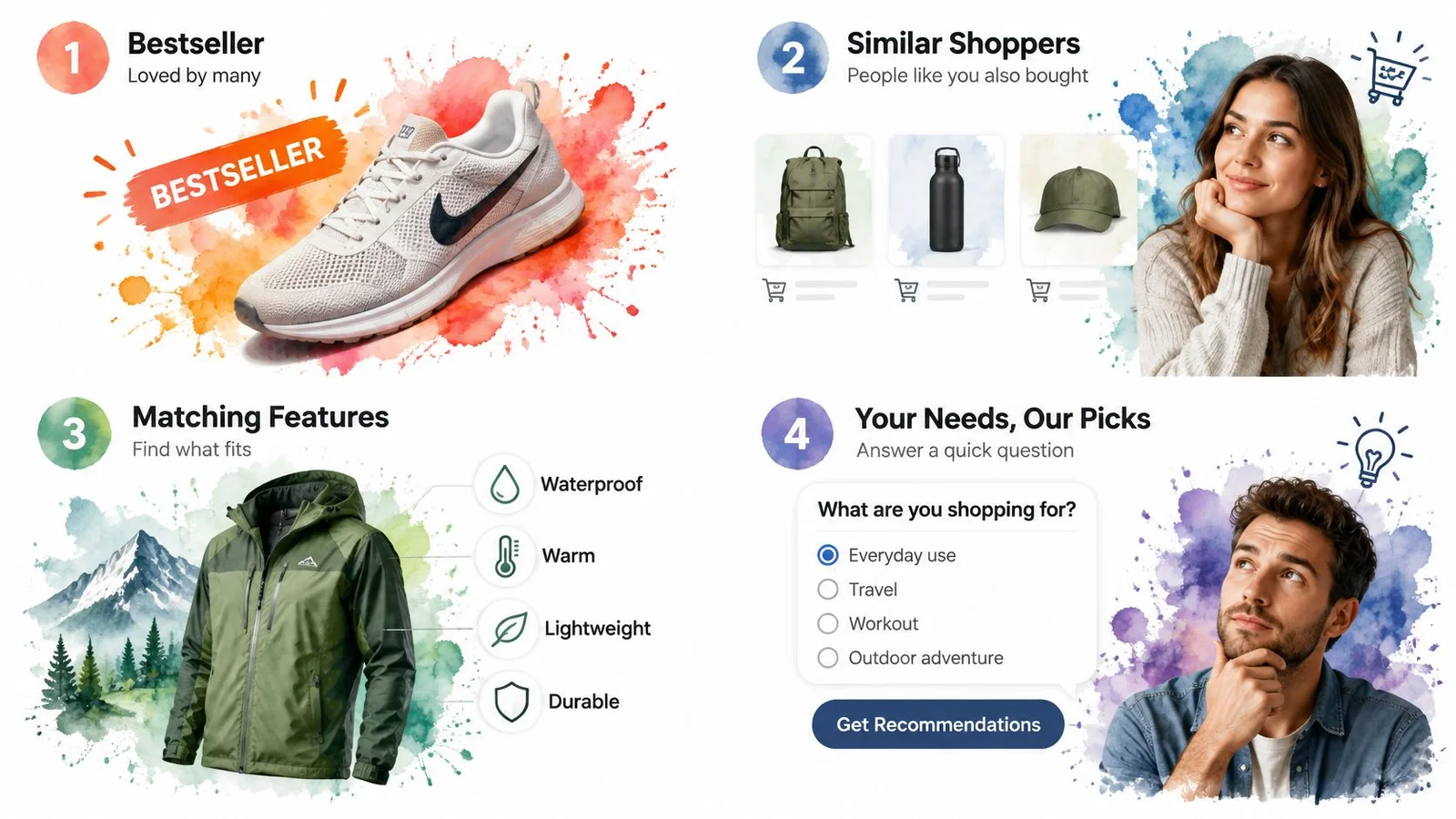
Not every suggestion is built the same way, and knowing which method produced the one in front of you tells you how much weight to give it.
| Recommendation type | How it chooses products | Works best when | Main weakness |
|---|---|---|---|
| Popularity-based | Shows bestsellers or top-rated items | The visitor is new to the category | Ignores the visitor's own needs |
| Collaborative filtering | Shows items that similar shoppers bought or viewed | The site has a large history of shopper behavior | Weak for new products and new users (cold start) |
| Content-based matching | Matches attributes such as price, size, category and features | Product data is detailed and accurate | Can repeat near-duplicate products |
| Needs-based questions | Asks about budget, use case or skill level, then ranks options | The purchase is expensive or hard to reverse | Adds friction and depends on honest answers |
Popularity needs no history and rarely embarrasses anyone, which is why a "Top sellers" row sits on so many homepages. It says nothing about fit, and it points every visitor at the same handful of items.
Collaborative filtering finds shoppers whose behavior resembles yours and shows what they bought. It needs volume, so new products and first-time visitors are its weak spot. Model choice doesn't close that gap by itself: benchmark comparisons of top-k ranking models show stronger results for neural and graph-based methods, while noting that offline gains don't carry over automatically because cold-start users and sparse products carry less signal to work with.
Content-based matching compares attributes like price, size, category and compatibility. It shines when catalog data is clean and detailed, and it fails by repetition, which is how you end up with five near-identical drills in a row.
Needs-based questions flip the order. A course site that asks how much experience you have before showing the beginner track is doing this. It costs the visitor a step, so it earns that step only when the purchase is expensive or hard to reverse.
Why a relevant list can still be a bad one
Relevance isn't the only thing a list should be graded on. A system can score well on accuracy and still serve five near-duplicates, shrinking discovery and hiding most of the catalog. A survey of recommender-system objectives found relevance was a goal in 94.7% of reviewed studies, while coverage appeared in 15.8% and novelty in 21.1%. The metrics a team chooses shape the list a shopper sees.
What moves sales is narrower than many assume. A randomized field experiment published in 2022 on an online book retailer's website found that personalized recommendations raised the propensity to purchase by 12.4% and basket value by 1.7%, according to the study of recommendation effects on purchase behavior. The gain didn't come from showing more inventory. It came from shoppers considering a wider set of alternatives and evaluating them more carefully. The design target is a decision, not a fuller screen.
The reason test: open a site you shop on and check whether each suggestion is labelled with why it's there, such as "because you viewed", "popular in this category" or "fits your budget". A labelled reason can be judged. A bare list can't.
Where Recommendations Add Revenue and Where They Don't
The largest field test of this idea ran on a major fashion retailer's website and came with an inconvenient detail. Researchers analyzed more than 2 million product-page views across nearly 1 million visitor sessions. Visitors who saw recommendations bought 9% more of the recommended products, while sales of the originally viewed products fell by 1.9%. After counting that shift, total product sales rose 11%, as reported in the University of Florida summary of the field experiment.
That 1.9% drop is the number most dashboards never show. Say a shopper opens a blue shirt page, spots a jacket in the "you may like" row, and buys the jacket instead. Shirt sales fall, jacket sales rise, and total revenue climbs. A report that counts only clicks on the recommendation sees a win. A report that counts only the shirt sees a loss. Neither one alone tells you what happened.
This is where cross-selling and upselling earns its keep, and also where it gets oversold. An add-on that raises basket value is a different claim from one that just pulls demand away from the item already in view. Only basket-level numbers can tell the two apart.
Two rules for judging the results
The same experiment delivered a second finding that complicates the first. Widely connected, popular products got a stronger sales lift from being recommended, while recommendations involving less-popular products could reduce sales. Pushing a niche item harder is not a neutral act.
Practical rule: measure revenue per visitor, not clicks on the widget. A recommendation block can look busy and still be taking demand from the page it sits on.
Then judge the outcome at basket or site level, because a single item is the wrong unit for this test. A short measurement list covers most of it:
- Revenue per visitor. The cleanest single number, since it counts what the recommendation added and what it displaced.
- Total basket value. Whether the session ended bigger than it would have without the suggestion.
- Completed orders or signups. Clicks on a recommended card are an intent signal, not a result.
- Recommended item versus originally viewed item, side by side. If the first rises while the second collapses by the same amount, you've rearranged demand rather than created it.
How Businesses Deliver Recommendations Across Channels
A suggestion is only as good as its timing. The same block that helps on a product page gets in the way on a confirmation screen, because the shopper is answering a different question at each step.

- Product page. A "frequently bought together" block adds what the item in view needs: the drill plus the bit set, the camera plus the memory card. The shopper is already deciding on this item, so the block answers "what else does this require".
- Cart. One short upsell before checkout suggests a matching accessory, such as a case for the headphones already in the basket. The decision is smaller here, so a single well-chosen option beats a carousel. If shoppers are bailing at this step anyway, our guide on how to reduce cart abandonment covers the fixes that come before any upsell.
- After purchase. A follow-up email recommending the refill, the companion course or the next module arrives when the buyer already trusts the first purchase. It reads as a next step rather than a pitch.
- Pricing page. A comparison that asks how many seats a team needs, then points at one plan, turns a feature grid into a recommendation. The visitor's question is which tier fits, not which tier has the longest list.
- Course catalog. A "pick by goal" filter that groups programmes by outcome, such as landing a first client or passing a certification, does the ranking work before the visitor scrolls.
If you run a Shopify storefront, a recommendation engine guide for Shopify merchants walks through how these placements connect to a catalog and where the data comes from. Placement gets sharper when the page reacts to what someone is doing right now, which is the promise behind real-time personalization.
Where conversation beats a carousel
Live chat suits a different moment: the visitor has a question and no row of products will answer it. A company assistant trained on the site's own content can respond using the product details, pricing and features published there, so the accuracy of that page content becomes the accuracy of the answer. Stale pricing produces confident, wrong recommendations, which is worse than no recommendation.
That's why grounding matters so much. Our explainer on how to prevent AI hallucinations walks through keeping a chat assistant tied to facts you've actually published. FOMOchat's AI rep works this way, answering from the content on your own site, so a fit question like "will this handle plaster over brick?" gets your answer instead of a guess.
Webinars run on the same principle. A Q&A thread that answers one common objection, such as whether a course assumes prior experience, does more work than a slide of testimonials. On a replay page, FOMOchat keeps those earlier questions visible, so later viewers see the objection asked and answered without waiting for a live host. Our guide to webinar chat covers how to set that up.
Match the question: name the decision the shopper is making right now, then pick the placement that supports it. If your block answers a question they haven't asked yet, it reads as noise.
Review and Influence Signals Shoppers Rely On
Reviews are the loudest signal in the room. In 2024, 80% of U.S. consumers reported being influenced to buy or avoid a product or service based on online reviews, according to Reviews.org's survey of 1,000 Americans. That's influence in both directions, which is worth remembering when a single angry review makes you abandon a good product.
| Consumer signal | Share of consumers | Survey and year |
|---|---|---|
| Influenced to buy or avoid a product by online reviews | 80% of U.S. consumers | 2024, Reviews.org survey of 1,000 Americans |
| Positive reviews made purchase more likely | 74.7% of surveyed Americans | 2024, CouponBirds survey of 1,014 respondents |
| Sought reviews to validate a company before buying | 70% of consumers worldwide | 2024, PwC Voice of the Consumer Survey |
| Bought after an influencer recommendation | 49% of U.S. and Canadian consumers, up from 40% the year before | 2024, 1WorldSync survey of 1,750 shoppers |
Those numbers tell you reviews move money. They don't tell you whether any particular review applies to you, and that's the gap people fall into. A star average compresses very different experiences into one decimal, and it hides which variant, region or use case the reviewer had in mind. It's the same weakness behind why notification popups fall flat for complex products: a count of happy buyers says nothing about whether you're one of them.
The contextual trap
Say a student is choosing a laptop and the recommendation engine surfaces the most reviewed model in the category. It has thousands of ratings, a high average, and a reputation built on running heavy design software. The student needs battery life and a light bag. A newer model with a few hundred reviews fits the actual job better, and the popular one wins on volume alone.
Sort the reviews before you weigh them. Check whether they're recent, since firmware and build quality change between production runs. Check whether they're verified purchases rather than drive-by opinions. Read the negative ones looking for a deal-breaking use case rather than a lower score, because "too heavy for daily carry" matters to one buyer and not another. Then ask the question that settles it: do these reviewers look like me, doing what I plan to do with it? The same dynamic shows up in social proof for ecommerce, where the volume of approval can crowd out the specifics of fit.
When ratings, review volume and your own context disagree, your context wins. Popularity is a prior, not a verdict.
When to Trust a Recommendation and How to Act On It
Trust in recommendations is thinner than the adoption numbers suggest. In a 2025 survey of consumers in the US, UK, Canada and Australia, 43% said they would trust information from an AI chatbot or tool, but only 14% trusted it completely, according to Attest's 2025 consumer adoption of AI report. The same survey found just 33% trusted how companies handle data collected through AI, and 74% said retailers should clearly disclose when AI-generated recommendations are being used.

Read those together and the picture is clear. People will use these tools, and they want to know what they're looking at. So learn the warning signs:
- An unlabelled sponsored slot. If the top suggestion is an ad and nothing says so, the reason behind it is money, not fit.
- Details that look frozen in time. A price from last quarter, or a stock status that contradicts the delivery estimate.
- One "best overall" pick with no stated needs. Nothing is best in general. A pick is best for somebody.
- No trade-offs anywhere. Every real product gives something up. A recommendation that names none is selling.
- Borrowed urgency. "Only today" on an item that's been discounted for a month.
What a trustworthy recommendation shows
A checkable suggestion exposes its working. You should be able to see where it came from, when its data was last updated, why it fits the needs you stated, what it gives up against the alternatives, which options it rejected, and how confident it is. That last part is rare and the most useful.
That's why fit-aware listing quality checks belong in the workflow. Keeping product context accurate enough to be checked is the operational half of trust, and resources on recommendation integrity treat that as a reviewable standard rather than a marketing claim. In our own setup at FOMOchat, the Configure step asks you to set up chat personas, define your product context, and choose a conversation style, which is exactly where the facts behind an answer get fixed.
A six-point check before you buy
- Confirm the stated needs match yours. If the system assumed a budget or a use case you never mentioned, start over.
- Check that price, stock and details are current. A recommendation built on stale data is a guess wearing a lab coat.
- Look for the missing trade-offs. What does this pick give up, and does that loss matter to you?
- Ask whether the placement is paid for. Sponsorship isn't disqualifying. Hiding it is.
- Test the review signals. Recent, verified, and written by people in your situation.
- Wait if confidence is low. Asking one question or sleeping on it costs minutes. A wrong £800 purchase costs months.
That last point runs against everything recommendation design rewards. Add more personalization, the logic goes, and conversion rises. But the 2025 shopper research on AI-mediated product discovery found that almost one in four consumers had used generative AI instead of a search engine to find products, rising to 41% among 18 to 34 year olds, and that the strongest preference boost went to products combining high ratings with high review volume. Volume and stars, in other words, are what the systems reward, whether or not they fit.
The answer isn't less recommendation. It's recommendation that asks first. A system that checks budget, region, workload and failure tolerance before it ranks is doing the hardware store's job properly.
A recommender that says it doesn't have enough information, or tells you to wait, is usually the one you should trust more. It has nothing to gain from your decision today.
FOMOchat puts that counter conversation on your own pages: an AI company representative trained on your website content answers visitor questions with your real product details, pricing and features, while group chats let people watch others ask the same fit questions before they commit. You set the facts and guardrails, review the outputs, and embed it with a small snippet. Start with a free preview at FOMOchat and see which questions your visitors ask before they buy.