You've got a visitor on your pricing page. They've read the headline, compared the plans, and reached the exact point where a small unanswered question can stop the sale. Maybe they're wondering whether a feature is included, whether a webinar replay is available, or whether the course is suitable for their situation. They don't want to open another tab, send an email, or wait on hold. They leave.
That's the job live chat for websites should do. It should remove decision friction while the visitor is still engaged, not merely provide a support inbox after the purchase. The widget, routing, response quality, and disclosure choices all determine whether chat becomes useful assistance or another ignored interface.
The Real Problem Live Chat Solves on a Website
A visitor rarely abandons a page because they suddenly dislike the offer. More often, they encounter uncertainty at the worst possible moment. A SaaS buyer sees two similar pricing tiers and wants to know which one supports their team. A course prospect wants to understand the workload before enrolling. A webinar registrant wonders whether the session will be recorded.
Without an immediate answer, that uncertainty expands. The visitor postpones the decision, looks for reviews, or moves to a competitor whose page makes the next step feel safer. A visible chat option gives them a low-effort way to ask before doubt turns into abandonment.
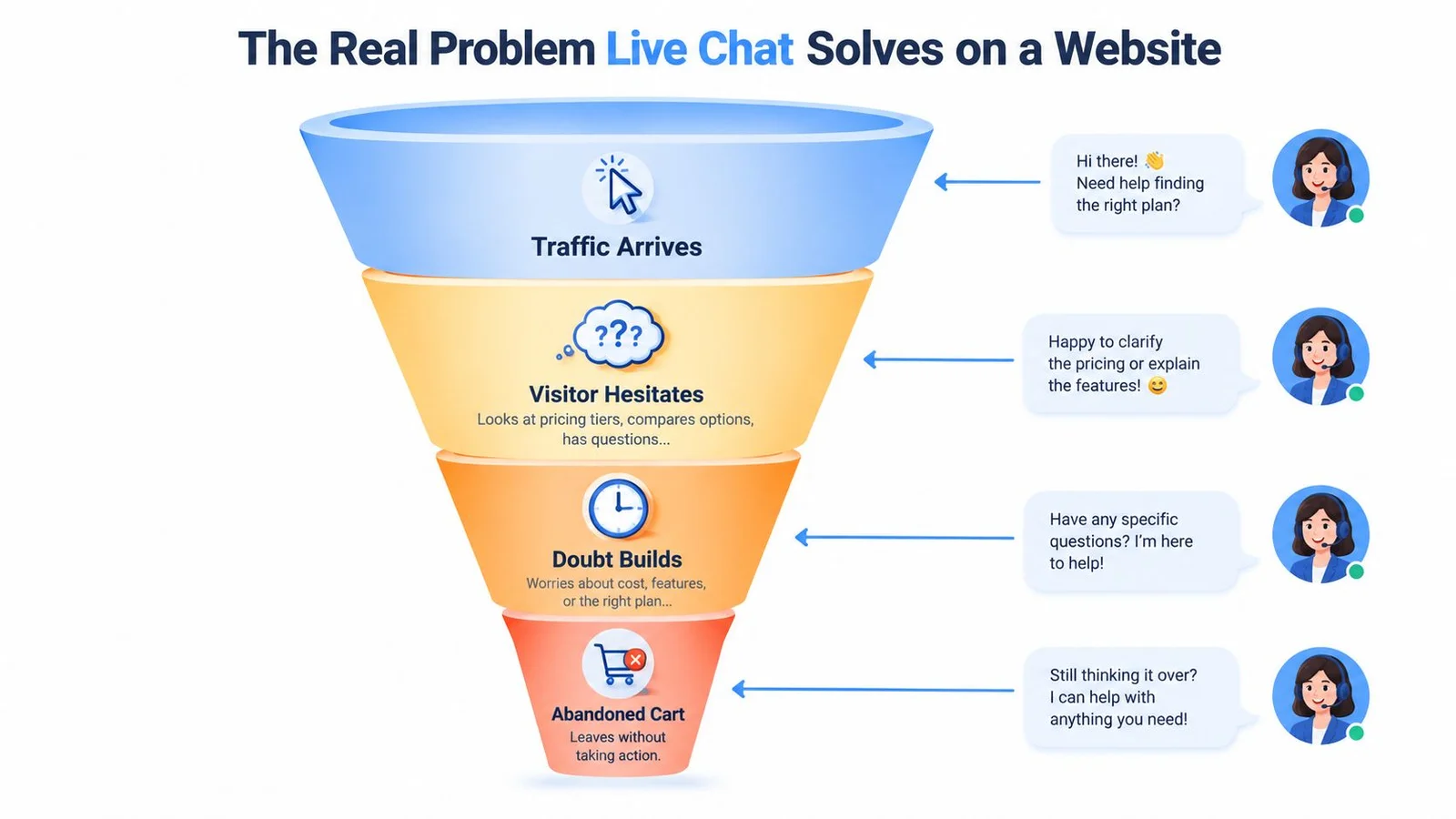
Chat is a decision layer, not just a help desk
The behavioral evidence supports that role. A J.D. Power finding cited by SuperOffice's live chat statistics reported that 42% of online customers preferred live chat, compared with 23% for email and 16% for social media or forums. The same source reported that 41% expected live chat on a company website.
Those preferences matter. Chat sits inside the buying context. The visitor can ask about the plan while looking at the plan, clarify course access while considering enrollment, or resolve a registration concern without leaving the page. That immediacy is more valuable than a generic “Contact us” link because it preserves momentum.
Practical rule: Hire chat to answer the question blocking the next action. Don't install it simply because every competitor has a bubble.
Your first task is to identify the friction point. Review sales calls, support tickets, abandoned checkout notes, and questions in webinar registration emails. The recurring questions usually reveal where chat belongs and what it should answer. Guidance on finding customer pain points can help you turn those questions into useful prompts, answers, and escalation rules.
A chat widget won't rescue a weak offer or confusing page. It can, however, catch a motivated visitor at the moment they need reassurance. That makes its placement and operating model commercial decisions, not decoration. If you're comparing tools for a lean team, our roundup of the best live chat software for small business is a practical next read.
What Live Chat Actually Is and How a Widget Works
Live chat for websites is an on-page conversation tool that lets a visitor send a message and receive an answer without navigating to email, a contact form, or a phone call. The experience feels synchronous even when an AI system or support queue handles the response behind the scenes.
The visitor sees a small bubble, bar, or panel. Your team sees an inbox, routing queue, CRM record, or AI conversation. Both experiences connect through a lightweight script embedded on the website.
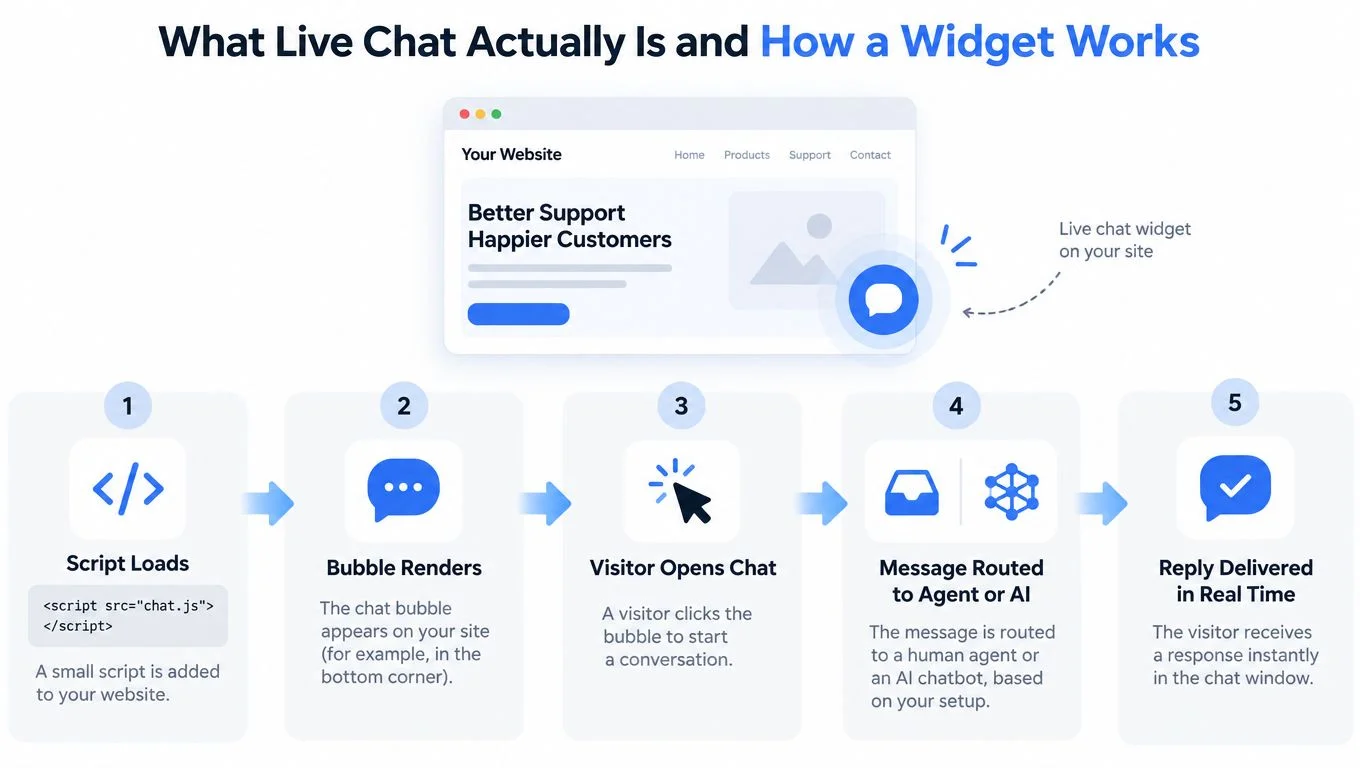
The visitor-side flow
A typical widget follows five simple steps:
- The script loads. A small piece of JavaScript runs when the page loads and connects the page to the chat service.
- The bubble renders. The interface appears in the position and style you configured, often near the lower corner of the page.
- The visitor opens chat. A click, timed prompt, scroll trigger, or proactive invitation starts the conversation.
- The message routes. The question reaches a human inbox, an automated workflow, an AI model, or a combination of these.
- The reply appears. The visitor receives an answer inside the page and can continue browsing while the conversation remains available.
The installation itself is usually simple, but implementation still deserves care. Your team should know which pages load the widget, what data the service stores, which events enter analytics, and what happens when nobody is available.
What makes chat different
A contact form collects a message for later. Email creates a separate task. Phone support requires the visitor to stop browsing and enter a queue. Chat keeps the conversation attached to the decision already underway.
That difference changes the questions people ask. Visitors may raise small objections they wouldn't bother writing into an email, such as whether a feature exists, whether a replay is included, or whether they can switch plans later. Those small questions often carry high buying intent.
For the technical side, use a platform-specific installation guide such as how to embed a chat widget. Our guide to the best website chat widget covers the UX choices that matter before you copy a script. Keep the first deployment narrow. Start with the page where uncertainty is highest, connect the widget to a clear destination for unanswered questions, and verify the full visitor-to-response path before expanding sitewide.
Human, Bot, and AI-Hybrid Chat Compared
No chat setup wins every job. A human team offers judgment, a rules-based bot offers consistency, and an AI-hybrid system offers broader coverage with controlled automation. The right choice depends on the questions visitors ask and the cost of getting an answer wrong.
Chat setup trade-offs at a glance
| Setup | Best For | Coverage | Answer Quality | Main Cost Driver |
|---|---|---|---|---|
| Human-only | Complex sales, sensitive support, high-value accounts | Limited by staffing and availability | Strong for nuanced conversations | Agent time and coverage |
| Bot-only | Repetitive FAQs and simple routing | Broad for predefined paths | Consistent but narrow | Configuration and maintenance |
| AI-hybrid | Product pages, courses, launches, and webinars | Broad with escalation options | Flexible when grounded by approved content | Knowledge setup, review, and escalation |
Human-only chat
Human chat performs best when context matters. A prospective enterprise buyer may need help mapping a product to an unusual workflow. A frustrated customer may need empathy and judgment rather than a scripted answer. A course creator selling a high-touch program may also prefer a real person to handle objections.
The weakness is operational. Coverage disappears outside staffed hours, response quality varies by agent, and every additional conversation consumes human attention. That's why teams often pair daytime humans with after-hours automation for 24/7 customer support. Human chat makes sense when the value of the conversation justifies that cost or when an inaccurate answer creates serious risk.
Bot-only chat
A rules-based bot is useful when the question set is stable. It can explain billing cycles, point visitors to documentation, collect a support category, or route someone to the right page. Its narrowness is an advantage when you need strict, predictable behavior.
The failure mode is obvious: visitors quickly reach the edge of the decision tree. If the bot offers buttons that don't match the visitor's question, the widget becomes a faster way to discover that nobody can help.
For broader automation context, how Shopify stores automate support is a useful resource because it shows how support workflows can combine self-service, routing, and human involvement. The same principle applies beyond commerce.
AI-hybrid chat
An AI-hybrid setup handles common questions automatically while preserving a human route for uncertainty, sensitive topics, or buying conversations that need judgment. On launch, course, and webinar pages, it can also combine answers with curated social proof, such as questions that reflect concerns other visitors share.
That combination is powerful only when it remains transparent. The visitor should know when software is responding, what information shaped the answer, and how to reach a person. For a deeper distinction between automated responses and agent-led conversations, see chatbot versus live chat.
The decision is straightforward. Choose human-heavy coverage where nuance and trust dominate. Choose a rules-based bot where predictability dominates. Choose AI-hybrid chat where demand is broad, questions repeat in varied language, and social proof can reduce hesitation without pretending to be a human conversation. For support-heavy pages, our guide to conversational AI for customer support shows how to keep automation helpful without sounding robotic.
Implementation Best Practices That Actually Move Conversion
A chat widget improves a page only when it appears at the right moment, answers the right question, and makes the next step easier. Treat implementation as part of the page experience.
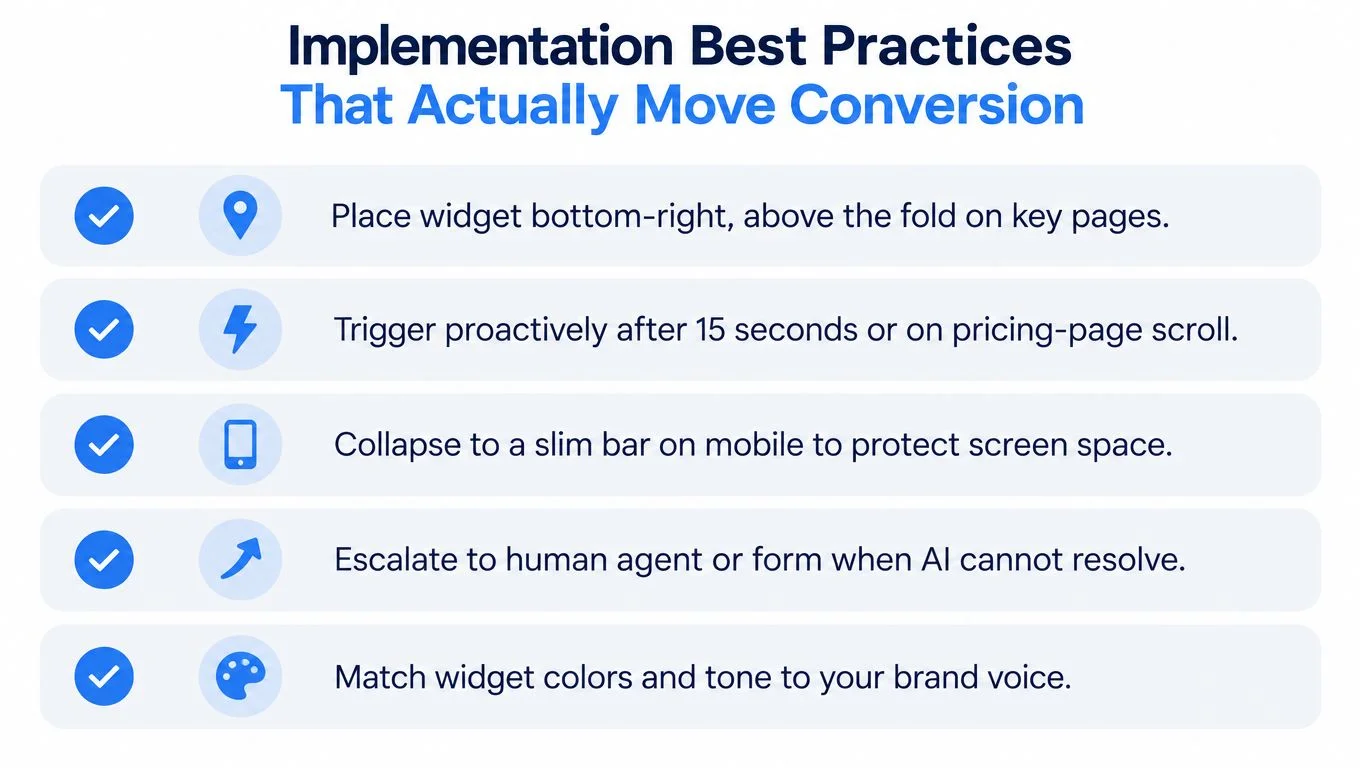
Use a practical setup checklist
- Place the widget where decisions happen. Start on pricing, checkout, enrollment, product, and registration pages. Keep the bubble visible without covering the primary button, form fields, cookie controls, or video controls.
- Trigger help with intent, not impatience. A proactive prompt can appear after meaningful engagement, such as time spent reading pricing or reaching a key section. Avoid launching a large greeting the instant the page loads. It interrupts visitors before they have a question.
- Design for mobile first. Mobile visitors have less space and less patience for overlays. Use a slim bar or compact bubble, keep the close control obvious, and make the message field easy to use with a thumb.
- Give every conversation an escape route. AI should hand off to a human, contact form, booking flow, or relevant resource when it lacks confidence. Don't force visitors to repeat their question after escalation.
- Match the brand. Use the same colors, vocabulary, tone, and level of directness as the page. A polished sales page paired with a cartoonish or overly casual widget creates distrust.
Response speed also shapes the experience. A Freshworks compilation reported that answering an inquiry within 5 to 10 seconds produced an 84.7% customer-satisfaction rate. See the Freshworks live chat statistics for the cited benchmark. If your team can't respond quickly, use an honest availability message and let the visitor leave useful context.
Keep the first message useful
Don't open with “How can I help?” unless you have a reason to ask such a broad question. On a pricing page, offer choices such as plan selection, feature availability, implementation, or billing. On a webinar page, ask whether the visitor needs information about the agenda, replay, access, or registration.
Collect only what the conversation needs. If you need a lead form, keep it focused and explain why you're asking. The practical reasoning behind why FormBackend recommends shorter forms applies here too: every unnecessary field creates another opportunity for a motivated visitor to stop.
Disclose AI before the visitor relies on it
Label the AI clearly near the chat title or first response. Add a human handoff option, state whether conversations may be stored, and avoid requesting sensitive information until the visitor understands how the data will be handled.
This isn't a cosmetic compliance note. A January 2025 survey of 5,000 consumers across the United States, United Kingdom, Canada, and Australia found that 54% were likely to engage with an AI chatbot, but only 33% trusted companies with data collected through AI. The same research reported that more than 80% of consumers across 14 markets believed AI-created content should be clearly labeled. Those findings are detailed in the AskAttest consumer adoption of AI report.
Train the system on approved product facts, define prohibited claims, require confidence qualifiers, and review conversations for hallucinations. The best widget doesn't sound most human. It makes the visitor feel informed and in control.
Metrics That Matter and the Ones to Ignore
Chat volume isn't growth. A busy widget can indicate strong intent, poor page clarity, a confusing offer, or an intrusive trigger. Measure what happens after the conversation, not just whether someone clicked the bubble. Clicks aren't conversions.
Track the full path
Chat-started rate tells you whether visitors notice and accept the invitation. It helps diagnose placement and trigger behavior, but it isn't a success metric by itself.
First-response time shows whether your operating model matches visitor expectations. Track the distribution, not only an average, because a fast answer followed by a long silence still feels broken.
Resolution rate measures whether the conversation reaches a useful outcome without unnecessary handoffs. Define resolution around the visitor's task, such as choosing a plan, finding an access detail, or completing registration.
Customer satisfaction adds a direct quality signal. Pair it with conversation review because satisfied responses can still fail to produce a qualified outcome.
Qualified-lead rate separates curiosity from commercial intent. Tag conversations by page, question type, product interest, and next action so the sales team can see which interactions deserve follow-up.
Assisted conversion rate connects chat exposure to the business outcome. Count conversions where chat influenced the journey, while keeping the attribution rule consistent. Don't claim that chat caused every conversion from a visitor who happened to see the bubble.
The Freshworks benchmark cited earlier demonstrates why response time belongs in this dashboard, but the number isn't a promise for your site. Traffic quality, offer complexity, staffing, page placement, and answer accuracy all change the result.
Measure the question answered, the action taken, and the revenue quality that follows. A raw message count can't tell you any of those things.
Ignore isolated activity numbers
Total chat volume, raw message count, and average session length are diagnostic signals at best. A long session may mean strong engagement, or it may mean the visitor couldn't get a clear answer. High volume may reflect a successful campaign, or a broken checkout.
Use event names your analytics team can understand:
- Chat opened: The visitor engaged with the widget.
- Intent selected: The visitor identified a topic or objection.
- Answer delivered: The system or agent responded.
- Escalation requested: The visitor needed human help.
- Qualified action completed: The visitor booked, enrolled, registered, or purchased.
- Chat-assisted conversion: The defined conversion occurred after meaningful chat interaction.
For a focused view of live chat conversion rate, keep the denominator and attribution window stable. Review the data by page type rather than blending support chats with sales conversations. The same widget can be excellent for support and weak for conversion if the team treats both interactions as one category.
Choosing the Right Chat Widget for Your Page Type
Start with the visitor's intent, not the vendor's feature list. A pricing page, course offer, webinar registration, and post-purchase help page need different conversation designs.
SaaS product pages
Use AI-hybrid chat when visitors ask varied questions about integrations, permissions, workflows, or plan fit. Sales teams often treat this page type as live chat for sales rather than a generic help desk. Ground answers in your approved documentation and pricing content. Offer a human route for security, procurement, implementation, and account-specific questions.
A pure FAQ bot works when the page has a narrow question set. It becomes limiting when buyers phrase the same objection in many different ways or need help comparing options.
Course sales pages
Course buyers often need reassurance about fit, schedule, access, support, and outcomes. An AI representative can answer grounded questions immediately, while curated participant-style conversations can surface objections that the sales page doesn't address directly.
Don't fabricate testimonials or imply that automated participants are independent customers. If the widget presents generated or curated social proof, label its nature and keep claims tied to verifiable course information.
Launch and webinar pages
Launch pages benefit from timely answers because visitors may arrive during a concentrated campaign window. A widget can handle agenda, access, replay, timing, and product questions while a human handles urgent or high-value conversations.
An AI-hybrid social-proof widget, including FOMOchat, fits this page type when the credibility bottleneck is as important as the information gap. Unlike toast-style social proof widgets that only flash a purchase notification, FOMOchat combines an AI company representative trained on website content with interactive group conversations, customizable guardrails, and embed-based installation. Keep the experience transparent, especially when conversations are generated or synchronized with video moments.
High-intent checkout and support pages
Use human-heavy chat when the visitor is already close to payment or needs help with a sensitive account issue. A rules-based workflow can handle predictable billing and access questions, but it should escalate quickly when the visitor signals frustration or asks for an exception.
For broader implementation considerations, live chat software for e-commerce provides useful context on placing chat inside shopping journeys. The principle is the same for SaaS and education: protect the primary action, answer the immediate objection, and avoid turning support into a maze.
The trust decision matters most with AI. The cited consumer research found 54% likely to engage with an AI chatbot, while only 33% trusted companies with data collected through AI. Use that gap as a design warning. Label the bot, explain data handling, include a human path, and measure qualified conversion rather than optimizing for chat starts.
Putting It All Together and Iterating After Launch
The right choice is simple: use the lightest chat setup that can answer the visitor's real objection without sacrificing trust.
Start with one page and one outcome. Choose pricing and qualified demo requests for SaaS, enrollment for a course, registration for a webinar, or completed checkout for a store. Then select the operating model, write approved answers, define escalation rules, add AI disclosure, and embed the widget.
Before launch, test the experience as a visitor. Open it on desktop and mobile, ask a known question, ask an unsupported question, request human help, close the panel, and complete the primary conversion. Confirm that the events reach analytics and that the team knows who owns unanswered conversations.
After launch, review the first conversations for recurring objections, incorrect answers, confusing prompts, and unnecessary handoffs. Improve the page when chat repeatedly answers the same missing-information question. Improve the knowledge base when the page already explains the answer but visitors still need clarification.
Don't expand sitewide until the first page has a working operating rhythm. A useful chat system compounds because every conversation improves the answers, the prompts, the escalation policy, and the page itself. The widget is only the interface. The growth asset is the feedback loop behind it.
FOMOchat combines an AI website representative with interactive group conversations, customizable guardrails, and an embeddable widget for product pages, launches, courses, and webinars. Visit FOMOchat to create a transparent chat experience that answers objections while adding relevant social proof to the page.