You're reviewing a pricing page on your phone. The offer looks clear, the signup button is visible, and a floating chat bubble sits in the corner. But would a visitor know whether it opens a help desk, an automated sales pitch, or a conversation with someone who can answer?
That's why a generic support chat icon deserves more attention than its size suggests. A vague symbol gives visitors little reason to interrupt their browsing. A useful label, honest availability signal, and sensible position give them a clearer next step.
Before changing the artwork, identify SaaS site conversion barriers. If visitors can't understand your pricing or find enrollment requirements, chat should help resolve those questions, not hide the underlying problem.
If you're choosing between a chat launcher and another interruption pattern, compare a real conversation against a notification popup that only flashes social proof. Visitors usually prefer asking a question over dismissing another badge.
These launcher designs offer different ways to invite that conversation. Treat each as a testable design approach, not a guaranteed conversion lift. The useful outcome isn't just more opens. It's more relevant questions, resolved objections, and completed signups without unnecessary distraction.
1. Classic Speech-Bubble Launcher
A round speech bubble in the bottom-right corner is a sensible starting point when you want chat to remain secondary to the page. Consider a SaaS product page where visitors should read the product explanation before asking about integrations. The launcher stays available without competing with every headline.

Start with placement, not decoration. Check the launcher against sticky signup buttons, cookie notices, video controls, and checkout fields. Try the opposite corner if the default position obstructs an important action, rather than shrinking the button until it's difficult to use.
Keep the implementation as quiet as the design
A benchmark of chat-widget performance found transferred payloads ranging from less than 100 KB to approximately 749 KB, with interface visibility taking roughly 2.5 to 9.4 seconds. That variation makes implementation quality part of the design decision.
Keep the initial launcher lightweight, load scripts asynchronously, and defer conversation assets until visitors interact or the primary content becomes usable. A small-looking icon shouldn't require a heavy application during the first render.
- Protect the main action: Leave pricing, form submission, and checkout controls unobstructed.
- Make interaction clear: Provide a visible focus state and a descriptive accessible name.
- Test the expanded state: An unobtrusive closed bubble can still open an oversized panel.
When comparing options, use this website chat widget guide alongside hands-on testing. Choose the widget that fits the page and implementation constraints, not just the launcher screenshot.
2. Brand-Colored Messenger Launcher
On a course sales page, a branded messenger button can feel more coherent than an unrelated help-desk overlay. Match the launcher to the site's visual language, then add a greeting such as “Questions about enrollment? Ask here.” That gives the color a useful job: identifying an available service rather than adding another decorative accent.

An Intercom-style messenger is a useful visual reference, but copying its silhouette won't establish trust by itself. Your greeting, response quality, and handling of unanswered questions need to match the promise of the design.
Practical rule: Use brand color to connect chat to the site, not to make it the loudest object on the page.
Check the launcher against light sections, dark sections, promotional banners, and its own open panel. If your primary brand color disappears against part of the page, use a contrasting boundary or an alternative treatment rather than forcing the palette.
Brand consistency includes accessible behavior
A chatbot accessibility analysis found that more than 80% of evaluated interfaces had at least one critical accessibility issue. Appearance alone isn't enough.
Test keyboard opening and closing, focus movement into the panel, Escape-to-close behavior, and focus returning to the launcher. New messages should be announced appropriately, and users should have a non-chat way to get help.
Use these widget design considerations to assess the whole experience. A polished button attached to an inaccessible conversation isn't a polished support experience.
3. Labeled Pill Launcher
“Ask about pricing” is a stronger starting hypothesis on a pricing page than an unexplained speech bubble. It tells visitors what the button does and gives them permission to ask about the issue already on their mind.
For an online course, try “Ask about enrollment.” On a webinar registration page, “Questions about attending?” may fit better. These are proposed microcopy examples, not proven winners, so test them against a neutral label and an icon-only version.
The trade-off is space. A pill-shaped launcher can communicate more, but it can also cover more content and compete with the primary call to action.
- Match the page: Refer to pricing, enrollment, access, or another relevant concern.
- Keep it compact: Remove words that don't clarify the action.
- Check narrow screens: Shorten or collapse the label only if the icon remains understandable.
- Measure question quality: More opens aren't useful if visitors immediately close the panel.
Make the opening conversation match the label
If the launcher says “Ask about pricing,” don't open with a broad promotional speech. Offer a relevant prompt about billing, plan suitability, or purchasing requirements, then let the visitor ask freely.
A Journal of Business Research study of dialogical interaction found similar satisfaction with chatbot and human interactions among customers pursuing utilitarian goals, while customers with hedonic goals reported higher satisfaction with human agents.
The practical distinction is intent. Automated answers may suit a factual enrollment question, while a hesitant buyer seeking reassurance may need a person. Write the label around what the visitor needs, then route the conversation accordingly.
4. Online Presence Dot Launcher
An availability dot makes a promise before anyone opens the conversation. If your webinar team is answering questions during an event, a status label such as “Event team available” gives the indicator a concrete meaning. Tools like FOMOchat pair that availability signal with group conversation and replay engagement, so attendees can keep asking after the live session ends. See our notes on webinar engagement tools for how chat fits the full event flow.
A green dot beside an unattended inbox does the opposite. Don't imply human availability just because an automated assistant can respond.
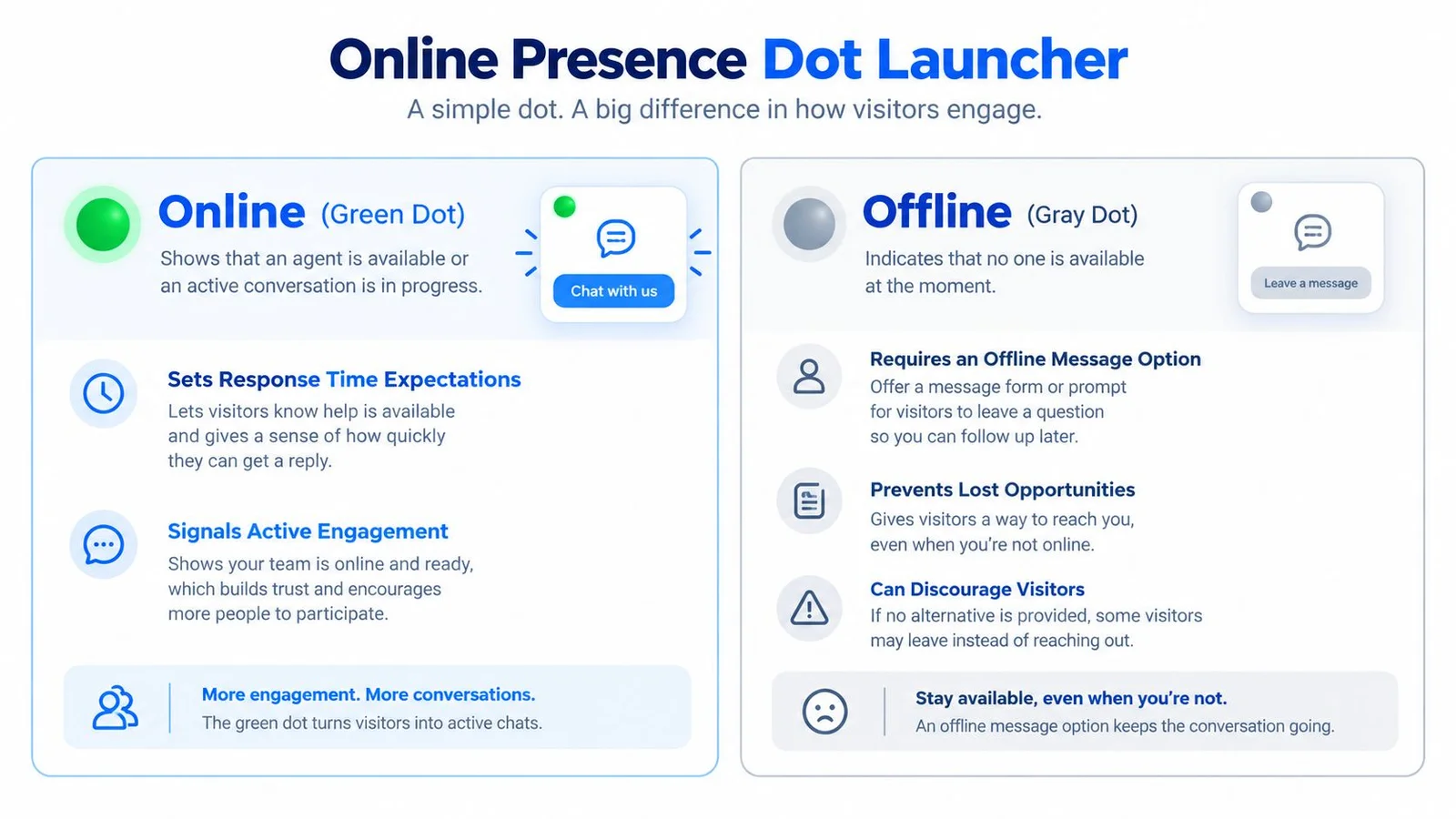
Use text alongside color so visitors don't have to interpret the dot alone. Distinguish between human support available, AI assistant available, and leave a question. Those are different services and should set different expectations.
Availability means someone or something can help now. It doesn't mean a human is watching, other visitors are present, or an answer is guaranteed.
Separate availability from social activity
For a product launch, you might want to indicate both support availability and an active group discussion. Keep those signals separate. The support team's status says who can answer; group-chat activity says something about participation.
If a conversation contains generated dialogue, label it accordingly rather than presenting it as live visitor activity. A presence indicator shouldn't become a shortcut for implying an audience that isn't there.
When staff leave, replace the live status with a clear next step. Let visitors submit a question, explain how they'll receive a reply, and avoid promising a response time your team hasn't committed to.
Evaluate this design through completed questions and successful resolutions, not just launcher opens. A credible offline state can be more useful than a misleading online one.
5. Human Avatar Launcher
A founder's face can be a fitting launcher on a founder-led SaaS page. An instructor's avatar can serve the same role beside a course offer. In both scenarios, the important question is whether visitors will speak to that person.

Use a clear, tightly cropped image that remains recognizable when reduced. The composition principles behind business headshots for LinkedIn are useful here, but choose a treatment that suits a tiny launcher rather than a full profile page.
A real face must not imply a live personal response when that isn't available. If an assistant answers on the instructor's behalf, explain that before visitors share their question.
Introduce the responder honestly
A Verizon customer-experience report reported satisfaction of 88% for mostly or fully human interactions versus 60% for AI-driven interactions, while 47% identified inability to reach a live human as their leading automation frustration. That supports providing an obvious escalation path, rather than treating an avatar as a substitute for access.
For an AI-assisted course chat, proposed opening copy could say: “I'm the course assistant, using information provided by the instructor. You can also contact the team.”
Use these website welcome-message examples to refine the introduction. Keep the avatar consistent, explain who answers, and make human contact easy to find when the assistant can't resolve the issue.
6. Unread Notification Badge Launcher
A badge is appropriate when a visitor has an unread reply. It's much harder to justify when someone has never opened the widget and the supposed message is only a sales prompt.
On a live webinar page, a notification could point to a new discussion reply or an unanswered question receiving a response. Name the event accurately. A new group message isn't necessarily a personal message for the visitor.
This video accompanies the notification example.
Use attention signals without manufacturing urgency
- Personal replies: Show unread status when a reply genuinely awaits that visitor.
- Group activity: Distinguish public discussion updates from direct support messages.
- Generated content: Label simulated dialogue rather than presenting it as current customer participation.
- Motion: Keep animation restrained and respect reduced-motion preferences.
A subtle dot may be enough. Persistent bouncing, repeated sounds, and an unexplained numeric badge ask visitors to investigate without explaining why.
A notification should report an event, not invent an obligation to click.
For social-proof chat, disclose what visitors are seeing before asking them to participate. FOMOchat leans on conversational AI social proof instead of fake urgency badges, which matches why social proof notifications often fall flat on complex products. Explain whether messages are public, whether dialogue is generated, and whether submitting a question exposes their identity to others.
Use pop-up notification guidance to think through timing and interruption. Test whether the badge produces useful conversations and completed registrations, not merely curiosity clicks followed by immediate closes.
7. Social Messaging Bubble Launcher
A WhatsApp-style launcher makes sense when the visitor will continue in WhatsApp. If the conversation stays inside your website, a distinctive branded bubble is a clearer choice than borrowing a platform's identity.
Consider a service-business landing page where visitors can choose between website chat and a messaging channel. The greeting should explain both routes before the visitor starts typing, especially if one route opens another application.
Familiar styling isn't permission to create a misleading destination. Use official platform assets only for a genuine connection to that platform, and describe what happens after activation.
Make the handoff predictable
- State the destination: Tell visitors whether they'll remain on the site or leave it.
- Identify the responder: Distinguish the business team from an automated assistant.
- Explain visibility: Say whether the exchange is private or part of a shared discussion.
- Preserve an alternative: Keep a contact form or another support route available.
The conversion trade-off is straightforward: an external channel may suit a visitor's preferences, but leaving the page can interrupt registration or checkout. Compare the complete path, not just the initial click.
Conversation quality still matters more than the borrowed shape. An academic analysis of more than 170,000 customer-service chats found that sentiment and mood during the conversation were the strongest predictors of perceived satisfaction.
Keep responses clear, relevant, and emotionally appropriate. If visitors need reassurance about a consequential purchase, don't force them through an upbeat scripted exchange that ignores their concern. The launcher should introduce a useful conversation, wherever that conversation happens.
7 Support Chat Icon Styles Compared
| Launcher Type | Implementation Complexity | Resource Requirements | Expected Outcome | Ideal Use Case | Key Advantage |
|---|---|---|---|---|---|
| Classic Speech-Bubble Launcher | Low: standard placement and styling | Minimal; icon and brand colors | Familiar, low-friction chat access | General support across desktop and mobile pages | Instantly recognizable and unobtrusive |
| Brand-Colored Messenger Launcher | Medium: coordinate launcher and chat-window branding | Brand colors, logo, and contrast checks | Stronger brand recognition and an integrated feel | SaaS products and course pages | Makes chat feel native to the brand |
| Labeled Pill Launcher | Low to medium: write and adapt concise labels | Short copy; responsive layout for mobile | Clearer purpose and potentially more clicks | Pricing, enrollment, or other conversion-focused pages | Explains the value of starting a chat |
| Online Presence Dot Launcher | Medium: connect status to real availability | Accurate availability data and an offline option | Sets response expectations and signals activity | Staffed support hours, live events, and webinars | Communicates whether help is available |
| Human Avatar Launcher | Medium: select and maintain a recognizable avatar | Quality headshot or illustration; consistent image | Builds personal connection and trust | Founder-led SaaS, courses, and webinar pages | Humanizes the support experience |
| Unread Notification Badge Launcher | Medium: trigger badges from genuine activity | Activity tracking; restrained animation if used | Draws attention and encourages visitors to resume chats | Active campaigns, demos, and live webinars | Makes new activity easy to notice |
| Social Messaging Bubble Launcher | Medium: configure channel links and set clear expectations | Platform assets or custom design; channel integration if needed | Familiar appearance may reduce hesitation | Audiences who prefer messaging apps | Can connect website chat with social messaging |
Turn Your Icon Into a Conversion Trigger
Choose a launcher according to the question visitors need answered. A classic bubble can keep support available without dominating the page. A labeled pill can make its purpose explicit, while an avatar or availability indicator needs especially careful expectation-setting.
Start with the page, not the icon gallery. On pricing pages, help visitors evaluate fit and billing. On course pages, clarify prerequisites and enrollment. On webinar pages, distinguish registration help from live discussion.
Then test the complete experience, including page performance. An observational comparison of sites with and without live-chat widgets reported mobile Core Web Vitals pass rates of 37.6% with chat versus 43.3% without chat. That doesn't establish causation, but it's a good reason to measure the widget on representative pages rather than assuming the technical cost is negligible.
Measure useful outcomes
Track launcher opens, submitted questions, resolved concerns, and completed signups alongside mobile and desktop performance. Compare an enabled experience with a suitable baseline, and avoid changing the icon, greeting, placement, and loading behavior simultaneously if you want to understand what helped.
Keep another contact route visible. These contact page recommendations for DFW businesses provide a complementary starting point for reviewing how visitors reach your team outside chat.
For social-proof implementations, review trust as carefully as click-through. Clearly distinguish real participants, generated conversations, and AI answers. Explain who can see submitted messages, what happens to transcripts, and how visitors can reach a person.
When you want the launcher to open a shared conversation instead of a private ticket thread, look at group chat for websites and how an embedded chat widget sits on the page. Conversational widgets answer questions in context. Notification popups mostly ask for another click.
A support chat icon is ready to keep when it helps visitors move forward without obscuring content, creating false expectations, or making the page harder to use. Pick a relevant style, write a specific invitation, and evaluate the conversation that follows.
FOMOchat combines an AI representative trained on your website content with customizable support chat and group conversations, including generated dialogue that should be clearly disclosed. Visit FOMOchat to explore a launcher that matches your page, configure its appearance and conversation context, and test whether it helps visitors get answers before signing up.