
A visitor lands on your pricing page at 9 p.m., clicks into chat, and asks one sharp question about refunds. If the reply is slow, vague, or too confident, that person leaves with more doubt than trust. Good chat support responses do three things at once: they answer fast, they answer accurately, and they leave the visitor with a clean next step. Miss one and the chat costs you.
The pressure on that first reply is higher than many teams admit. Zendesk research cited in a 2026 industry compilation surveyed 6,182 consumers across 22 countries and found that 88% expected companies to respond faster than they had one year earlier, while 74% expected customer service to be available around the clock (customer service statistics compilation). That makes chat a conversion surface, not just a support channel, especially on pricing pages, enrollment flows, launch pages, and webinar registrations. If you want a model for always-on coverage, this guide to 24/7 customer support shows why availability shapes trust before a sale is complete.
Strong chat replies also need a lane of their own. A response that works for a casual product question can fail on billing, eligibility, or refunds, where precision matters more than friendliness. The rest of this guide treats every reply as a small conversion asset, with guardrails, confidence qualifiers, and handoff rules built in.
Why Chat Support Responses Matter More Than Ever
A support lead has seen this pattern a hundred times. A high-intent visitor checks your pricing page, hesitates over the refund policy, opens chat, and leaves before a human ever sees the question. The problem isn't only response speed. It's whether the first message makes the person feel understood and keeps the conversation moving.
That's why chat support responses need to do more than sound pleasant. They need to reduce friction, protect accuracy, and create momentum. A reply that's fast but wrong can do more damage than silence. A reply that is accurate but buried under a wall of text can still lose the deal.
The real job of the first reply
The first message should confirm the request, answer what can be answered immediately, and set up the next step if more detail is needed. In practice, that means your team should avoid generic openers that only say “How can I help?” and instead reflect the visitor's intent. If someone asks about pricing, the response should move directly into the pricing logic, not wait for another back-and-forth. Our list of website welcome messages has openers that match intent from the first line.
Practical rule: the first reply should make the visitor feel closer to a decision, not farther from one.
That logic matters because chat is judged in seconds, not hours. A 2025 benchmark report analyzed more than 220 million live-chat interactions and reported that customer satisfaction reached 84.7% when the first response arrived within 5 to 10 seconds, and fell by about 7 percentage points for each additional minute of waiting after that initial period (first response time benchmarks). Speed doesn't replace accuracy, but delay makes everything harder.
What most teams miss
Teams usually overfocus on tone and underfocus on decision design. They write friendly macros, then let the bot answer everything it can see, even when the question affects pricing, refunds, or compliance. That's where trust breaks.
A better definition is simple. A strong chat support response is the smallest message that gives a correct answer, states what's uncertain, and moves the visitor toward resolution.
Anatomy of a Reply That Actually Solves the Problem
A good reply has four parts, and each part does a different job. The opener acknowledges the intent, the body gives the answer or next step, the clarifying question appears only when needed, and the close tells the visitor what happens next. If any one of those parts is missing, the response feels incomplete.
Build the reply in the right order
Start with intent, not small talk. “Thanks for asking about the free plan” is better than “Hi there!” because it tells the visitor you understood the topic. Then answer in the fewest words that still preserve accuracy. If more context is required, ask one clear question, not three.
Here's the difference in practice.
Weak reply:
“Hi! Thanks for reaching out. We have a few options available, and I'd be happy to help you choose the right one.”
Stronger reply:
“Thanks for asking about the free plan. We don't list one on this page, but I can show you the current plan options or connect you with the team that owns pricing.”
For a refund question, the same pattern holds.
Weak reply:
“Sorry to hear that. Can you tell me more about the issue?”
Stronger reply:
“Thanks for checking. Refund eligibility depends on the purchase terms tied to your order, so I don't want to guess. Share the order details, and I'll route this to the right team right away.”
The second version does two useful things. It avoids overclaiming, and it keeps the interaction moving.
Keep sentences short when the question is simple. Tighten the wording further when the visitor is comparing plans, trying to enroll, or deciding whether to register.
Tone still matters, but it should support clarity, not replace it. Emojis can work for light, low-risk questions, but they usually weaken authority on pricing, refunds, and technical issues. The best brand voice is consistent across agents and AI, calm, specific, and unafraid to say what it doesn't know.
Response patterns by intent
| Intent | Opener goal | Body focus | Close |
|---|---|---|---|
| Pricing | Confirm the plan or offer being discussed | State the current option or limit with no fluff | Invite the next question |
| Refunds | Acknowledge concern and signal care | Point to the policy or route to the right team | Ask for the needed order detail |
| Fit | Reflect the use case | Match features to the stated need | Offer a demo, guide, or handoff |
| Timing | Reduce uncertainty quickly | Set expectations for follow-up or availability | Tell the visitor what happens next |
A useful companion to this is what realistic dialogue looks like, because chat support works best when it sounds natural without drifting into improvisation. Realistic doesn't mean casual at all costs. It means the reply sounds like a competent person who knows the policy and respects the visitor's time.
Handling the Objections That Block Conversions
The questions that block conversions usually cluster around pricing, trust, fit, and timing. A weak reply gives the visitor a reason to leave. A strong reply names the concern, anchors to a verifiable fact, and points to a concrete next step. For more scripts, see these objection handling techniques.

Pricing and refund pushback
Pricing objections are often really clarity objections. If the answer is vague, the visitor assumes there's a catch. If the answer is too eager, it can sound evasive.
A weak reply says, “Let me know if you have any other questions.” That hands the decision to a competitor. A stronger reply says, “I can help with the current plan details, and if you're asking about refunds, I'll route you to the policy owner so you get the right answer for your order.”
For refund requests, avoid improvising around policy language. If the answer depends on the order terms, say that directly. The goal is to be precise enough that the visitor trusts the process, even if the answer is not the one they wanted.
Trust and fit objections
Trust questions often hide beneath simple wording. A visitor may ask whether the product works with their setup, but what they really want to know is whether your team will overpromise. A response should match the stated use case, avoid inflated claims, and reference only approved product facts.
Acknowledge, Anchor, Advance: acknowledge the concern, anchor to a verified fact, and advance the conversation with one clear next step.
That pattern works well on SaaS pricing pages, course enrollment flows, and webinar registrations, where people need just enough certainty to keep going. If the visitor asks whether a course fits beginners, answer with the published prerequisites or direct them to the relevant syllabus. If they ask whether a webinar is live or recorded, state the format plainly and invite the registration step. On webinar pages, FOMOchat goes a step further. It shows a group-style conversation where questions about format and replay access get answered in the open, so the next visitor has the answer before they ask.
Timing objections
Timing objections are usually about readiness, not interest. A person may say they'll come back later, but the actual issue is uncertainty. The reply should remove the friction that's holding them back.
That's where a chat response can do more than answer. It can set the decision frame, point to the next action, and lower the cost of continuing the conversation. A clear, calm message often does more work than a long explanation.
Deciding What AI Should and Should Not Answer
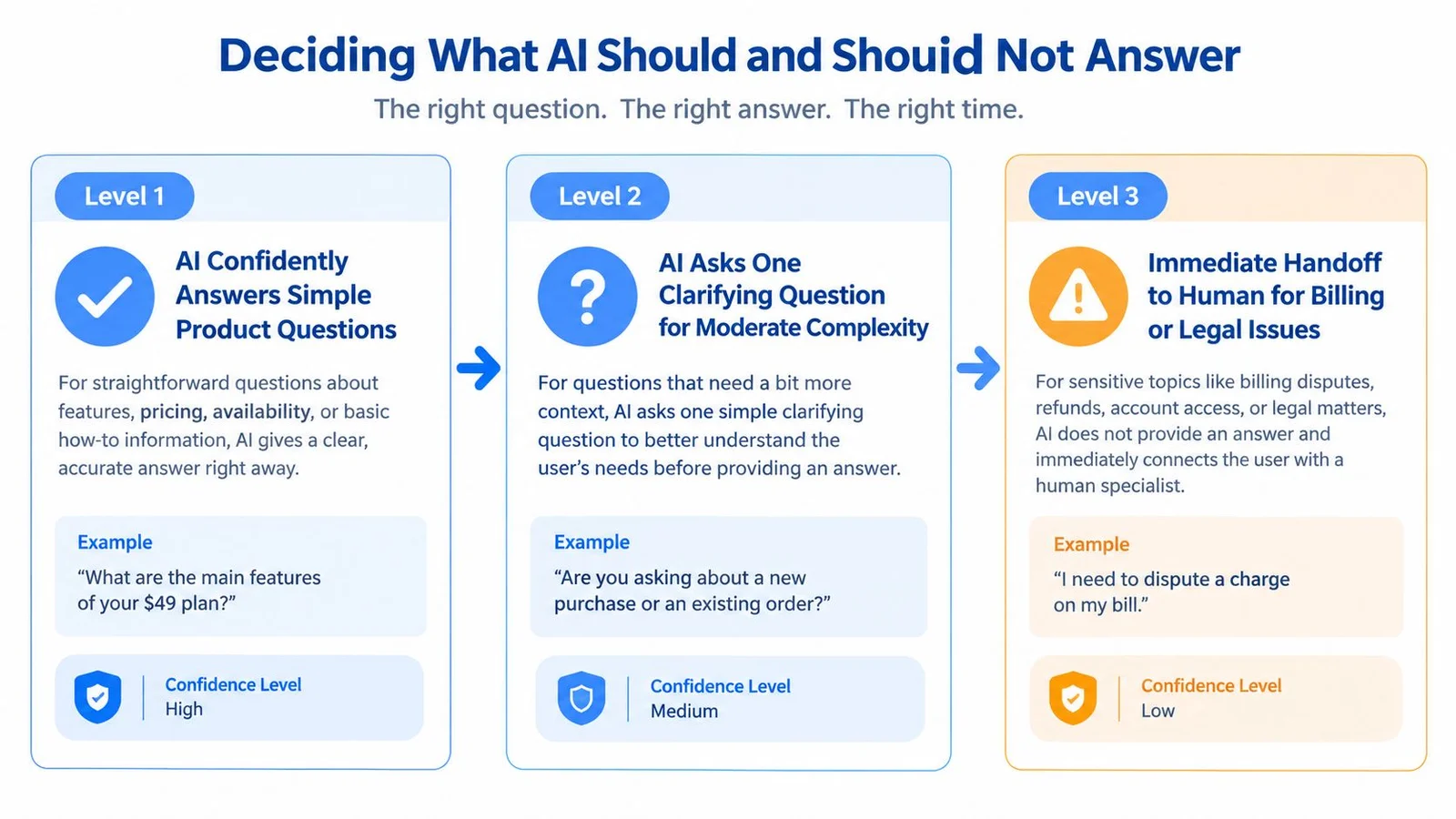
AI should answer simple, explicit questions quickly, but it should not bluff its way through pricing, billing, refunds, or compliance. The line is not between “AI questions” and “human questions.” It's between answers the system can ground confidently and answers that affect money, eligibility, or account-specific outcomes. If you're still deciding how much to automate, our chatbot vs. live chat comparison breaks down the trade-offs.
Use confidence tiers, not one blanket rule
A useful model is simple. Level 1 is for direct questions with an approved answer, like feature availability or page-specific details. Level 2 is for questions that need one clarifying question before the answer is safe. Level 3 is for anything that should move straight to a human, especially billing, cancellation, refunds, legal language, or account-specific data.
The practical difference is in the wording. A Level 1 reply can say, “Based on the page you're viewing, the plan includes X.” A Level 2 reply can say, “Based on what you're describing, I need one detail to point you to the right option.” A Level 3 reply should just hand off.
For a deeper framework on policy boundaries, how guardrails work is useful, and the same logic appears in broader business guidance on how guardrails shape decision authority. The point is not to restrict usefulness, it's to make sure the system knows where it can speak and where it can only route.
Know where trust breaks
Recent U.S. holiday-shopping research found that 45% of consumers said AI failed to understand their problem, 55% had to escalate an AI-handled issue to a human, and 54% believed humans delivered better service (holiday AI customer service report). That's a warning sign for overconfident automation. Visitors will tolerate an AI answer when it's grounded. They won't tolerate a confident guess on a refund or eligibility question. Our guide on how to prevent AI hallucinations covers the grounding side of this.
A strong configuration makes those boundaries visible. It says what source it used, where the answer came from, and what it can't determine. It also keeps simulated group dialogue clearly framed as illustrative, not as real customer testimony. If the system is pretending to be a person, trust drops fast.
Put the human in the loop early
In that context, governance checkpoints for AI assistants become useful, because the question is not only whether AI can answer, but whether the answer should be allowed to stand without review. Human review matters most when the result could change what the visitor pays, whether they qualify, or how they interpret the offer. AI should speed up the easy part and stop before it crosses into decision-making it can't own.
Designing the Handoff Without Losing Context
A clean handoff is more than “let me transfer you.” The bot should summarize the issue, state what it already tried, and pass the context in a way the human can use immediately. If the customer has to repeat themselves, the handoff failed.
For a pricing objection, the bot's last message can say, “I'm passing this to a teammate who can confirm the current pricing details for you.” For technical troubleshooting, it can say, “I've captured the issue and the steps you already tried, and I'm routing this to support now.” For refund requests, it should be even more careful and avoid promising an outcome it can't approve.
What the internal alert should carry
The support agent needs the visitor's question, the AI answer claimed, the confidence level, and the handoff reason. That keeps the human from starting blind. It also helps the team learn which intents are being escalated too often.
A useful internal note might read like this:
- Visitor intent: asks whether the plan includes a free tier
- AI answer claimed: no confirmed free plan on current page
- Confidence: low
- Handoff reason: pricing detail needs confirmation from approved source
- Transcript note: visitor is comparing options before purchase
The first human reply should acknowledge the context instead of restarting the conversation. “Thanks for waiting, I see you're checking current pricing options” is much better than “How can I help?” The visitor should feel the thread continued, not reset.
A handoff that preserves context feels fast even when a human takes over.
The benchmark data backs up why this matters. In a supervised sample, technical escalations made up 44.1% of cases, emotional escalations 8.6%, and worker-initiated escalations 12.3%. Emotional escalations also took 40.8% longer and reduced ratings by 0.928 points on a five-point scale (human escalation benchmarks). That's a reminder to route early when the issue is sensitive, not to wait until the conversation deteriorates.
For implementation details, integration best practices matter because the handoff only works if the chat system can pass the right fields into the right queue. Billing, legal, and account-specific data should go to human-only queues from the start. The bot's job is to preserve the thread, not to negotiate its way around policy.
Measuring What Actually Matters
Many teams track response time and stop there. That's not enough. You need to know whether the first reply was fast, whether later replies stayed tight, whether the issue was truly resolved, and whether the visitor had to return again.
Use a two-stage measurement model
Separate queue wait from message response time. Queue wait tells you how long the visitor sat before the first meaningful reply. Message response time tells you how long it took between messages after the conversation started. Then track first-contact resolution, CSAT by intent, abandonment rate, escalation rate, and whether the claimed resolution was accurate.
A 2024 operational benchmark reported an average live-chat queue wait of 23.6 seconds and an average message-response time of 44.8 seconds, suggesting a practical target of 40 seconds or less for subsequent replies rather than treating first-response time as resolution time (customer support first response time benchmarks). That distinction matters because a fast hello doesn't mean the problem is solved. To tie these numbers to revenue, track your live chat conversion rate alongside customer satisfaction scores.
Watch the right failure mode
| Symptom | Primary metric | Secondary signal |
|---|---|---|
| Visitors leave before getting help | Abandonment rate | Queue wait |
| Replies feel fast but unhelpful | First-contact resolution | Repeat contact |
| AI says the issue is solved, but it isn't | Accuracy of self-reported resolutions | Escalation rate |
| Certain pages create more friction | CSAT by intent | Page or campaign segment |
| Agents are transferring too often | Escalation rate | Transcript review |
Averages can hide pain. A small number of abandoned or escalated chats can make a team look healthy on paper while a key page still performs badly. Medians and percentiles are more useful when you need to find the sessions that broke.
Don't optimize for containment alone
Containment sounds good until it hides bad answers. A chat program that “resolves” conversations by closing them too early will inflate automation rates and damage trust. Review a sample of transcripts each week, segment by intent, and compare what the system said with what the customer needed.
That's the operating rule. Speed matters, but accuracy and follow-through matter more.
Putting the Playbook to Work Today
A useful chat system can fit on one page. Start with a four-part reply structure, then add confidence tiers, handoff rules, and a small dashboard that shows whether the channel is helping or hurting conversion.
A paste-ready operating checklist
- Reply structure: acknowledge intent, answer or route, ask one question only if needed, close with the next step.
- Confidence tiers: answer directly when the source is explicit, clarify once when intent is ambiguous, hand off when the issue affects billing, refunds, eligibility, or compliance.
- Handoff script: summarize the issue, state what was already checked, pass the transcript, and name the reason for transfer.
- Dashboard: first-response time, message-response time, first-contact resolution, abandonment, and escalation by intent.
- Review habit: sample transcripts weekly and correct weak phrasing before it spreads.
Short answers to common policy questions
Should AI disclosure be visible? Yes, because transparency builds trust. In a 2025 survey of 5,000 consumers, 82% of respondents who cared about AI said they would trust it more if it were explainable, 62% said transparency about AI use would increase brand trust, and 76% had noticed growth in AI-enabled customer-service chatbots (Unlocked 2025 report).
When should confidence qualifiers appear? Whenever the answer depends on the page context, a policy limit, or a source that could change. A phrase like “Based on the page you're viewing” is small, but it keeps the system honest.
How should social-proof-style dialogue stay honest? It should be framed as generated or illustrative, not as real customer testimony. That keeps the conversation useful without pretending to capture a real audience response. It's also the line between a conversation and a notification popup. A popup can say someone signed up. It can't answer the refund question. FOMOchat was built for that gap, with an AI rep that answers from your site content and adds confidence qualifiers when the source is thin.
A chat support response is never just a line of text. It's a small piece of brand storytelling that can earn the next click or lose it. FOMOchat gives teams a way to combine instant website answers, social-proof-style conversations, and configurable guardrails so visitors get useful replies without sacrificing accuracy.
If you want support chat that helps convert instead of just answering, try FOMOchat. It's built for product pages, launches, courses, and webinars where speed, clarity, and handoff discipline all matter at once.